CAD Data Management & PLM Integration.
Your design. The full product context.
Connect CAD files, engineering structures, revisions, BOMs, documents, changes, and release status in one controlled PLM environment. Give engineering teams reliable CAD data management while giving manufacturing, quality, and product teams the lifecycle context around the design.
CAD data management.
The product context around it.
CAD data management in PLM is the controlled management of CAD files, CAD structures, revisions, metadata, lifecycle states, and relationships to the broader product definition. Instead of treating a CAD model as an isolated file, PLM connects the design to items, BOMs, drawings, documents, engineering changes, approvals, and release processes.
The result is a product record that preserves both the engineering definition and the lifecycle context teams need to review, change, release, manufacture, and support the product. Learn more about product lifecycle management.
CAD revisions. Lifecycle control.
Keep the engineering context.
Working Iterations and Controlled Revisions
Keep work-in-progress engineering updates distinct from approved product revisions. Track design evolution while maintaining clear release history and lifecycle state.
- Maintain traceable design iterations and revision history.
- Make the latest valid released revision easy to identify.
- Link revision decisions to approval and release context.
CAD and Product Revision Context
Connect CAD files and structures with the corresponding item, product record, drawings and lifecycle status. Teams can see which revision is being reviewed and which revision is approved.
Engineering Change and Release
Relate design updates to engineering change requests, affected items, approvals and release decisions. Preserve the reason for a change, not only the file version.

Your CAD data.
Every relationship in view.
Review designs with their item records, BOM structures, revisions, documents, and engineering changes.
Design Data with Lifecycle Context
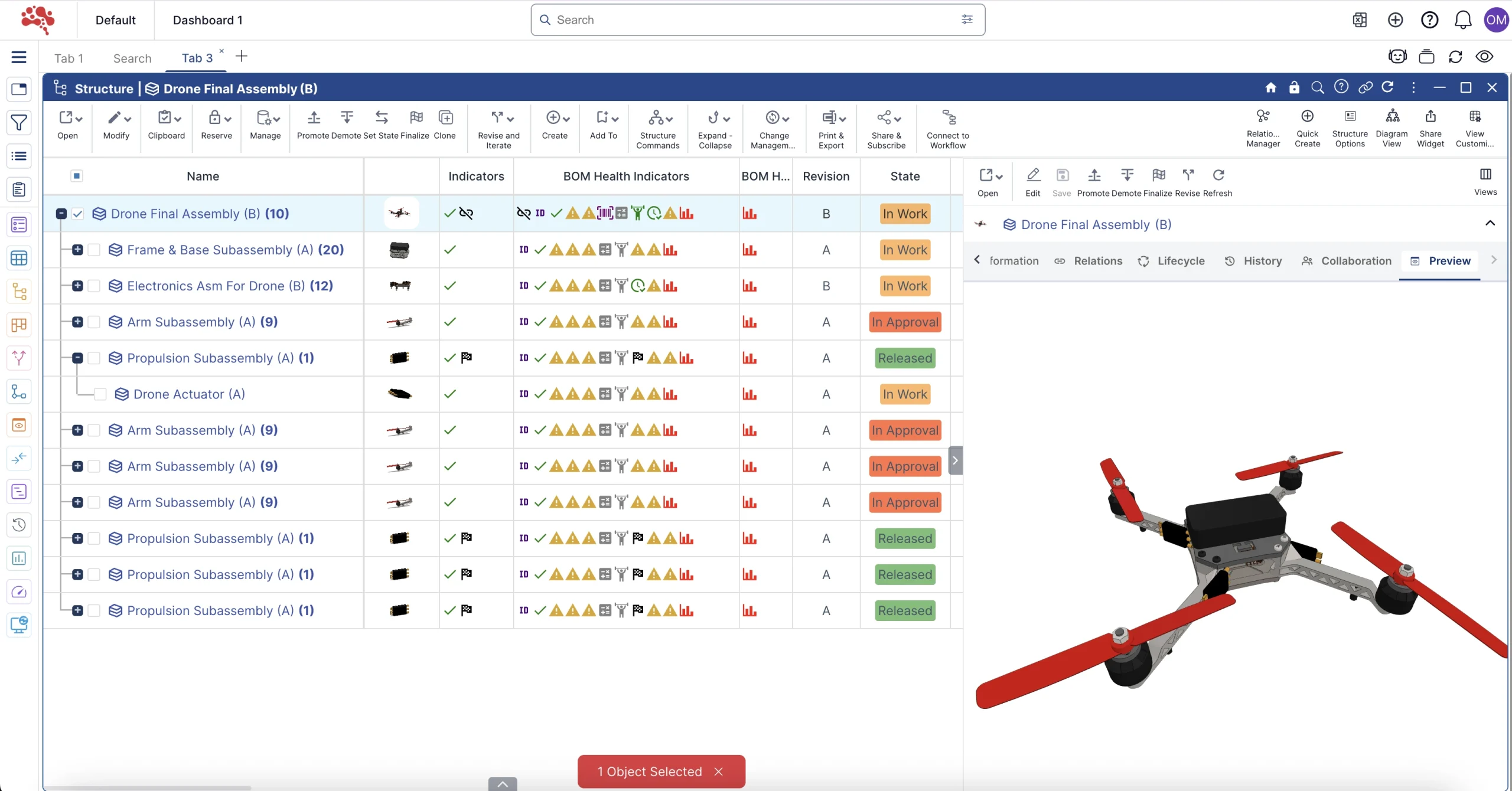
Link CAD deliverables to item records, product structures, supporting drawings, revisions, engineering changes, approvals, and release decisions in one controlled product context.
CAD + Item / BOM Relationships
Connect design data to the controlled BOM management and product structure context so engineering and downstream teams can review the correct product definition.
Connect design changes to release.
Relate design updates to engineering change requests, affected items, approvals, and release decisions. Preserve the reason for a change alongside the file version.
CAD data, PDM and PLM.
Understand the scope.
These disciplines work together, but they do not control the same scope of product information.
| Layer | Primary focus | Typical product context |
|---|---|---|
CAD data managementDesign files | Control CAD files, assemblies, metadata, versions/revisions, ownership and access. | Design-centric engineering data |
PDMEngineering data | Broader file and engineering-data control, including vaulting, search, revision workflows and CAD relationships. | Engineering data and document control |
PLMProduct lifecycle | Connect engineering data to items, BOMs, requirements, changes, approvals, suppliers, manufacturing, quality and product release. | Cross-functional lifecycle control |
Scroll across to compare all columns.
Nora IPLM positions CAD data management inside a broader PLM operating model, not as a replacement for every native CAD or PDM function. For a deeper comparison, explore SOLIDWORKS PDM vs cloud PLM.
CAD structure. Product structure.
Keep the relationship clear.
A CAD assembly describes design-file relationships in the authoring environment. A product structure or EBOM is the controlled product definition used across engineering and downstream lifecycle processes. The two may align closely, but they are not always identical.
CAD structure
- Native design relationships between CAD models and assemblies
- Optimized for engineering design and authoring
- May exclude purchased or non-modeled items
- Changes as engineers edit design files
Product / EBOM structure
- Item and BOM relationships used across the lifecycle
- Optimized for release, change and downstream collaboration
- Can include purchased parts, documents and non-CAD content
- Changes through controlled item/BOM revisions and release
Linked product definitions, with their own engineering and lifecycle roles.
CAD-PLM integration should preserve the relationship between these structures so teams can review differences before release. See how teams manage CAD and BOM data together.
From native design.
To released product context.
Follow the controlled engineering path from native CAD authoring to an approved product definition that downstream teams can use.
Create or update the design
Work in the CAD authoring environment.
Capture CAD data
Synchronize relevant files, structures and metadata into PLM.
Associate product records
Link items, structures, revisions and supporting documents.
Review lifecycle context
Review design alongside BOMs, requirements, changes and release status.
Route approvals
Use controlled engineering change and approval workflows.
Release product definition
Share the approved revision with manufacturing, quality and supply chain.
Give manufacturing the released product context.
Manufacturing, quality, procurement and supply chain teams need the approved product definition without having to work inside native CAD tools. CAD data management in PLM provides visibility into released items, BOMs, drawings, documents, change history and lifecycle status.
Connect engineering release to BOM management, manufacturing BOM management and downstream workflows without duplicating product records.
Design & drawings
Controlled revision
Items & structure
Released product definition
Change decisions
Review & approval history
Supporting documents
Manufacturing-ready context
Your engineering desktop.
One lifecycle foundation.
Multi-CAD data management.
Manufacturers rarely operate in a single CAD environment. Different teams, suppliers and product lines may use different design tools. Multi-CAD data management provides a common lifecycle layer around those systems so revisions, item relationships, BOM context, changes and releases can be governed consistently.
For connector details and roadmap updates, review Nora IPLM’s CAD and PLM integrations.
Desktop Services.
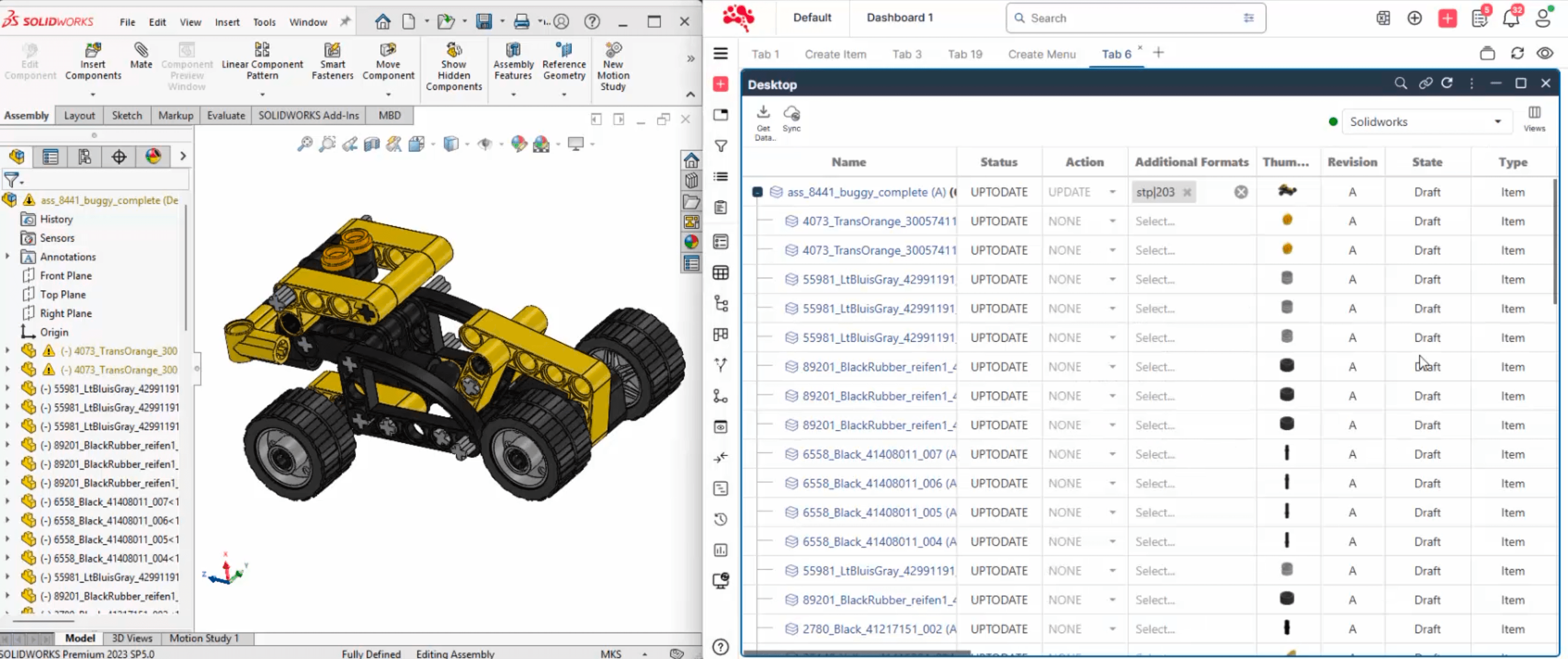
Nora IPLM Desktop Services bridges familiar engineering tools and the controlled PLM environment. Move design data into PLM, preserve revision context, link files to product records and continue working without unnecessary tool switching.
Nora IPLM describes Windows Desktop Services workflows for SOLIDWORKS and CATIA. Contact our team for current connector availability and supported operations.
Discuss your CAD workflowSOLIDWORKS desktop context
Manage design data in a familiar engineering workflow while keeping related PLM records visible.
CATIA desktop context
Keep CAD deliverables connected to revision and product lifecycle information.
Other engineering integrations
Explore available connectors and supported workflows through the integrations team.
Office 365 document collaboration belongs to the wider integrations ecosystem. See the integrations overview for more information.
A design update.
Every affected record in view.
A CAD file change is rarely only a file change. Geometry updates can affect an item revision, parent assembly, BOM, drawing, requirement, supplier document or manufacturing release package.
Explore engineering change management- Identify affected CAD and item records
- Review parent structures and BOM lines
- Connect the ECR / ECO and approvals
- Track revisions and implementation
- Publish the approved definition
Bring the history.
Preserve the relationships.
Moving CAD data from shared drives or legacy PDM into PLM.
Migration is not only a file transfer. Preserve the relationships between CAD assemblies, product structures, revisions, ownership and supporting documents. Pilot a representative product before migrating the full library.
Inventory active CAD files, assemblies, drawings, ownership and release states.
Find duplicates, obsolete files, broken references and inconsistent names.
Map CAD files to items, structures, revisions and documents in PLM.
Pilot one product, validate references and permissions, then migrate in phases.
The right product context.
Across every team.
Design Engineering
Reliable ownership, revision/iteration history, item relationships and change context, with less time spent searching for the correct design.
PLM / Configuration Managers
Controlled mapping between CAD data, product structures, revisions, lifecycle states and release processes.
Manufacturing / Quality
Access to approved drawings, BOM context, change history and release status without native CAD authoring access.
Product / Program Teams
Visibility into design ownership, release readiness and product-data relationships across the lifecycle.
Keep exploring.
CAD, PDM and product structure.
Explore the engineering workflows behind CAD data management, revision control and connected BOM information.
PLM for SOLIDWORKS Users
Learn how SOLIDWORKS users can manage CAD files, BOMs, revisions, engineering changes, documents, and product releases in cloud PLM.
Read guideSOLIDWORKS PDM vs Cloud PLM
Compare PDM and cloud PLM across CAD management, BOM control, engineering changes, approvals, and cross-functional collaboration.
Read guideCAD Revision Management Best Practices
Explore practical ways to improve CAD revision control, traceability, release readiness, and engineering change visibility.
Read guideHow Engineering Teams Manage CAD and BOM Data Together
Learn how CAD data and BOM data stay connected through product structures, change control, releases, and manufacturing handoffs into MBOM management.
Read guideGood questions.
Clear answers.
What is CAD data management in PLM?
CAD data management in PLM controls CAD files, structures, metadata, revisions, and lifecycle state while connecting the design to items, BOMs, documents, changes, approvals, and release processes.
What is the difference between CAD data management, PDM and PLM?
CAD data management focuses on design files and engineering structures. PDM extends file and engineering-data control through vaulting, search, revisions, and workflows. PLM connects that engineering data to the broader product lifecycle, including BOMs, changes, requirements, manufacturing, quality, suppliers, approvals, and releases.
How does CAD-PLM integration connect CAD files to BOMs?
The integration associates design files and CAD structures with controlled item and product structures in PLM. This helps teams review the design and the BOM in the same lifecycle context while preserving revision and change traceability.
Does Nora IPLM support multi-CAD environments?
Nora IPLM supports a multi-CAD strategy by providing a common PLM layer around design data from different authoring environments. Connector availability and workflow coverage depend on the authoring environment; contact our team for current details.
How are CAD revisions managed in PLM?
CAD revisions remain connected to lifecycle state, product records, related documents, engineering changes, and approvals so teams can distinguish work-in-progress iterations from released product definition.
Can manufacturing teams access CAD-related product data without native CAD software?
PLM can give non-CAD users browser-based visibility into approved product records, drawings, BOM context, revisions, documents, and release status. Native authoring or editing still belongs in the appropriate CAD tool.
Can existing CAD data be migrated into Nora IPLM?
Existing CAD files and related data can be migrated, but the migration should preserve structures, references, revisions, ownership, metadata, and links to product records. Pilot and validate a representative product before moving the full library.
When should a manufacturer move beyond shared-drive CAD management?
Common triggers include version confusion, duplicate files, broken references, formal release needs, cross-functional approvals, CAD-to-BOM misalignment, and increasing change-management requirements.
CAD data. Product decisions.
One connected lifecycle.
Move beyond disconnected CAD files and shared-drive handoffs. Keep design data connected to items, BOMs, revisions, documents, engineering changes, approvals, and released product context in Nora IPLM.