Product Lifecycle Management (PLM) Software for Modern Product Teams
Connect your product data, people and processes, from the first idea to engineering, manufacturing and service. Explore product lifecycle management with Nora IPLM.

What is PLM?
PLM at a glance
One connected product record
- People
Engineering, manufacturing and service
- Data
CAD, BOMs, documents and requirements
- Processes
Changes, approvals and releases

Product lifecycle management (PLM) is a strategy supported by software that connects people, product data and business processes across the entire product lifecycle, from early ideas and requirements through design, manufacturing, service and end of life. Instead of managing critical engineering information across disconnected files, folders and systems, PLM provides a governed environment for the product definition and the decisions around it.
A PLM system creates a shared source of truth for product information, helping teams manage requirements, items and parts, CAD files, engineering and manufacturing BOMs, documents, revisions, configurations, changes, projects and workflows in one connected environment. Product relationships and revision history make it easier to understand which information belongs together and which definition is current.
PLM also supports the processes that move product data forward. Engineering can coordinate design and change work, manufacturing can prepare downstream structures and handoffs, and other stakeholders can review the information relevant to their role. Integrations can connect PLM with CAD, ERP and other engineering or business systems so approved product information can move through the wider toolchain. By creating a digital thread across departments, PLM can improve traceability, collaboration and control; the results still depend on data quality, process design, integration scope and user adoption.
- Centralized product data management
- BOM and configuration management
- Document and CAD file management
- Requirements and project management
- Engineering change management
- Workflow automation and approvals
- Cross-functional collaboration and traceability
- Reporting, analytics and dashboards
Product lifecycle flow
- Idea
- Requirements
- Design
- BOM
- Development
- Change
- Release
- Manufacturing
- Service
- End of life
A simplified view of connected product work. Activities overlap and repeat; BOMs and changes span multiple lifecycle stages.
Product information.
With the context to act.
Nora IPLM connects the records and processes around your product. See how ideas, changes, manufacturing structures and configurations stay in context.
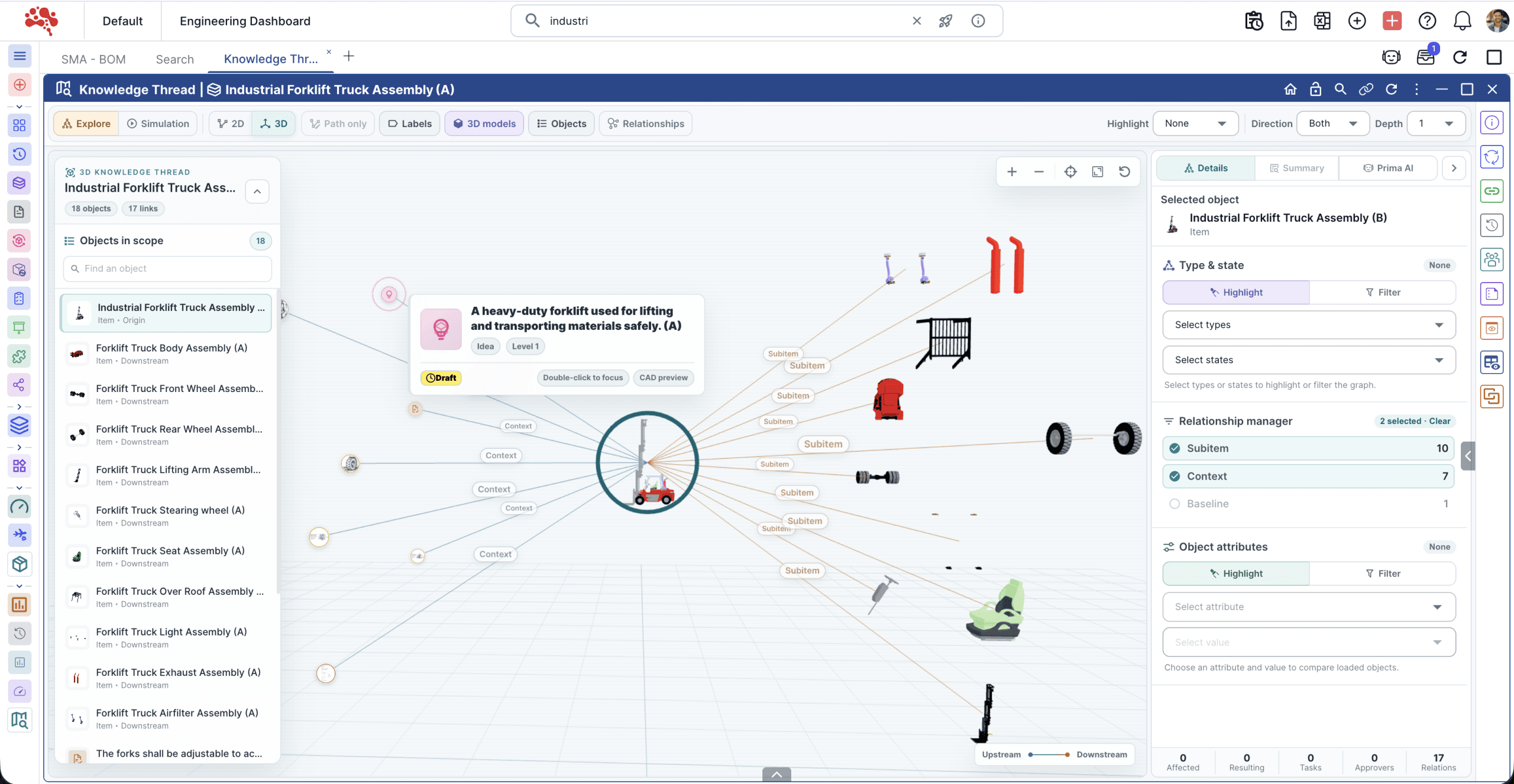
Connect ideas with product context.
Keep an idea and its related records in view. A knowledge thread helps teams follow the connections behind product decisions.
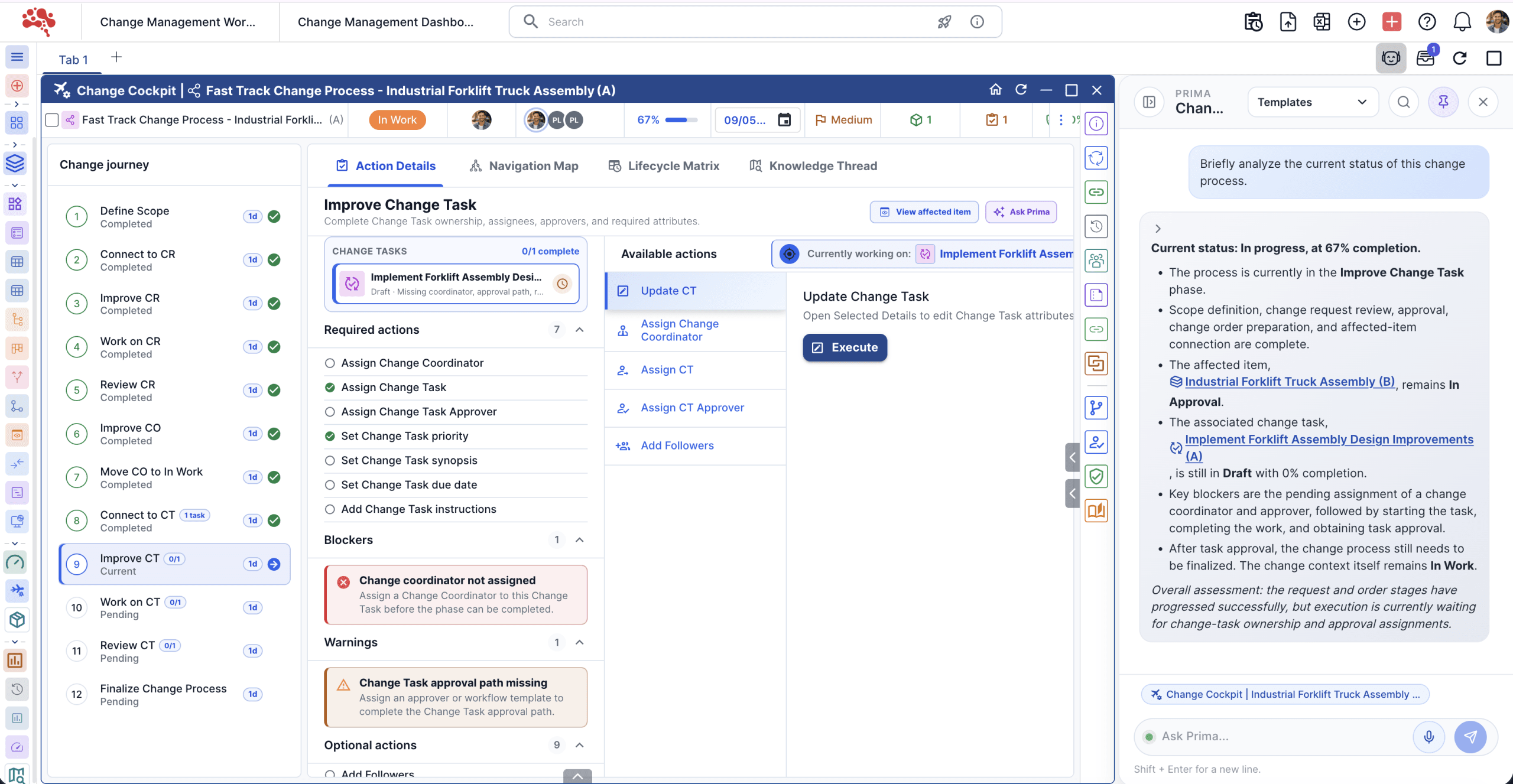
Understand the change process.
Explore process analysis alongside change information. Review the context teams need to understand and coordinate change work.
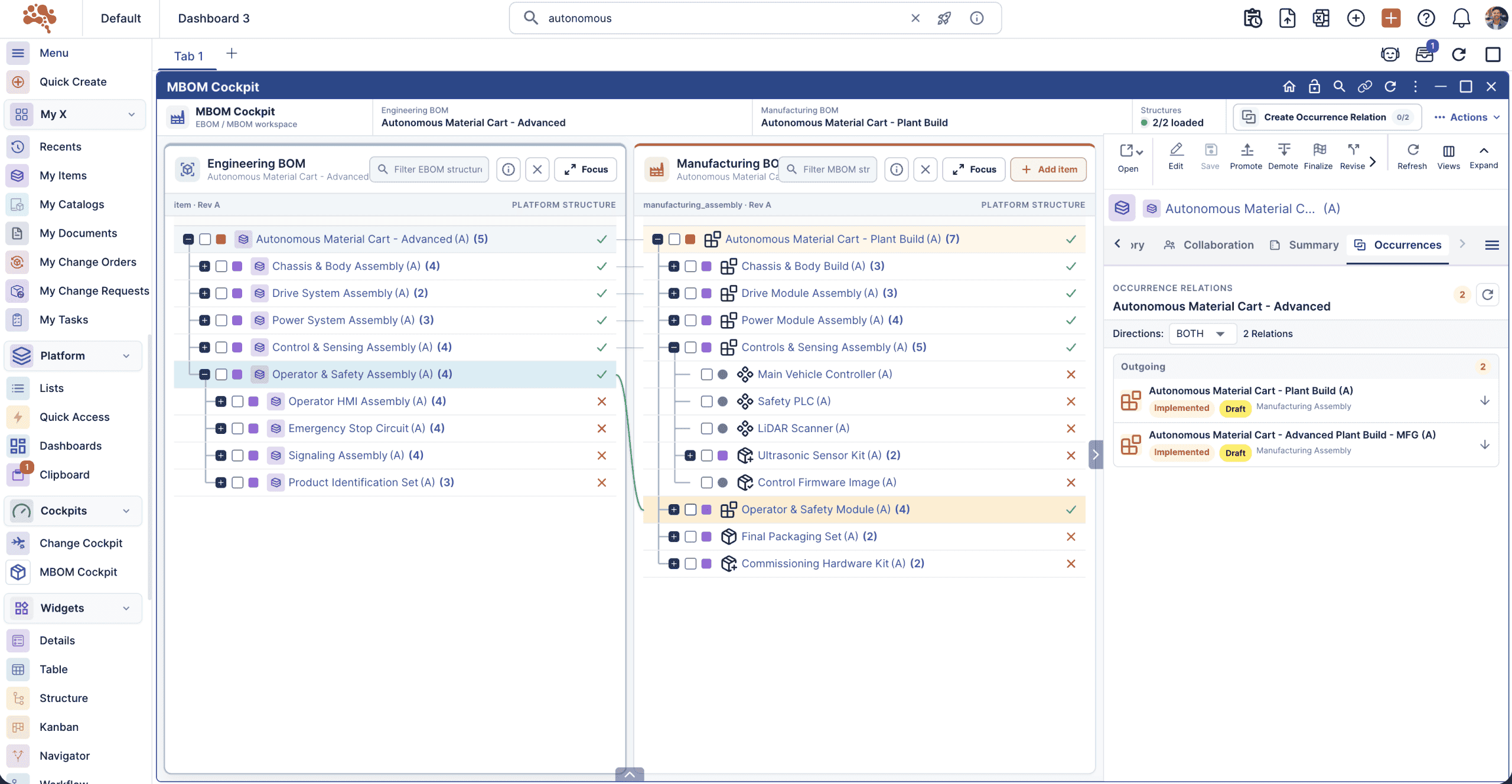
Bring manufacturing into the picture.
Review manufacturing BOM information in a dedicated workspace. Connect engineering decisions with the structures used to prepare production.
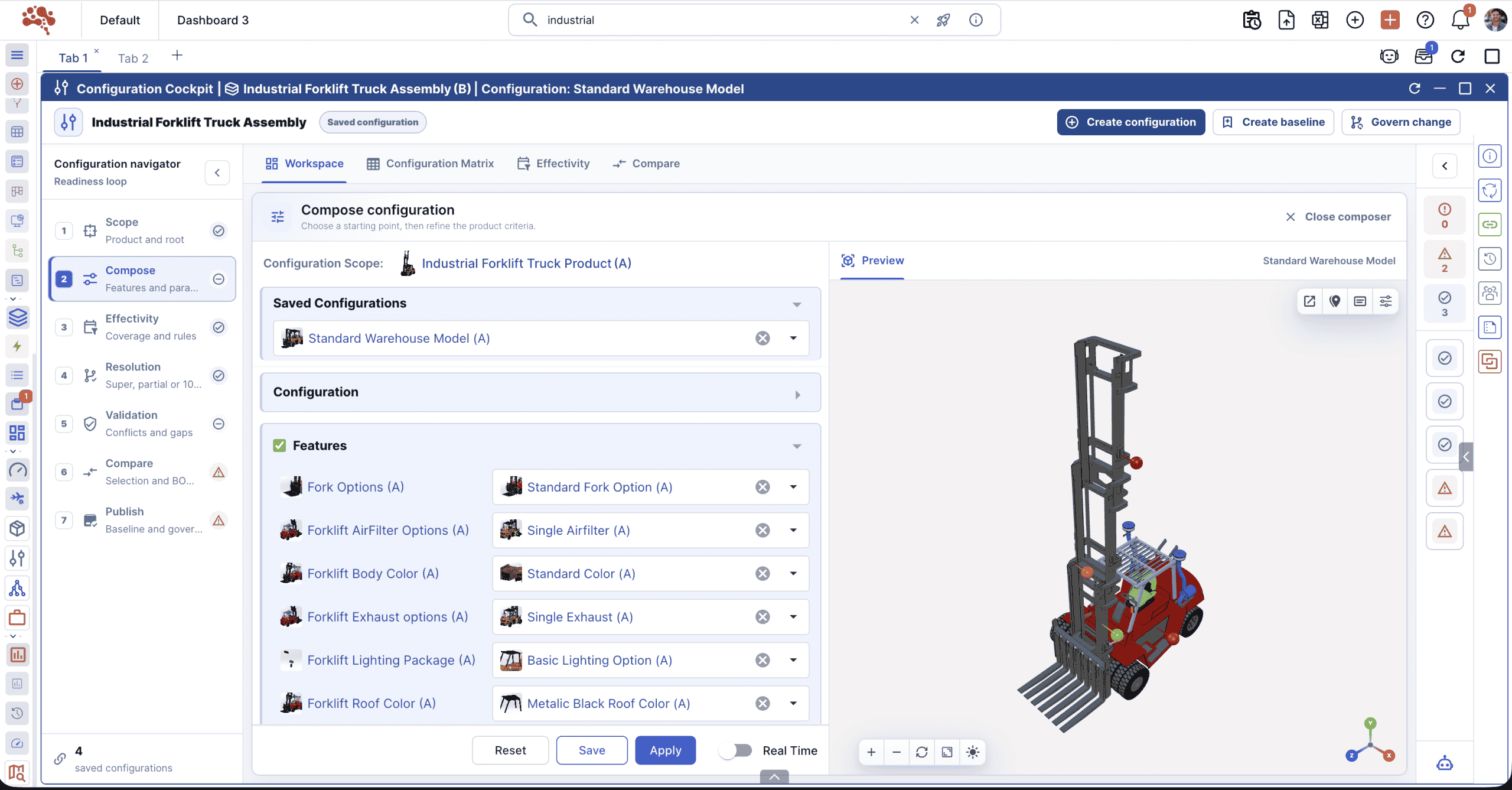
Keep configurations in context.
Explore product configurations and their related information in one cockpit. Check the selected product definition before the next handoff.
More of your product work, connected.
Highlighted modules
More modules
What PLM software connects across the product lifecycle.
PLM is more than a repository for engineering files. It connects product data with the workflows, decisions and downstream handoffs that shape a product from design through manufacturing and change.
Product data and PDM
Product data management provides the engineering-data foundation: CAD files, revisions, item records and product structures. PLM extends that controlled data into lifecycle processes, cross-functional decisions and downstream work.
Explore item managementCAD data in product context
Connect design files with the items, revisions, documents and structures they define. CAD integration helps engineering teams work with design data without separating it from the wider product record.
Explore CAD data managementBOM and configuration management
Manage engineering and manufacturing structures, variants and configuration rules while keeping product relationships traceable. This gives teams a controlled definition for different product options and downstream needs.
Explore BOM managementEngineering change management
Connect the reason for a change with affected product records, reviewers, approvals and resulting revisions. A controlled change process helps teams understand what changed, why it changed and what must happen next.
Explore change managementCollaboration and workflow
Give engineering, manufacturing and other stakeholders shared context for reviews, approvals, tasks and decisions. Workflow management makes ownership and process status visible around the product information being reviewed.
Explore workflow managementManufacturing and MBOM
Carry the engineering definition into manufacturing planning by connecting EBOM and MBOM structures, product revisions and release context. This supports clearer handoffs between engineering and production teams.
Explore MBOM managementIntegrations across the engineering stack
PLM works within a wider toolchain. Integrations can connect CAD, ERP and other engineering or business systems so teams can coordinate product information without treating each application as an isolated source.
Explore Nora integrationsFrom product data to lifecycle control
The value of PLM comes from the relationships between data and process: requirements influence designs, designs define BOMs, changes create new revisions, and approved definitions move toward manufacturing and service.
Review the lifecycle flow

How PLM, PDM, ERP and IPLM fit together.
Connect design information, lifecycle decisions and business operations. Each approach brings a different focus to the product story.
PDM
Product data management
Control engineering design data
Provides the design-data foundation for wider lifecycle work.
PLM
Product lifecycle management
Govern the product lifecycle
Connects people and product decisions across functions.
ERP
Enterprise resource planning
Plan and run business operations
Uses released product information in operational processes and complements PLM.
IPLM
Innovation and product lifecycle management
Connect innovation with product execution
Nora’s approach keeps early reasoning connected to lifecycle work.
Typical areas of focus. Capabilities overlap and vary by vendor and configuration; PLM offerings may also include innovation management.
Explore the IPLM approachBuilt around the work
of engineering teams.
Different industries face different product challenges. Start with the information and handoffs your teams need to control.
From concept to controlled change
Follow a product change.
Keep the reasoning connected.
An engineer proposes replacing a component in a forklift assembly. Here is how a connected PLM process can keep the change in context.
Find the product definition
Identify the affected part, engineering structure, drawing and revision.
Understand what is connected
Review related product records and capture the reason for the proposed change.
Review and approve
Assign ownership and route the change through the configured review process.
Prepare the handoff
Check manufacturing context and release the approved definition through the agreed process.
Illustrative engineering change example. The screenshots show Nora interfaces, not a customer result or a promise of automatic updates.
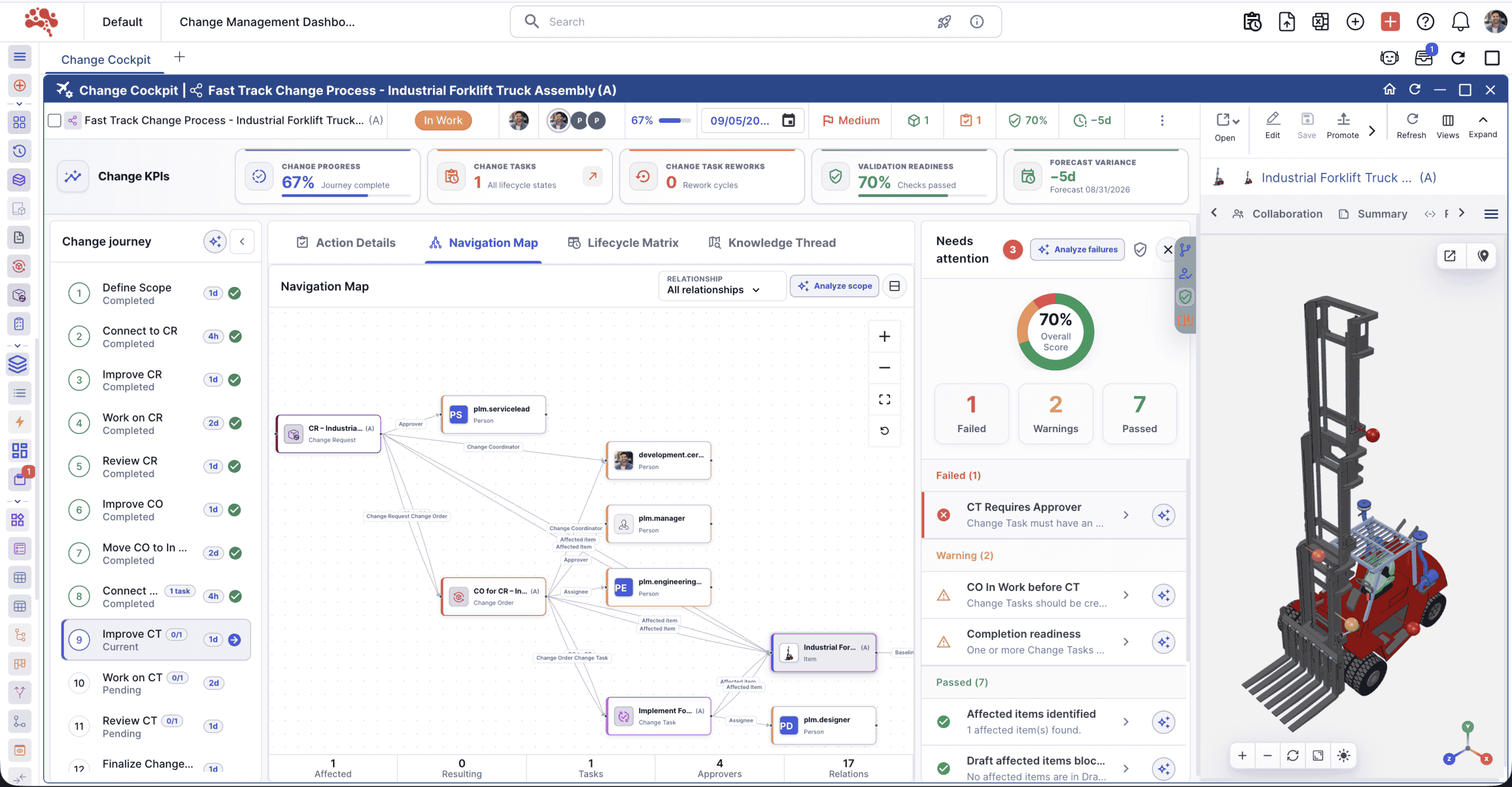

The result: a traceable record of what changed, why it changed and which definition was approved.
Start with a workflow.
Build from there.
Introducing PLM takes more than opening an account. A focused pilot lets engineering, operations and IT test the data, process and responsibilities together.
Evaluate fit using your own product structure and change process: check revision control, permissions, data import and export, CAD integration needs and manufacturing handoffs.
Talk through your workflow
A practical PLM starting point
- Choose one use case. Start with a BOM, a release or an engineering change.
- Audit the data. Identify owners, duplicates, naming rules and revision history.
- Define the process. Agree on responsibilities, access and approval gates.
- Validate the connections. Test required tools, data exchanges and connector scope.
- Pilot and measure. Train a small team; track review time, data completeness and rework.
Cost and timing depend on licensing, data migration, integrations, configuration and training. Account access is only the beginning of implementation.
Make an informed
PLM decision.
Explore platform comparisons and practical guides for connected CAD and product data.
Compare PLM platforms
Nora IPLM vs 3DEXPERIENCE Explore workflows, deployment and SMB fit. Nora IPLM vs Aras Innovator Review configuration and administration considerations. Nora IPLM vs Arena PTC Explore PLM, quality and supplier collaboration. Nora IPLM vs Teamcenter Compare product scope and adoption considerations.Explore CAD and BOM workflows
PLM for SOLIDWORKS users Connect design files with lifecycle work. SOLIDWORKS PDM vs cloud PLM Understand where PDM and PLM overlap. Managing CAD data across teams Organize ownership, revisions and approvals. CAD revision management best practices Keep design changes traceable. Managing CAD and BOM data together Follow structures, releases and handoffs.Good questions.
Clear answers.
About PLM, the product information it connects and where Nora fits.
What is product lifecycle management?
PLM is an approach to managing the information, processes and decisions involved in a product’s lifecycle. PLM software supports that approach with connected records and controls, from requirements and design through manufacturing, service and retirement.
What information does a PLM system manage?
Typical records include requirements, parts, CAD files, bills of materials, documents, revisions and engineering changes. Projects, tasks and approval workflows give this information ownership and process context. The exact scope depends on the platform and how it is configured.
How is PLM different from PDM?
PDM focuses on engineering design data such as CAD files, versions and product structures. PLM connects that information to broader lifecycle processes and teams. There is overlap: check the workflows you need rather than relying on the label alone.
What is the difference between IPLM and traditional PLM?
Nora uses IPLM to describe Innovation and Product Lifecycle Management: connecting ideas and opportunities with product execution. PLM platforms can also include innovation capabilities. Read the IPLM guide for the approach and its relationship to PLM.
Why is PLM important for engineering and manufacturing?
A shared product definition helps teams find current information and understand what has changed. Traceable records and clear approvals support coordinated handoffs, reduce avoidable rework and provide evidence for quality processes. The results depend on data quality and adoption.
Can PLM help manage engineering changes?
Yes. A configured change process can connect the reason for a change with affected records, assigned reviewers and approval history. Teams can then follow the approved definition into downstream work. This does not mean every downstream record is updated automatically.
Is Nora IPLM cloud based?
Yes. Nora IPLM provides a cloud-based workspace for connected product information and processes. A 30-day trial lets you explore the platform. Migration, integration and rollout requirements should be evaluated separately with the Nora team.
Can Nora connect with CAD and other engineering tools?
Nora provides CAD data management and integration workflows. Review the CAD data management module, then confirm supported tools, versions, connector scope and data exchange requirements for your environment before planning a rollout.
What is the difference between PLM and ERP?
PLM primarily governs product definitions, engineering data and lifecycle decisions, while ERP primarily supports operational processes such as purchasing, inventory, production and financial transactions. The systems can complement each other when released product information needs to move from engineering into operations.
How should a team start implementing PLM?
Start with a focused use case and a representative product. Clean the relevant data, define ownership and approval rules, validate integrations and migration needs, then pilot the workflow with a small group before expanding. Implementation scope depends on existing data, processes, systems and training requirements.
See your product workflow
in Nora IPLM.
Explore with a 30-day trial, or talk through your product data and processes.