Nora Prima AI
AI that understands
and acts across your
product lifecycle.
Lifecycle-aware AI for BOMs, changes, documents, suppliers, and release workflows. Analyze, generate, explain, navigate, and track product work directly inside Nora IPLM.
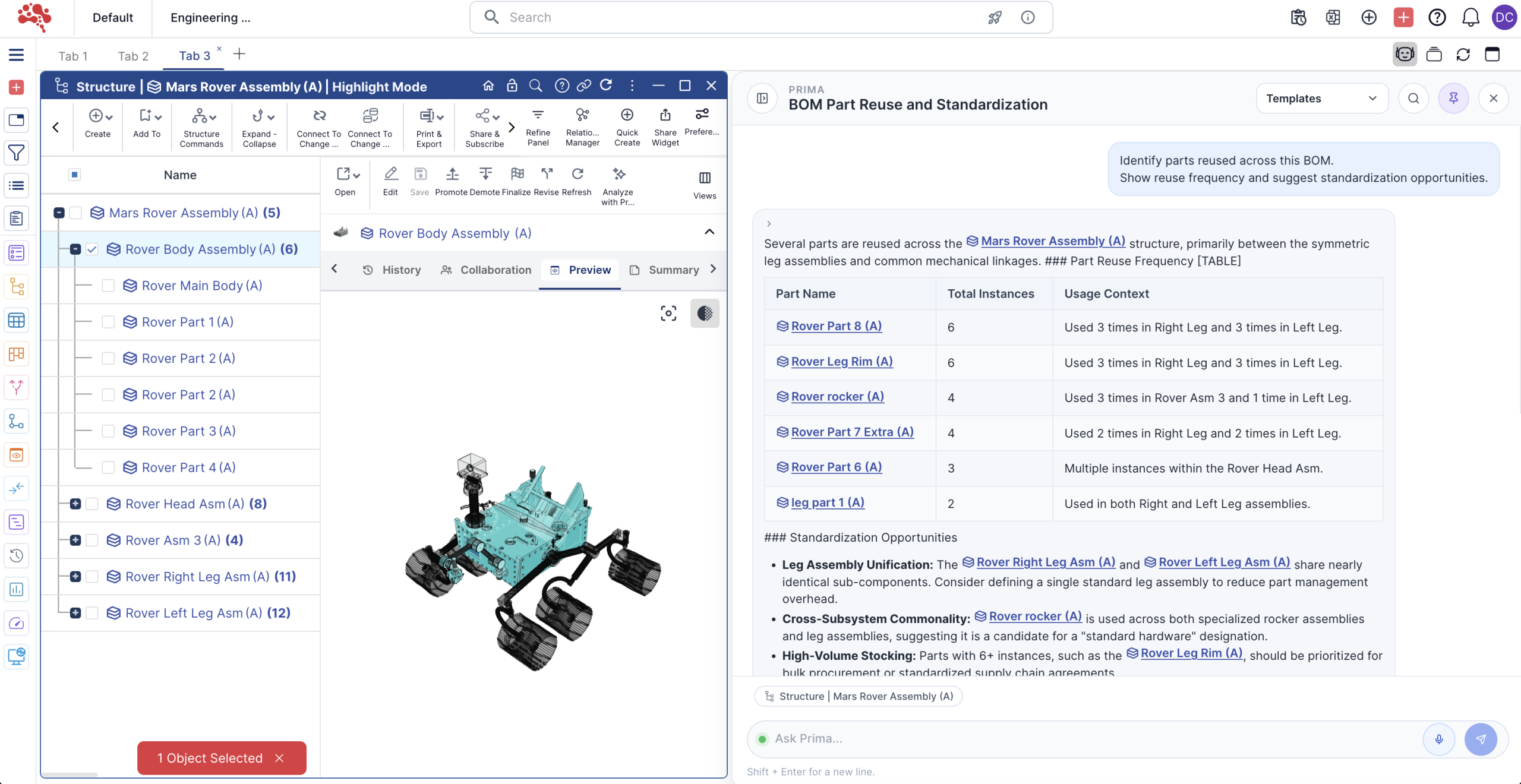 Built into Nora IPLM Enlarge
 Connected to your
product context
- BOMs & parts
- Documents
- Changes
- Suppliers
- Release workflows
Product context.
Practical AI support.
Prima brings product knowledge, governed reasoning, and operational support into the work your team already does, from investigating a BOM to preparing a release summary.
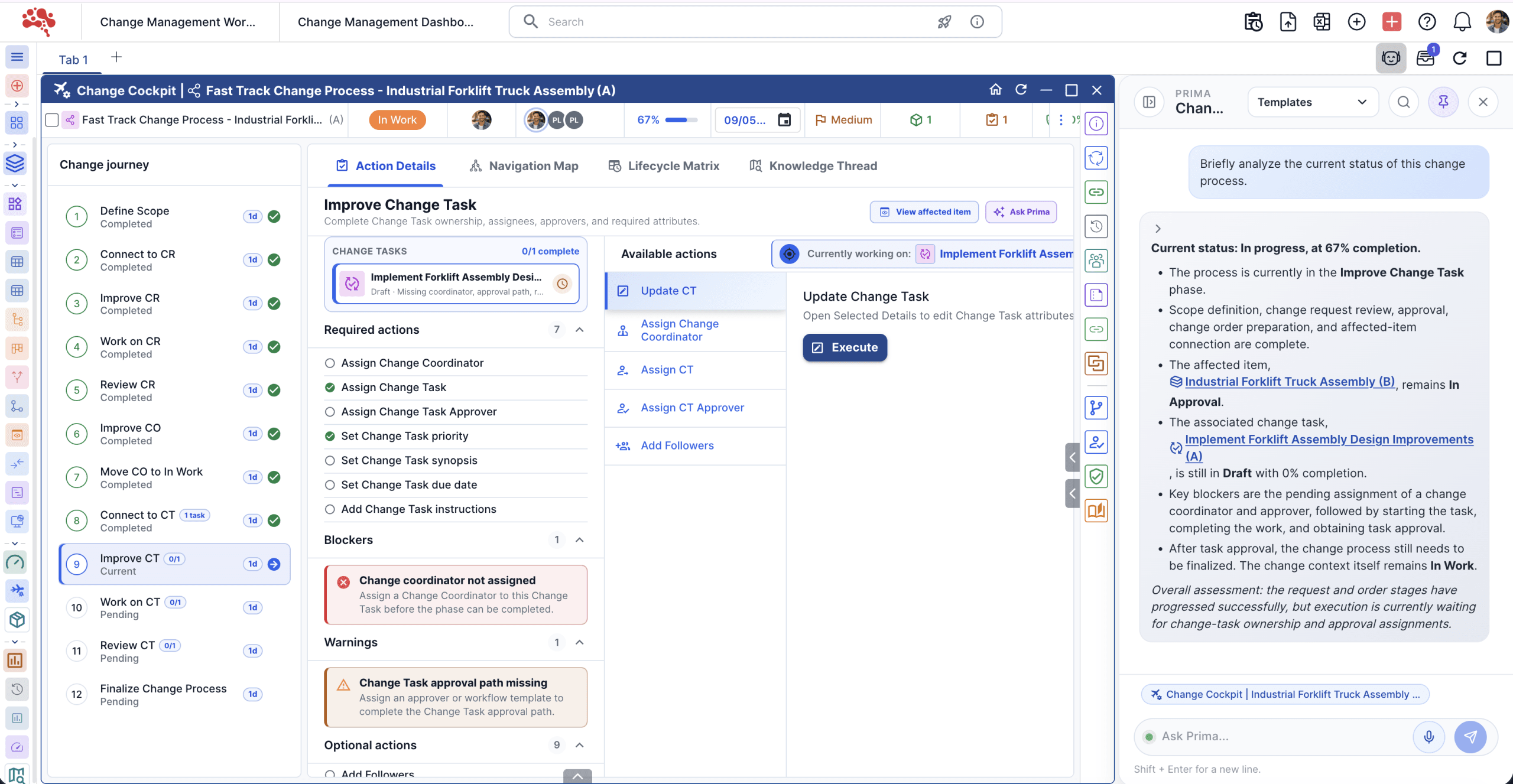 Prima process analysis Enlarge ↗
Dynamic context
Work with open widgets, selected objects, metadata, relationships, dependencies, revisions, and lifecycle states. Prima starts with the context of your current work.
Real workflow support
Analyze product structures, find part-reuse opportunities with 3D Similarity Search, surface quality gaps, and prepare structured outputs for engineering and product teams.
Governed reasoning
Keep assistance tied to product sources, access rights, tenant boundaries, and the lifecycle rules that govern your data.
AI automations
Run scheduled checks, readiness summaries, lifecycle monitoring, and operational signals across product workflows.
Five ways to move
product work forward.
From a quick question to an ongoing operational check, Prima supports the full range of lifecycle work.
Analyze
Evaluate BOM health, requirement coverage, product risks, and lifecycle data quality.
BOM health · Risk analysisGenerate
Prepare summaries, change explanations, review drafts, and structured lifecycle outputs.
Review drafts · SummariesExplain
Understand revision differences, lifecycle transitions, root causes, and product decisions.
Revisions · Root causesNavigate
Find objects, follow relationships, query product information, and locate relevant answers.
Objects · RelationshipsTrack
Monitor requirement completion, quality trends, change status, workflow progress, and readiness.
Progress · ReadinessYour AI workspace.
Right where you work.
Context follows the workDynamic context selection keeps the active product, document, or workflow in view.
Knowledge stays connectedPlatform and enterprise retrieval bring relevant sources into the conversation.
Useful outputs, repeatable controlsGuided prompts and widget-level actions help teams apply AI consistently.
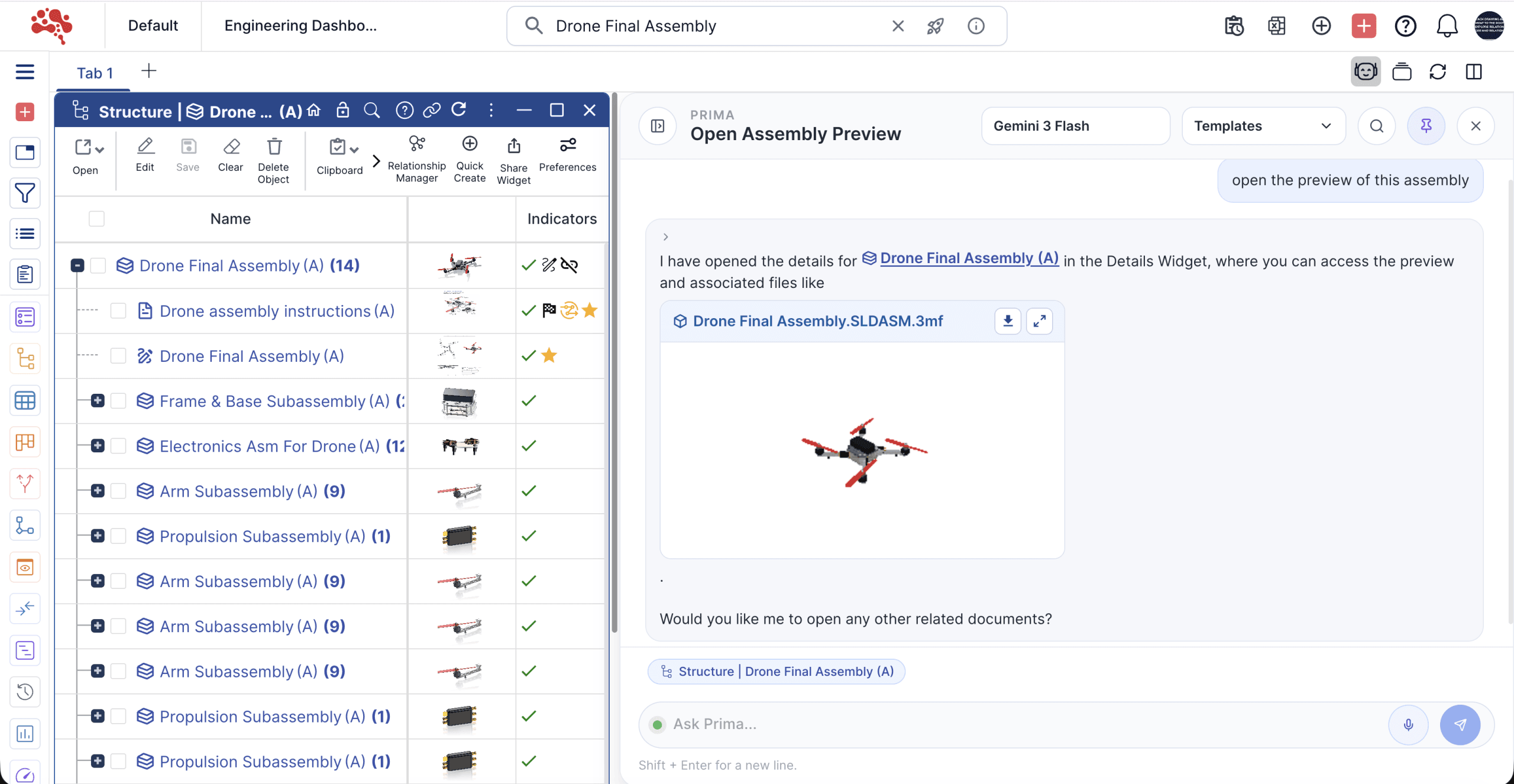 Nora Prima · In your product workspace Enlarge ↗
Start with the work.
Not a blank prompt.
Explore practical starting points for your product workflows. Choose a category and preview how a template turns context into a useful output.
WORKSPACE
PRODUCT STRUCTURE
Review the structure. Find the next improvement.
Select a template to see an example prompt.
DECISIONS & IMPACT
Make the change review easier to follow.
Select a template to see an example prompt.
EXECUTION & OWNERSHIP
Keep the work moving with clear priorities.
Select a template to see an example prompt.
DELIVERY & REPORTING
Bring project signals into one clear view.
Select a template to see an example prompt.
DATA QUALITY
Build confidence in the product record.
Select a template to see an example prompt.
TECHNICAL KNOWLEDGE
Make technical information easier to use.
Select a template to see an example prompt.
Examples show how you might frame a request. Explore the live platform to use Prima with your product data.
See the impact.
Before the change moves forward.
Follow a change through connected product data. Compare scenarios, inspect the evidence, and use Prima to explain what needs attention.

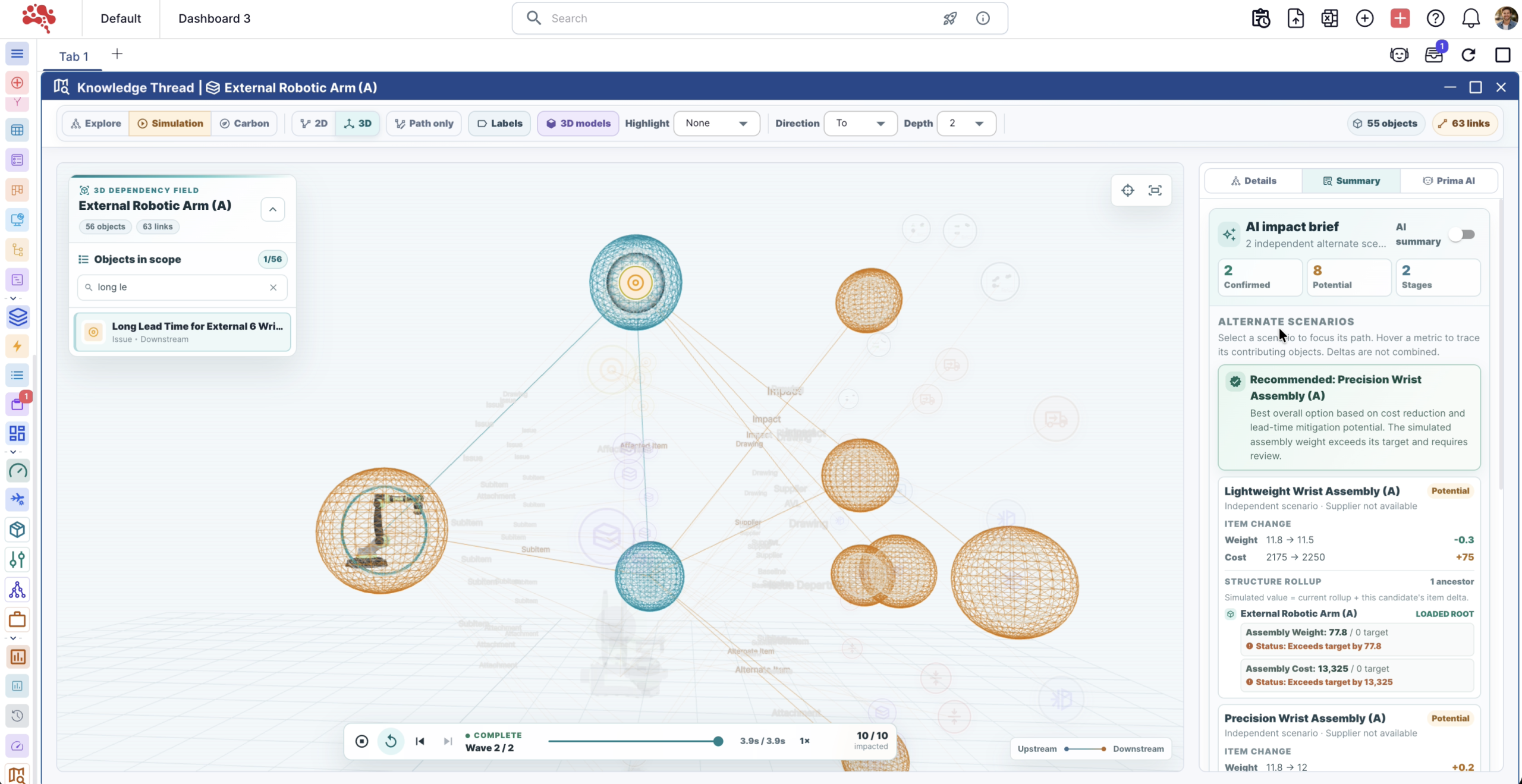
Trace the affected scope
See confirmed and potential impact separately, with the connected paths that support each assessment.
Compare the alternatives
Review replacement scenarios using available attributes, including weight, cost, and supplier context.
Understand the evidence
Read an AI impact brief grounded in the qualified analysis, with missing information called out.
From product questions
to governed action.
A shared approach across engineering, quality, operations, and leadership.
- 01 / CONTEXT
Read the current work
Bring active objects, selections, revisions, and lifecycle information into context.
- 02 / REASON
Connect the evidence
Reason across product objects and relationships within the user's access boundaries.
- 03 / GENERATE
Prepare a useful output
Create an analysis, explanation, draft, or summary for the task at hand.
- 04 / ACT
Support the next step
Help users progress through product work while retaining workflow controls and required approvals.
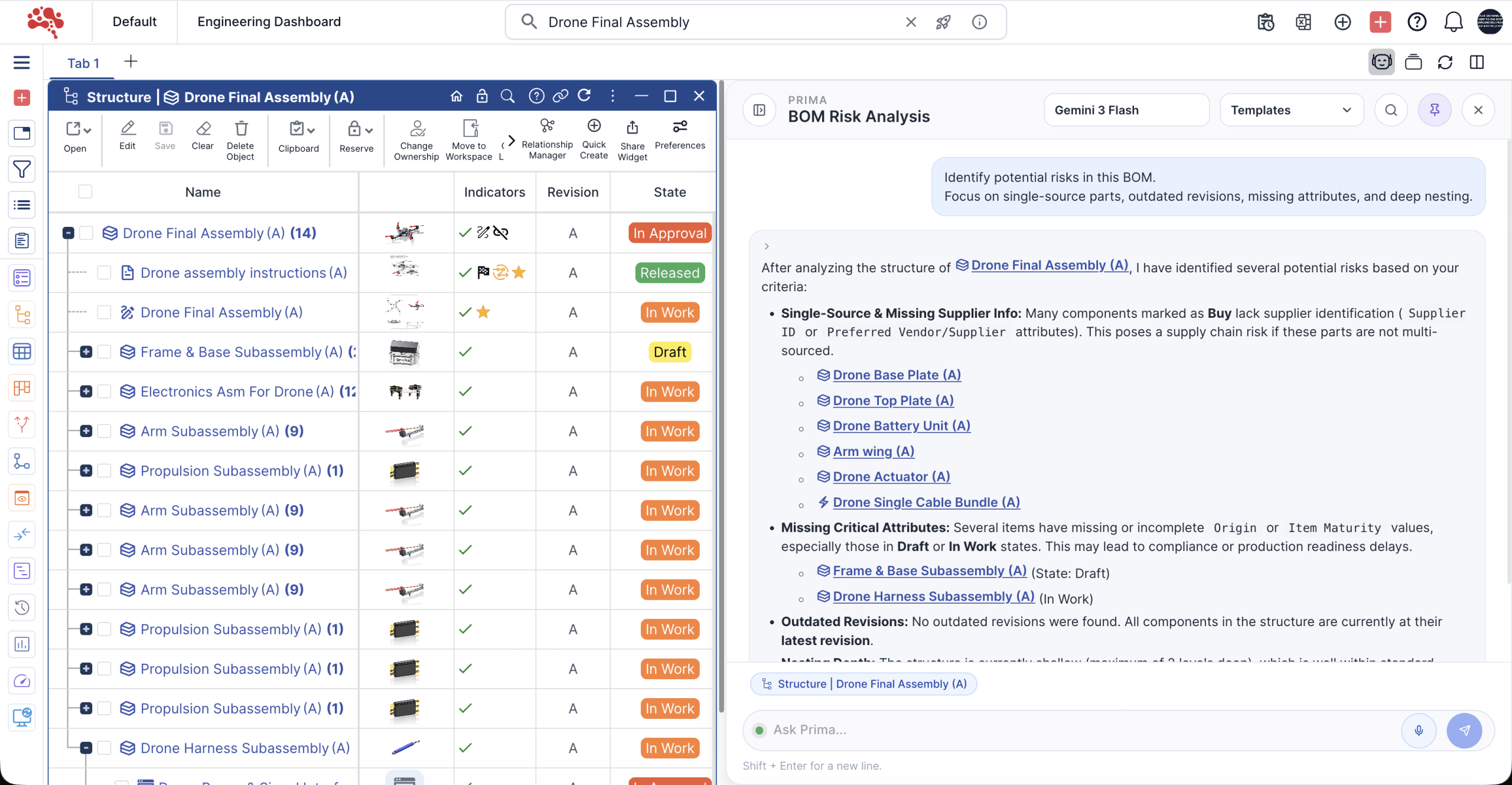 Connected product knowledge · BOM risk analysis Enlarge ↗
AI built on
product knowledge.
Grounded in lifecycle dataObjects, states, revisions, and history provide the foundation for analysis.
Inside your PLM governanceExisting permissions, tenant boundaries, and lifecycle rules continue to apply.
Reusable across teamsShared templates and governed outputs support consistent AI use across projects.
Good questions.
Clear answers.
Talk to the Nora team What can I do with Nora Prima?
Prima helps teams analyze, generate, explain, navigate, and track lifecycle work. This includes BOM health, reuse opportunities, document intelligence, project and task summaries, product risks, and operational readiness.
How does Prima understand the current work?
Dynamic context includes open widgets, selected objects, metadata, dependencies, revisions, and states. Platform and enterprise retrieval help bring relevant product knowledge into the response.
Can we standardize AI workflows with templates?
Yes. Templates cover BOMs, changes, tasks, projects, item data quality, and documents. Run them with the current context, refine them, or create variations for your team's workflow.
Does Prima support ongoing monitoring?
AI automations support scheduled checks, readiness summaries, lifecycle monitoring, and operational signals, helping teams follow progress and identify gaps across product workflows.
How are permissions and approvals handled?
Prima operates within existing PLM permissions, tenant boundaries, and lifecycle rules. AI recommendations and structured outputs support the governed workflow; required human approvals remain part of that process.
Where does change-impact simulation fit?
It is one application of Prima's broader AI capabilities. Knowledge Thread qualifies connected impact evidence, and Prima helps explain it for review, alongside workflows for BOMs, documents, tasks, projects, and other lifecycle data.
How can we evaluate Prima for our workflow?
Book a live demo to discuss your AI use cases or start a 30-day Nora trial. The Nora team can confirm the capabilities and setup available for your evaluation.
Turn product data into
operational intelligence.
Bring analysis, content generation, explanations, connected navigation, and monitoring into your team's daily PLM work.