Nora IPLM Lab. Building the next chapter of product work.
Explore what is released and what is taking shape across engineering, manufacturing, product knowledge, AI connections, and workflows. Ten features. One connected PLM foundation.
Engineering clarityChanges, structures, and configurations
Manufacturing contextProduct definitions and process planning
Practical AIAssistance grounded in product data
Ten features.
Real product challenges.
Explore released capabilities alongside the work still in development. Each feature connects product context to a practical engineering or manufacturing workflow.
Change Cockpit
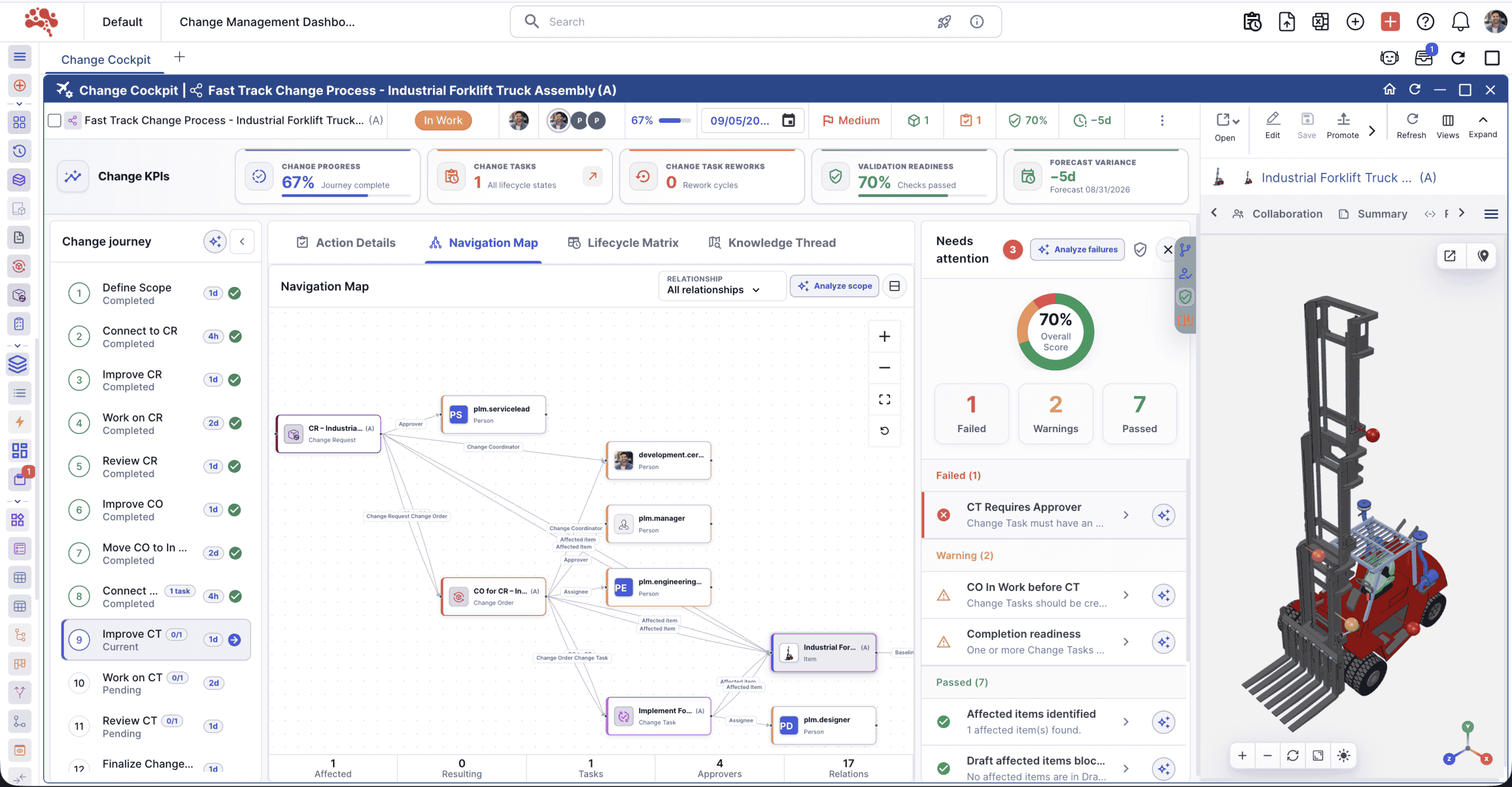
Bring affected objects, decisions, approvals, and readiness checks into one engineering change review.
- Review ECO and ECR impacts in connected context
- Keep ownership, decisions, and approvals traceable
- Spot downstream manufacturing and service risks
 Preview unavailable. Open the full-size image.
Outcome: Faster reviews, stronger governance, and fewer late change impacts.
Workflow details and intended users
Engineering change reviews become difficult when affected BOMs, documents, requirements, manufacturing processes, and service records are spread across separate views. Reviewers may approve an ECO or ECR without a complete picture of downstream risk.
Change Cockpit is an engineering change management workspace that brings impact, ownership, decisions, approvals, and implementation readiness into one governed review.
What it enables
- Accelerate ECO and ECR reviews with connected product context
- See affected BOMs, documents, requirements, processes, and service data before release
- Capture traceable decisions, ownership, approvals, and risk signals
- Reduce downstream manufacturing, quality, and service surprises
- Coordinate engineering, manufacturing, quality, and service teams
- Best for
- Engineering leaders, change managers, quality teams, and PLM administrators.
- Outcomes
- Faster reviews, stronger governance, and fewer late change impacts.
Selective Structure Clone
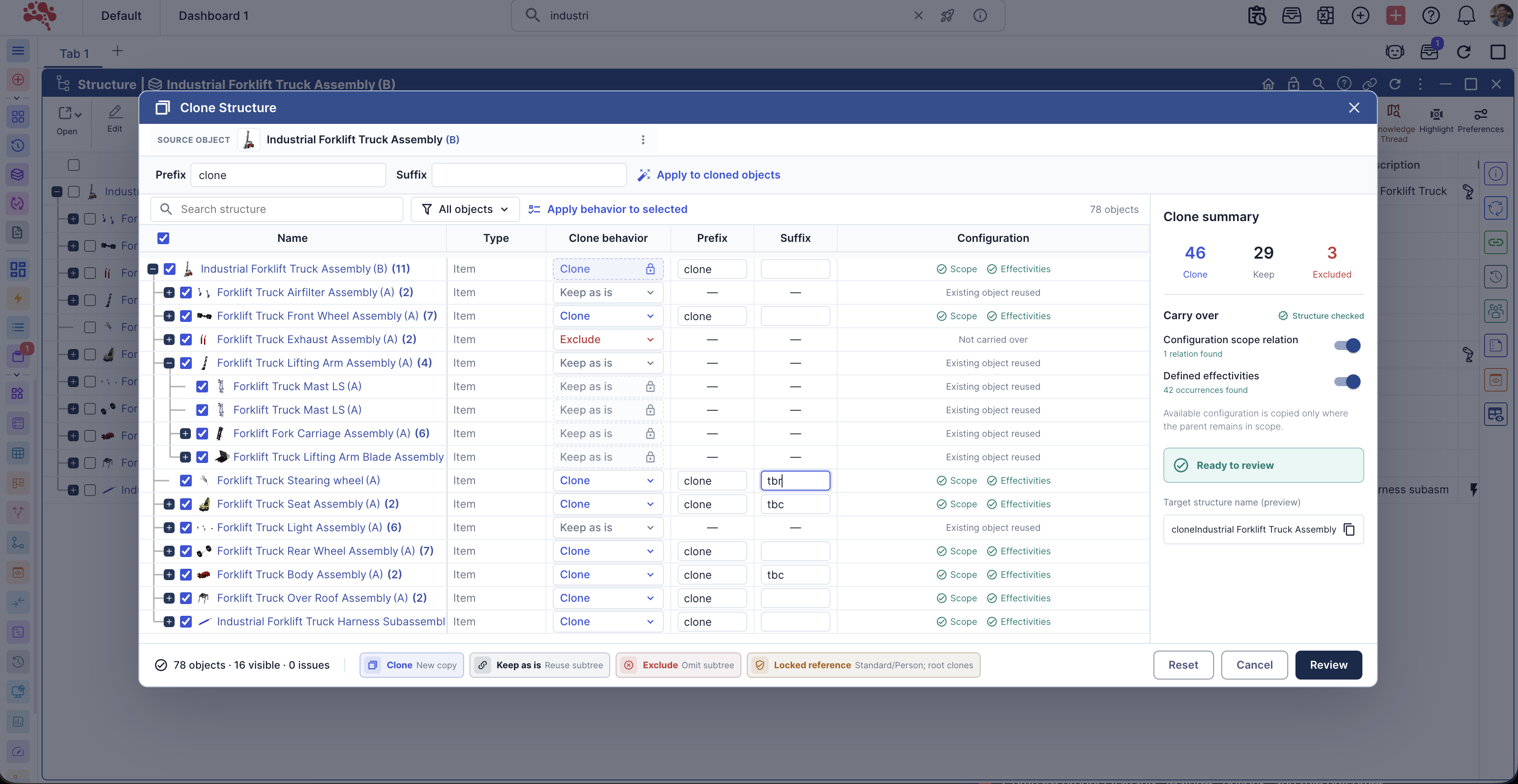
Choose what to clone, keep as a reference, or exclude when creating a new product structure.
- Control reuse by object or subtree
- Preview the resulting structure before creation
- Preserve approved references and configuration context
 Preview unavailable. Open the full-size image.
Outcome: Faster setup, more precise reuse, and cleaner governed structures.
Workflow details and intended users
Creating a new product or variant from an existing structure can save time, but uncontrolled copying creates duplicate product data, unclear ownership, and disconnected lifecycle records.
Selective Structure Clone supports controlled product structure reuse. Teams can choose whether each object is cloned, kept as an existing reference, or excluded; carry over approved configuration context; and review the resulting structure before creation.
What it enables
- Set up new products, programs, and variants faster
- Choose clone, keep-as-is, or exclude behavior by object or subtree
- Reuse approved objects without duplicating product data
- Preview the target structure, configuration scope, and effectivity carryover
- Apply consistent product-data governance to reuse workflows
- Best for
- Product data managers, engineering teams, and configurable product businesses.
- Outcomes
- Faster setup, more precise reuse, and cleaner governed structures.
MBOM Cockpit
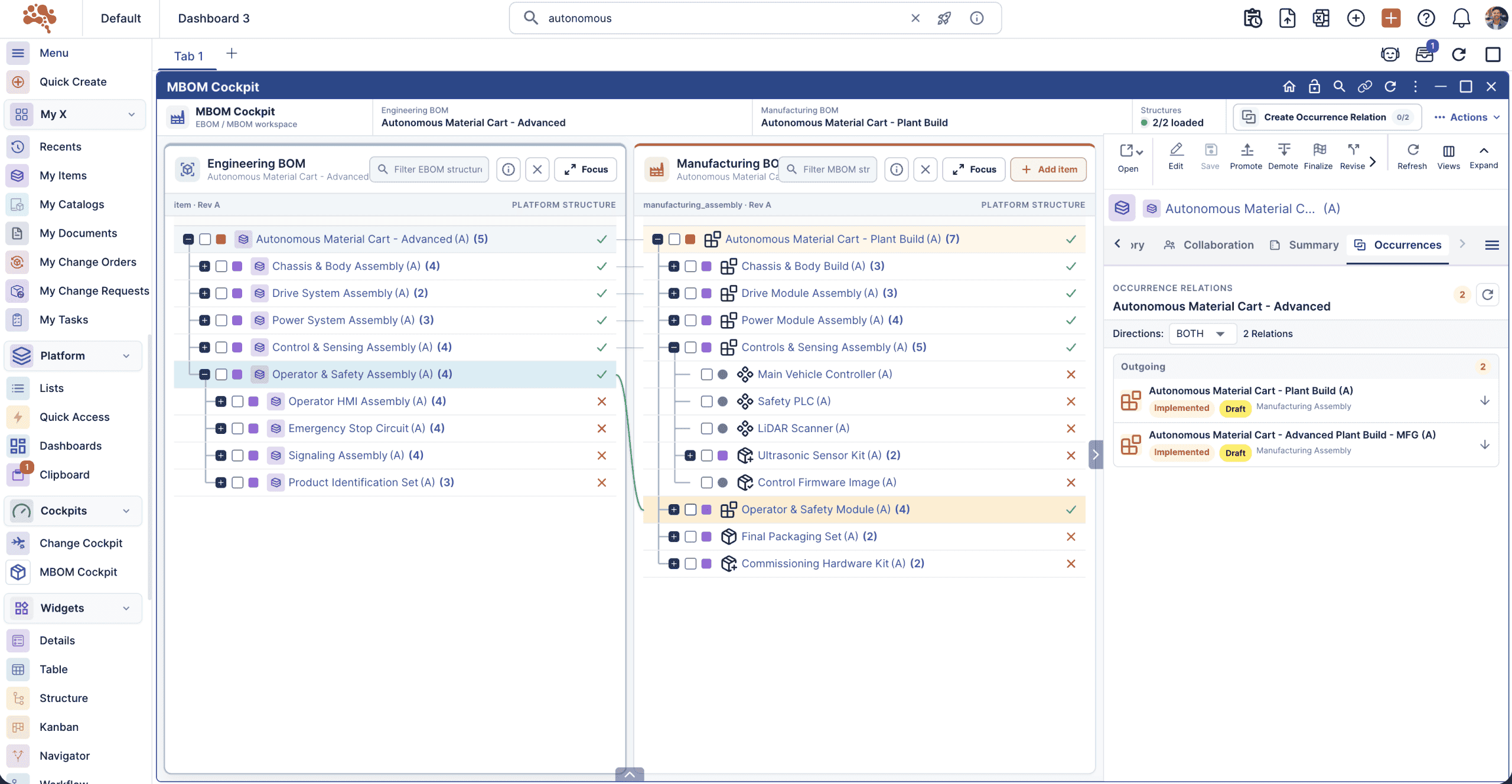
Compare engineering and manufacturing definitions, resolve differences, and review release readiness together.
- Review EBOM-to-MBOM changes across revisions
- Connect process plans, resources, and work instructions
- Surface blocking checks before approval
 Preview unavailable. Open the full-size image.
Potential outcome: Cleaner EBOM-to-MBOM alignment, earlier issue detection, and stronger release readiness.
Workflow details and intended users
Turning an engineering definition into a build-ready manufacturing structure requires more than copying an EBOM. Teams need to manage plant context, item allocations, lifecycle states, effectivity, resource dependencies, and readiness checks together.
At Nora IPLM Lab, we are developing the MBOM Cockpit as a governed workspace for creating and validating manufacturing contexts, reviewing EBOM-to-MBOM deltas, and coordinating release readiness.
What we’re working toward
- Compare engineering baselines with manufacturing contexts and resolved MBOMs
- Track added, modified, replaced, and deleted items across revisions
- Coordinate MBOMs, process plans, resources, work instructions, and ERP or MES packages
- Surface blocking checks and warnings before approval
- Preserve lifecycle, effectivity, and change traceability
- Best for
- Manufacturing engineering, industrialization, operations, and PLM teams.
- Potential outcomes
- Cleaner EBOM-to-MBOM alignment, earlier issue detection, and stronger release readiness.
Manufacturing process management
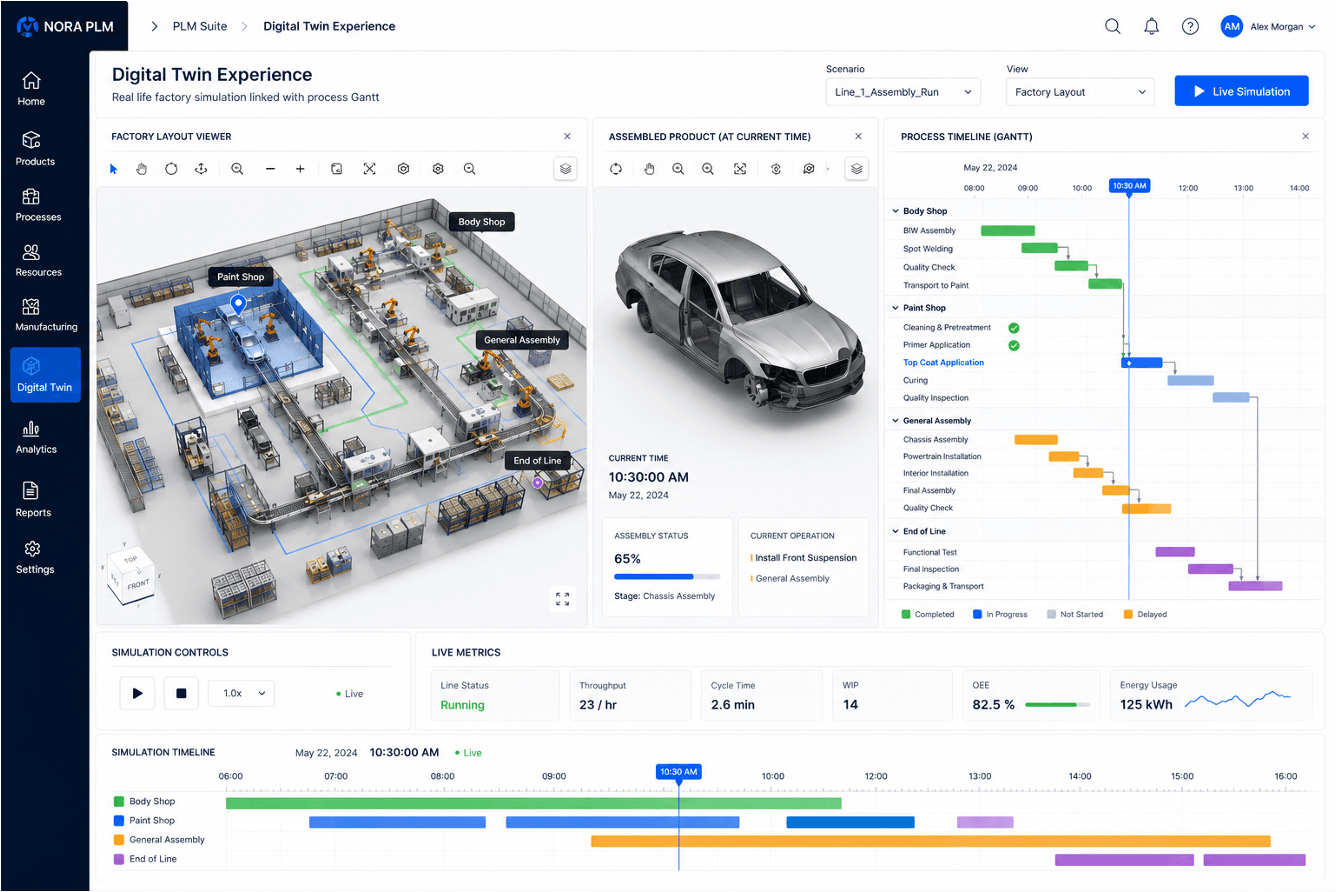
Connect the manufacturing definition to operations, resources, instructions, and production scenarios.
- Plan operations, sequences, and work centers
- Allocate resources and link instructions to the MBOM
- Explore cycle times and production constraints
 Preview unavailable. Open the full-size image.
Potential outcome: Better process planning, faster production validation, and fewer shop-floor surprises.
Workflow details and intended users
Once an MBOM defines what will be built, teams still need to define how it will be built. Operations, sequences, work centers, resources, instructions, cycle times, and production constraints must remain connected to product and change context.
At Nora IPLM Lab, we are developing Manufacturing Process Management to plan the bill of process, allocate resources, simulate production scenarios, and evaluate the effect of engineering or manufacturing changes before release.
What we’re working toward
- Create and manage operations, sequences, work centers, tools, and resources
- Link process plans and work instructions directly to the MBOM
- Evaluate production scenarios through digital-twin simulation
- Review cycle time, throughput, WIP, energy use, and production constraints
- Understand how product changes affect manufacturing execution
- Best for
- Manufacturing engineers, process planners, industrial engineers, and operations teams.
- Potential outcomes
- Better process planning, faster production validation, and fewer shop-floor surprises.
Knowledge Thread
Explore the upstream and downstream relationships around a product object, with source context in view.
- Follow dependencies across product objects
- Filter relationships by type, state, and attributes
- Give AI assistance traceable source context
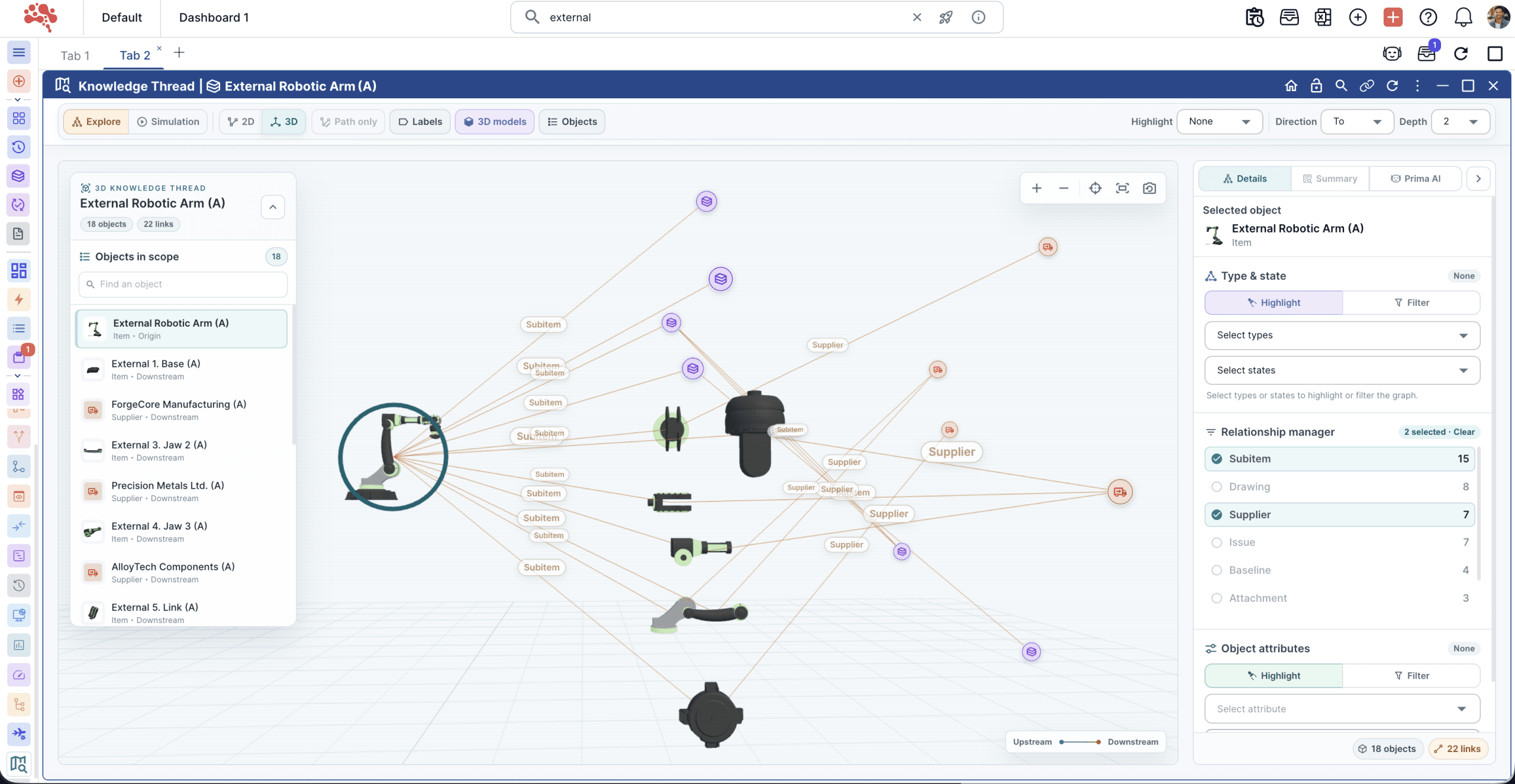 Preview unavailable. Open the full-size image.
Outcome: Faster relationship discovery, clearer impact analysis, and stronger digital-thread visibility.
Workflow details and intended users
Critical product context extends beyond a BOM tree. Items connect to suppliers, drawings, issues, baselines, attachments, changes, processes, configurations, and service records, yet these pathways can be difficult to follow across separate views.
Knowledge Thread is an interactive, relationship-aware workspace for exploring upstream and downstream product context. It strengthens discovery, impact analysis, and AI-assisted PLM with visible, governed source relationships.
What it enables
- Explore upstream and downstream relationships from the active product object
- View items, suppliers, drawings, issues, baselines, and attachments together
- Highlight or filter relationships by object type, lifecycle state, and attributes
- Reveal change pathways, dependencies, risks, and reuse opportunities
- Give Nora Prima AI traceable product context for stronger explanations
- Best for
- Product-data, change-management, supplier-quality, and digital-transformation teams.
- Outcomes
- Faster relationship discovery, clearer impact analysis, and stronger digital-thread visibility.
Configuration Cockpit
Validate options, rules, and effectivity to resolve a specific 100% BOM from a governed 150% definition.
- Compare variants and validate option rules
- Resolve order-specific product structures
- Maintain lifecycle and configuration traceability
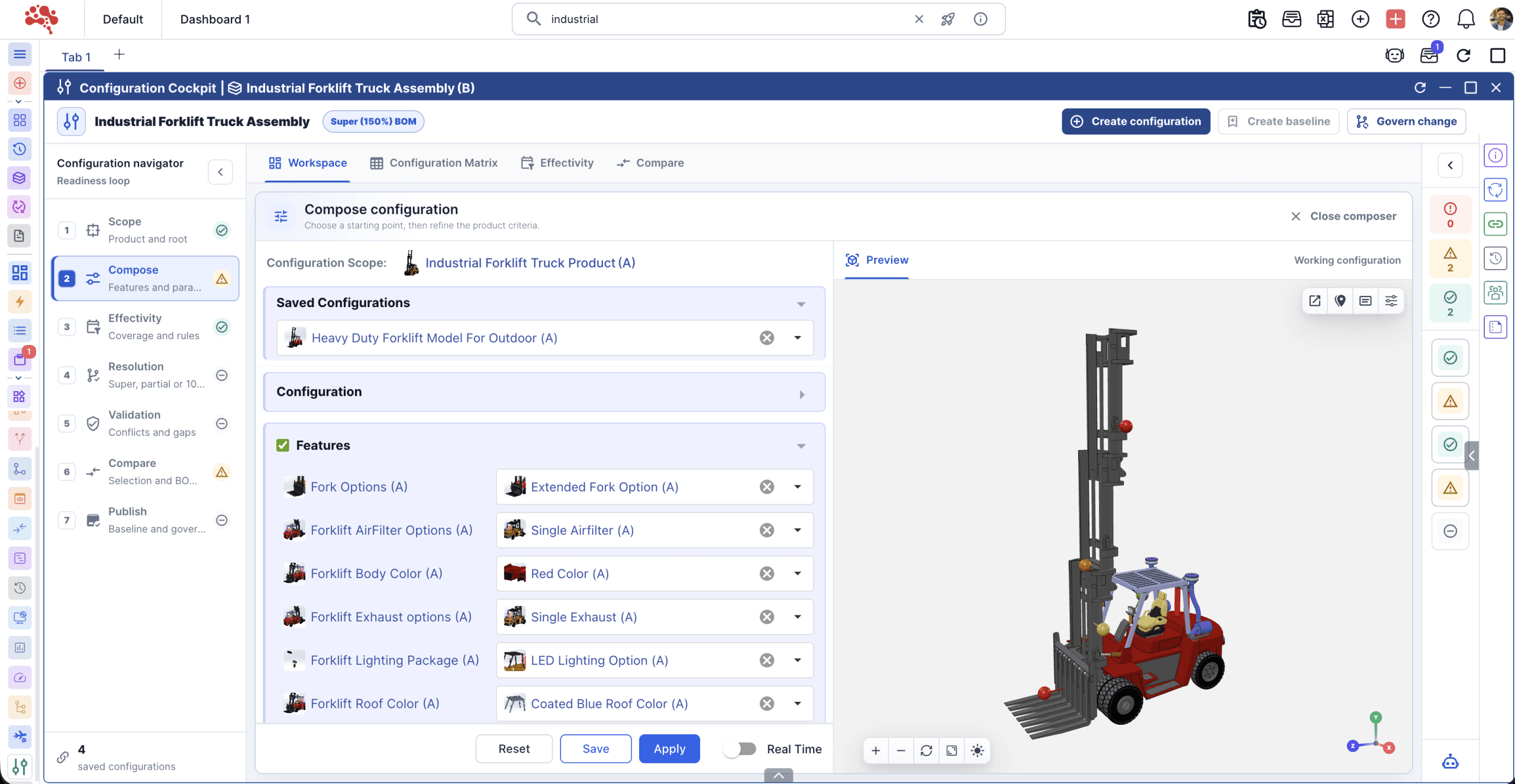 Preview unavailable. Open the full-size image.
Potential outcome: More accurate configurations, less duplication, and stronger variant control.
Workflow details and intended users
Configurable product families introduce complex option rules, effectivity conditions, market requirements, and order-specific structures. Duplicating a product definition for every variation increases maintenance effort and weakens traceability.
The team is actively developing the Configuration Cockpit as a focused product configuration management workspace for comparing variants, validating rules, reviewing effectivity, and resolving an accurate 100% BOM from governed 150% BOM logic.
What we’re working toward
- Compare product variants, features, options, and rule outcomes
- Validate configuration logic and effectivity before release
- Resolve accurate 100% BOMs from controlled 150% BOM structures
- Reduce duplicate product definitions across markets, models, and orders
- Connect configuration decisions with lifecycle traceability
- Best for
- Manufacturers of configurable equipment, vehicles, electronics, and machinery.
- Potential outcomes
- More accurate configurations, less duplication, and stronger variant control.
Nora Prima AI · Phase 2
Analyze the active product context and prepare structured recommendations with human review built in.
- Identify part reuse and duplication opportunities
- Summarize impacts, risks, and open decisions
- Prepare drafts for controlled user review
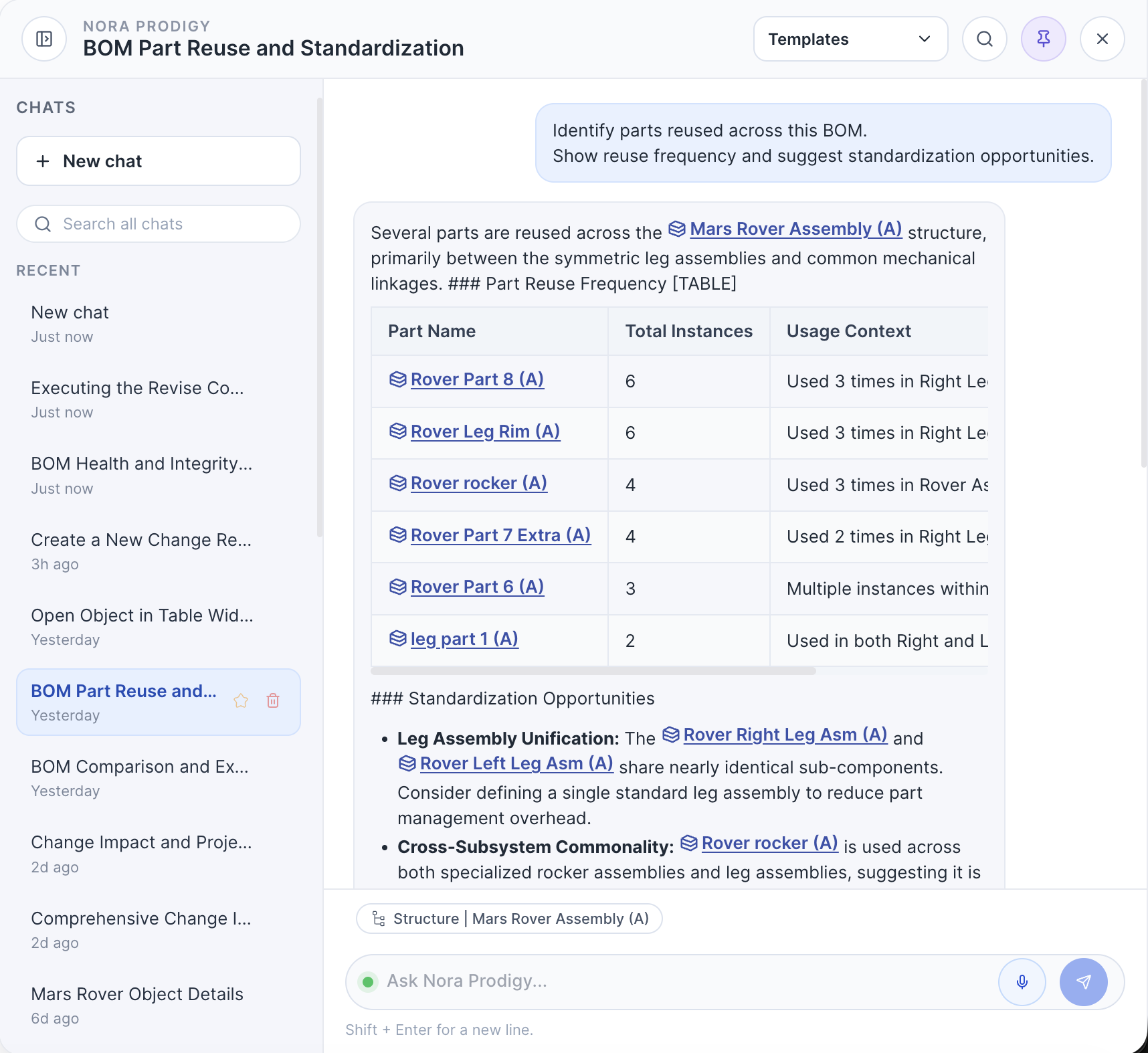 Preview unavailable. Open the full-size image.
Potential outcome: Faster analysis, more consistent decisions, and practical AI support inside governed workflows.
Workflow details and intended users
The next phase of AI in PLM needs to do more than answer general questions. It should understand the product, structure, change, document, or workflow a user is working on and provide useful support without losing governance or traceability.
At Nora IPLM Lab, we are developing Nora Prima AI Phase 2 around focused, context-aware assistance that can analyze product data, surface opportunities, prepare structured outputs, and help users move through controlled PLM workflows.
What we’re working toward
- Work with the active BOM, change, document, project, or product context
- Identify part reuse, duplication, and standardization opportunities
- Summarize change impact, risks, dependencies, and open decisions
- Prepare structured drafts and recommendations for user review
- Keep human approval, source context, and lifecycle traceability visible
- Best for
- Engineering, product-data, change-management, and PLM teams.
- Potential outcomes
- Faster analysis, more consistent decisions, and practical AI support inside governed workflows.
Nora IPLM MCP Server
Connect compatible AI assistants to permitted product records, structures, files, and workflows through the Model Context Protocol.
- Find and compare product records in their lifecycle context
- Follow structures and relationships from an AI conversation
- Carry out supported actions within existing user permissions
MCP ServerProduct data
& workflows
Authenticated access · Scoped tools · User permissions
Beta feature: Explore the Nora IPLM MCP Server and its supported capabilities.
Workflow details and intended users
Product questions often require information from multiple records, structures, and documents. The MCP Server brings permitted Nora IPLM context into compatible AI assistants.
Beta access and supported tools depend on the authenticated user's profile, scopes, and permissions. Available operations can help users investigate product context and act through supported workflows.
What it enables
- Search accessible product records and inspect history
- Compare revisions and explore parent, child, and where-used relationships
- Find relevant files and knowledge in product context
- Use supported actions within governed permissions
- Best for
- Engineering and product teams using compatible AI assistants.
- Availability
- Released (Beta). Capabilities vary by permissions and configured tools.
Agentic Workflow and BPM Capabilities
Separate from Nora IPLM’s existing Workflow Management capabilities, this work explores broader business process orchestration and agent-assisted steps with governed approvals.
- Model multi-step processes across teams and product data
- Use agents to prepare context and proposed next actions
- Keep approvals, ownership, and process history visible
workflowHuman review
& approval
Connected context · Clear ownership · Governed execution
Development goal: More coordinated processes with human control over important decisions.
Workflow details and intended users
Product processes span tasks, decisions, changes, and handoffs. Teams need a way to orchestrate those steps while preserving the product record and a clear approval path.
Nora IPLM’s existing Workflow Management capabilities already define workflows, route tasks, automate transitions, and track approvals. Agentic Workflow and BPM Capabilities are a separate development effort focused on broader process orchestration, agent-assisted preparation, and governed execution.
What we’re working toward
- Define process steps, owners, conditions, and handoffs
- Bring relevant product context to each task
- Let agents prepare summaries and proposed actions for review
- Track approvals, exceptions, and execution history
- Best for
- PLM administrators, process owners, engineering teams, and change managers.
- Status
- In development. Functionality and availability may change.
Knowledge Graph Network Mode
See connected product objects as an interactive network inside Knowledge Thread.
- Explore relationships with force and radial layouts
- Group nodes by object type while keeping links visible
- Focus on the shortest path to a selected connection
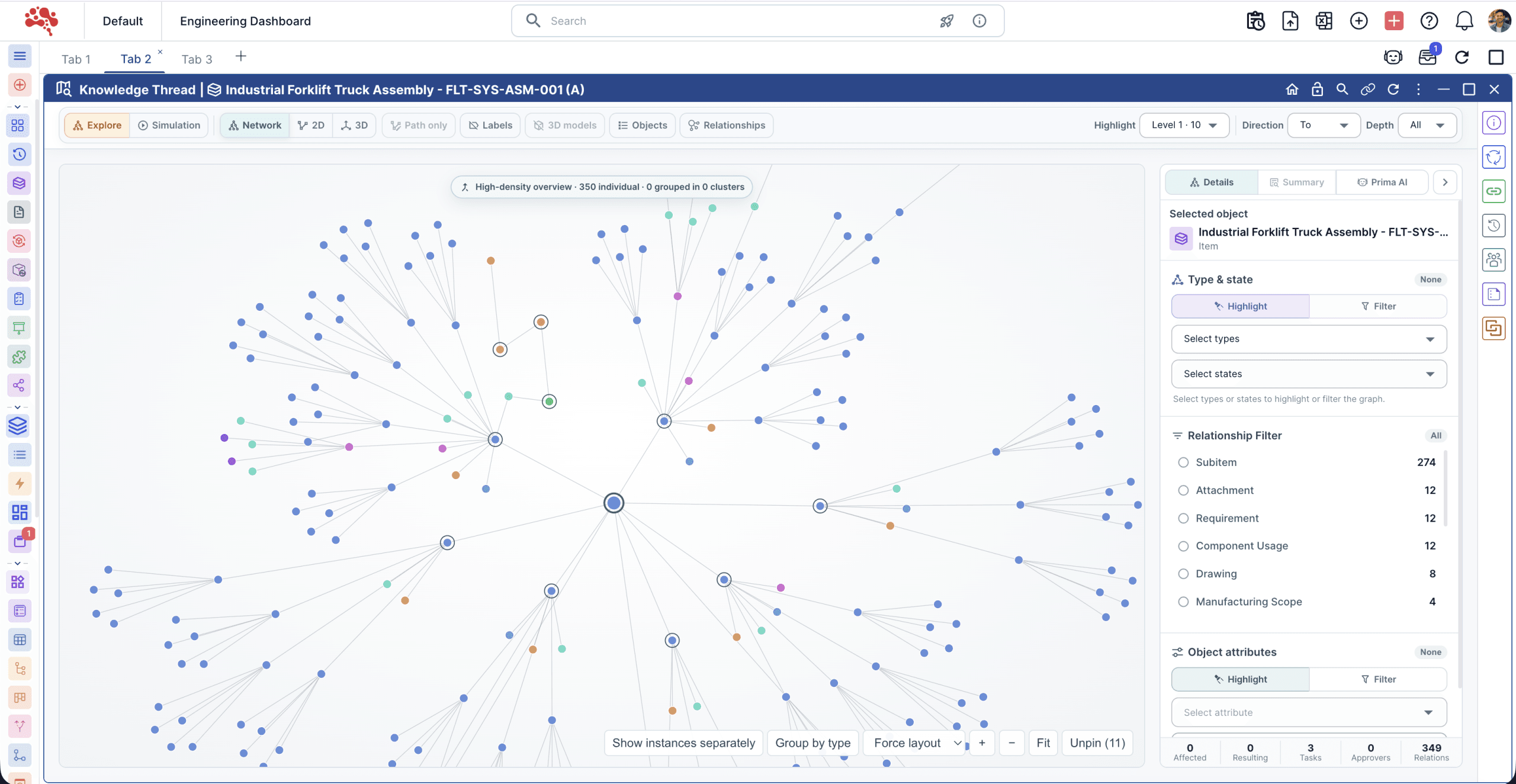 Preview unavailable. Open the full-size image.
Explore it: See Knowledge Thread Network mode in product context.
Workflow details and intended users
A product relationship is easier to investigate when neighboring objects and their links are visible together. Network mode gives Knowledge Thread a flexible graph view for that exploration.
Start from a product object, zoom and pan through the network, group related object types, and isolate a path to the connection that matters.
What it enables
- Switch between force and radial network layouts
- Select nodes to inspect connected object details
- Group objects by type without losing relationship links
- Isolate a shortest path from the starting object
- Best for
- Engineering, change, and product-data teams exploring dependencies.
- Outcome
- Faster investigation of connected product context.
How the Lab works
Built around the work.
Tested against reality.
We evaluate usability, technical feasibility, and governance before a concept can become part of the platform.
Every workstream builds on Nora’s product lifecycle management foundation, connecting product context while keeping ownership and approvals visible.
Discover
Understand the workflow, affected teams, and outcome worth improving.
Prototype
Test interactions, data relationships, and technical feasibility.
Validate
Evaluate representative engineering and manufacturing scenarios.
Productize
Refine usability, performance, documentation, and release readiness.
Explore the connected product context
 Preview unavailable. Open the full-size image.
Frequently Asked Questions
What is Nora IPLM Lab?
What is Nora Prima AI Phase 2?
How does Nora IPLM Lab support engineering change management?
What is Knowledge Thread in PLM?
How are MBOM and manufacturing process management different?
What is product configuration management in PLM?
How does Nora IPLM Lab support digital thread initiatives?
Is Nora IPLM Lab a public product roadmap?
Who should provide feedback on Nora IPLM Lab concepts?
What should product work
make easier for you?
Bring your engineering, manufacturing, or product-data challenge to Nora IPLM Lab.