Engineering Change Management in PLM.
From request to controlled release.
Control product changes from initial request through review, approval, implementation and release. Nora IPLM connects change requests, affected items, BOMs, documents, workflows, approvals and implementation tasks so engineering teams can evaluate impact and maintain full traceability across the product lifecycle.
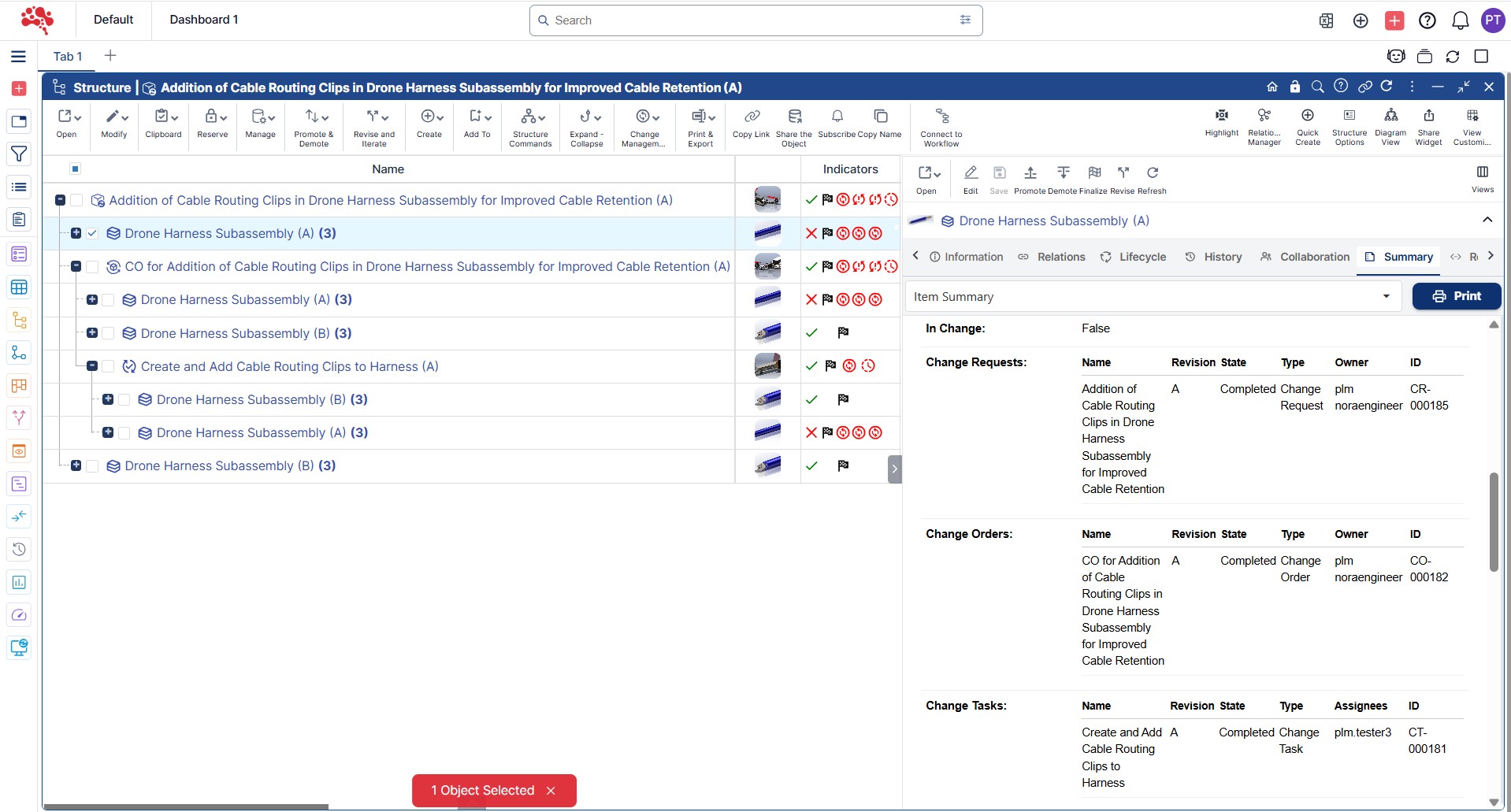
Engineering Change Management in PLM
One connected workspace.
Automated Engineering Change Workflows & Process Management
Route change requests, reviews, approvals and implementation tasks through repeatable workflows with clear ownership and lifecycle checkpoints.
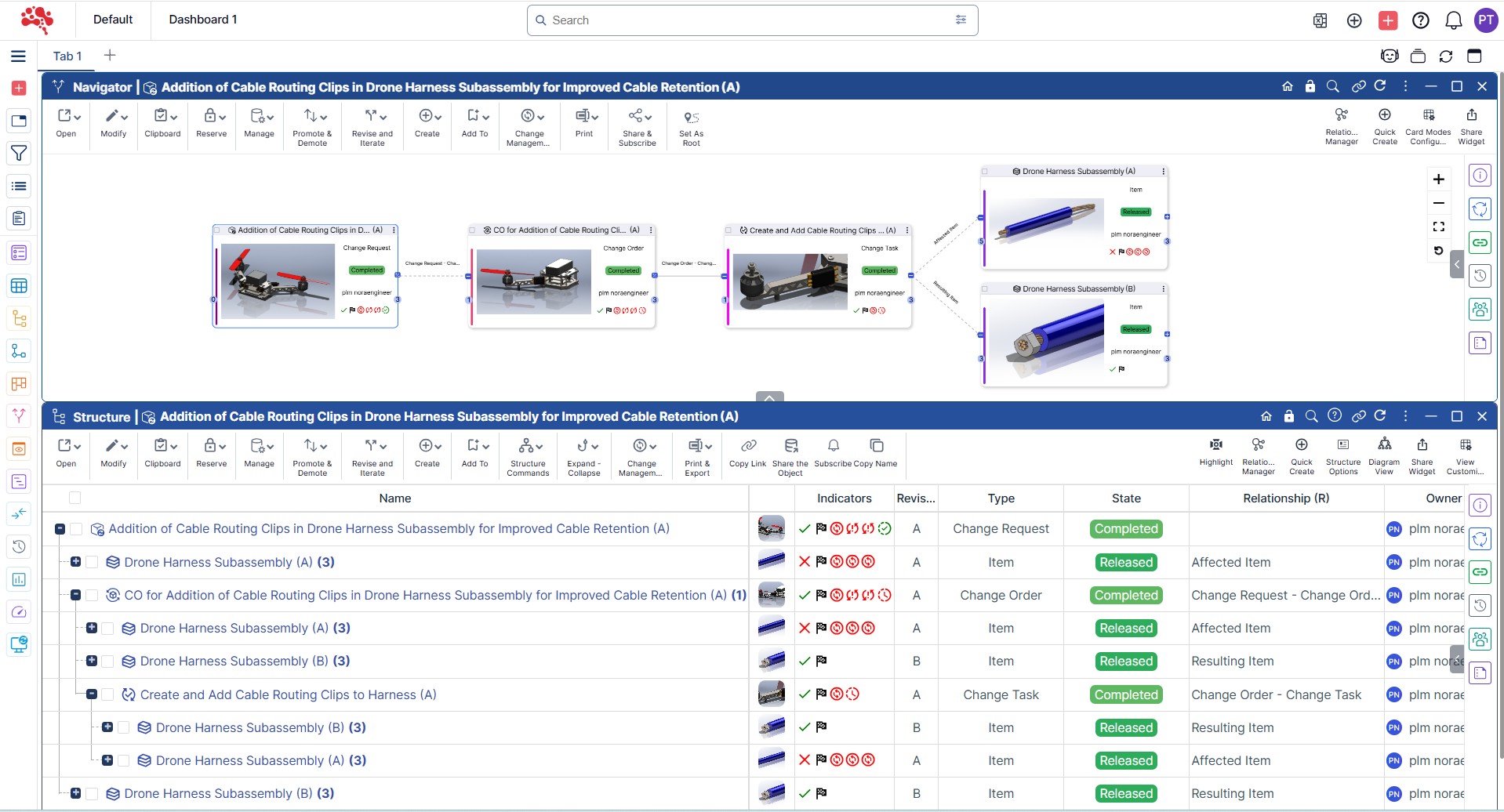
Real-Time Notifications & Updates
Alert the right users when reviews are required, approvals are pending or affected product data needs attention.
Affected Items and Baseline Impact Analysis
Identify which parts, BOMs, documents, requirements, configurations and baselines may be affected before approving a change.
Your engineering changes.
Every decision connected.
Keep the product record and the work around it in view as you move through each stage.
Streamline Product Change Management Across the Entire Lifecycle
Connect change requests, affected items, approvals, and downstream updates so teams can move faster with fewer handoff gaps.
End-to-End Change Tracking for Full Visibility
Full Visibility
Track each change request from identification through review, approval, implementation, and release. Teams can see what changed, why it changed, who approved it, and which product data was affected.

Individual & Group Task Assignments
Task Ownership
Assign change tasks to specific users or functional groups so every review, approval, and implementation step has clear ownership and accountability.

What Is Engineering Change Management in PLM?
Engineering change management is the controlled process of evaluating, approving, implementing and tracking changes to products, parts, BOMs, documents, requirements and related lifecycle information.
In a PLM environment, every change can remain connected to the product data it affects. This allows teams to understand what is changing, why the change is needed, who approved it, which records are affected and whether implementation is complete before release.
Common Product Change Types
Engineering Change Request (ECR)
Capture and evaluate a proposed product or engineering change before approval.
Engineering Change Order (ECO)
Authorize and control the implementation of an approved change.
BOM Change
Modify parts, quantities, assemblies or product structures.
Document Change
Update specifications, drawings, work instructions or technical documents.
Configuration Change
Control updates to product variants, options or configuration rules.
Manufacturing Change
Coordinate approved product updates with downstream manufacturing information.
Why Engineering Change Management Matters
Reduce uncontrolled or undocumented product changes
Identify affected items before approval
Coordinate reviews across engineering, quality and manufacturing
Keep decisions, approvals and implementation history traceable
Reduce downstream errors caused by incomplete change communication
Accelerate release by standardizing repeatable change workflows
Product changes rarely affect only one record. A seemingly small design update can influence BOMs, documents, configurations, manufacturing instructions, project work and downstream teams.
A controlled engineering change process helps teams assess these relationships before implementation and ensures that approved updates move through a consistent, traceable path.
How Engineering Change Management Works
Identify the Change
Capture the reason for the change, supporting information and the product data involved.
Assess Impact
Review affected parts, BOMs, documents, requirements, configurations, baselines and downstream processes.
Define Ownership
Assign reviewers, approvers and implementation responsibilities.
Review and Approve
Route the change through the required technical and business approval workflow.
Plan Implementation
Define tasks, dependencies and the product information that must be updated.
Execute the Change
Update affected product records and complete assigned implementation tasks.
Verify Completion
Confirm that the approved change was implemented correctly across affected data.
Release and Preserve History
Move the updated product information forward while retaining the full decision and change history.
Engineering Change Request vs Engineering Change Order
ECR
Engineering Change Request
- Purpose
- Propose and evaluate a change
- Focus
- Need, feasibility and impact
- Typical Activities
- Problem definition, impact review, recommendation
- Outcome
- Approve, reject or revise the proposal
ECO
Engineering Change Order
- Purpose
- Authorize and implement an approved change
- Focus
- Execution, ownership and completion
- Typical Activities
- Tasks, approvals, product updates, verification
- Outcome
- Implement and close the approved change
The exact use of ECRs and ECOs varies by organization, but separating evaluation from execution can help teams create a clearer, more controlled engineering change process.
Common Engineering Change Management Use Cases
Design Changes
Control updates to drawings, CAD data, specifications and product designs.
BOM Changes
Manage part substitutions, additions, removals and quantity changes while preserving product structure history.
Quality-Driven Changes
Turn quality issues, failures or corrective actions into controlled engineering updates.
Supplier or Component Changes
Assess and implement product updates caused by supplier, material or component changes.
Cost Reduction Changes
Evaluate value-engineering changes while understanding technical and downstream impact.
Manufacturing Changes
Coordinate approved engineering updates with production-ready structures and manufacturing information.
Configuration Changes
Control updates that affect product variants, options or configuration rules.
Compliance or Requirement Changes
Trace regulatory or requirement updates to the product information that must change.
Change Impact Analysis Before Approval
A strong engineering change process should evaluate impact before a change moves downstream. Reviewers need visibility into the product records, dependencies and lifecycle processes that may be affected.
This helps teams make approval decisions using product context rather than reviewing the change request in isolation.
Affected parts and assemblies
EBOM and MBOM structures
Requirements and specifications
Documents and CAD data
Product configurations and variants
Existing baselines and released states
Open issues, risks or projects
Manufacturing and downstream lifecycle dependencies
Example: Managing a Component Change from Request to Release
A supplier discontinues a component used in an active product. Engineering creates a change request and links it to the affected item and BOM. The team reviews alternative components, checks the related documents and configurations, and evaluates downstream manufacturing impact.
After the replacement is approved, an engineering change order is created. Tasks are assigned to update the BOM, drawings and related product records. Once implementation is verified, the updated product information is released and the complete change history remains traceable.
Supplier Change
→
ECR
→
Impact Analysis
→
Approval
→
ECO
→
Implementation Tasks
→
Verification
→
Release
How Engineering Change Management Improves Product Control
Product Control
Controlled change management protects product integrity while helping teams move approved updates through the lifecycle efficiently. By keeping impact, ownership, approvals and implementation connected, teams can reduce rework and make change decisions with greater confidence.
Reduce change-related risk
Review affected product information before approved changes move downstream.
Keep teams aligned
Keep engineering and manufacturing teams aligned around controlled updates.
Maintain lifecycle control
Maintain approvals, change traceability and a complete history of product decisions.
Accelerate implementation and release
Move approved changes through repeatable workflows with clearer ownership.
Who Uses Engineering Change Management?
Engineering change management supports the cross-functional teams responsible for evaluating, approving, implementing and releasing controlled product changes.
Engineering managers
Change managers
Design and CAD teams
PLM managers
Quality teams
Manufacturing engineers
Product managers
Operations and supply-chain teams
Explore connected Nora IPLM capabilities.
Featured Modules & Widgets
Product Lifecycle Management

Efficiently manage, collaborate, and innovate across every stage of your product lifecycle.
Discover NowCAD Data Management
Efficiently manage, collaborate, and innovate across every stage of your product lifecycle.
Discover NowChange Management
Effectively manage and track changes with our streamlined change management features.
Discover NowExplore the workspace.
Follow the product context.
Continue the lifecycle.
Explore connected capabilities.
Good questions.
Clear answers.
What is engineering change management?
Engineering change management is the controlled process of evaluating, approving, implementing and tracking product changes across items, BOMs, documents, requirements and other lifecycle information.
What is the difference between an ECR and an ECO?
An ECR is generally used to propose and evaluate a change, while an ECO is used to authorize and control implementation after the change is approved.
Why is engineering change management important in PLM?
PLM keeps the change connected to the product data it affects, allowing teams to review impact, approvals, implementation and history in one lifecycle context.
What is change impact analysis?
Change impact analysis identifies the parts, BOMs, documents, requirements, configurations, baselines and downstream processes that may be affected by a proposed change.
Can engineering changes be linked to BOMs and items?
Yes. Change records can be linked directly to affected items and BOM structures so teams can understand where the change applies and what must be updated.
How do approval workflows support change management?
Approval workflows route changes to the correct reviewers and decision-makers, record sign-offs and prevent uncontrolled implementation.
How do baselines support engineering change management?
Baselines provide a reference state that teams can compare against later product states to understand what changed and assess impact.
Can change tasks be assigned to individuals or groups?
Yes. Change implementation work can be assigned to responsible users or functional groups so ownership and completion remain visible.
How does change management improve traceability?
It preserves the reason for the change, affected product data, review decisions, approvals, implementation work and final release history in one connected record.
Who benefits from engineering change management in PLM?
Engineering, quality, manufacturing, product, operations and PLM teams benefit because product changes remain controlled and connected to the lifecycle information they affect.
Engineering Change Management in PLM.
Keep your product work connected.
Manage ECRs, ECOs, affected items, impact analysis, approvals and implementation with full traceability.