PLM for Product Managers.
Keep the product vision connected.
Connect customer needs, product requirements, configurations, and delivery work in Nora IPLM. Keep the reasons behind product decisions linked to the definition your teams design, review, and release.

A clear product direction.
A shared product definition.
Good product decisions need more than a status update. See what the product must do, which version or variant you are discussing, and what a proposed change means for the teams delivering it.
Keep the need in view.
Carry customer feedback and agreed requirements into engineering conversations, with priorities and ownership attached.
Make the scope explicit.
Give every review a named product, selected configuration, and controlled revision so teams know what is in scope.
Keep decisions traceable.
Connect the rationale, affected records, review tasks, and approvals so the next team can follow the reasoning.
One product family.
Room for the right choices.
Bring configuration and variant management into product planning. Define shared modules and customer, market, or model options while keeping their differences visible.
Use dependencies, exclusions, and effectivity rules to validate combinations. A 150% BOM holds the family’s possible parts and options; the selected variant produces its 100% configured BOM.
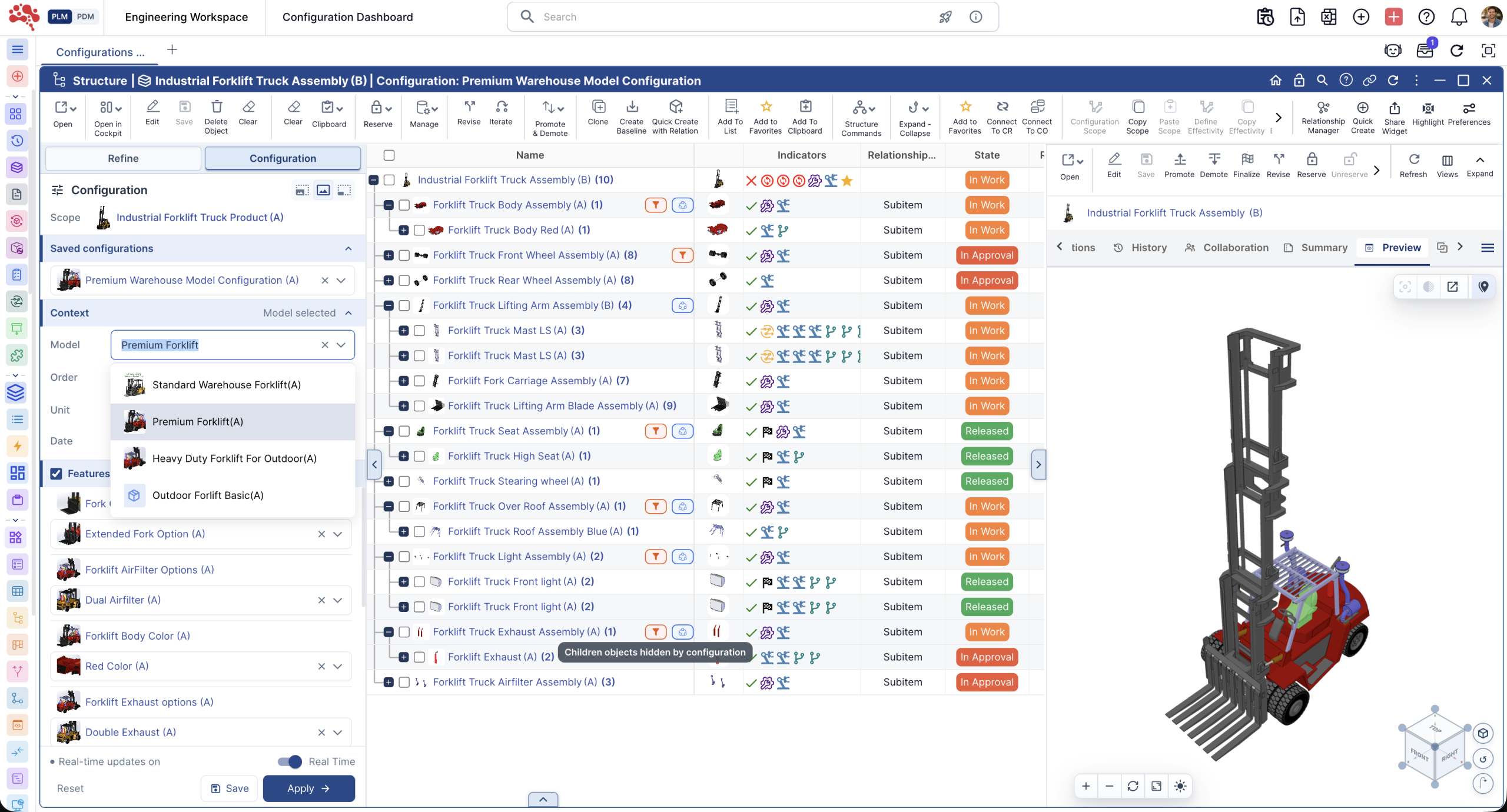
- Variant
- Which combination of product options are we offering?
- Revision
- Which controlled evolution of the record are we reviewing?
- Baseline
- What did the selected product information look like at that checkpoint?
From customer need.
To the product behind it.
Connect product discovery with the engineering definition. Keep requirements, reusable components, and supporting evidence close to the decisions they inform.
Ideas, feedback & requirements
Capture opportunities through ideation and innovation management. Translate agreed needs into requirements with priorities, owners, and links to the product work they guide.
Product architecture & BOMs
Use items and engineering BOMs to make the product structure tangible. Review common modules, assemblies, and variant differences when discussing scope and reuse.
Documents & product evidence
Keep specifications, CAD references, and review material connected through document management. Discuss a product decision with the supporting information and its revision in reach.
Issues, risks & tradeoffs
Bring product issues into the review alongside affected requirements and items. Record the tradeoff, responsible owner, and follow-up work so unresolved concerns remain visible.
Follow the product decision.
Through the work it changes.
Move between change reviews, delivery milestones, and reporting. Each view brings a different part of the same product conversation into focus.
Understand the decision before approving it.
Review the engineering change, affected items, related requirements, and configured product scope together. Make tradeoffs visible before committing to an updated definition.
Connect review tasks and approvals through controlled workflows. Keep the reason for the decision alongside the records that changed.

Connect the commitment to the work.
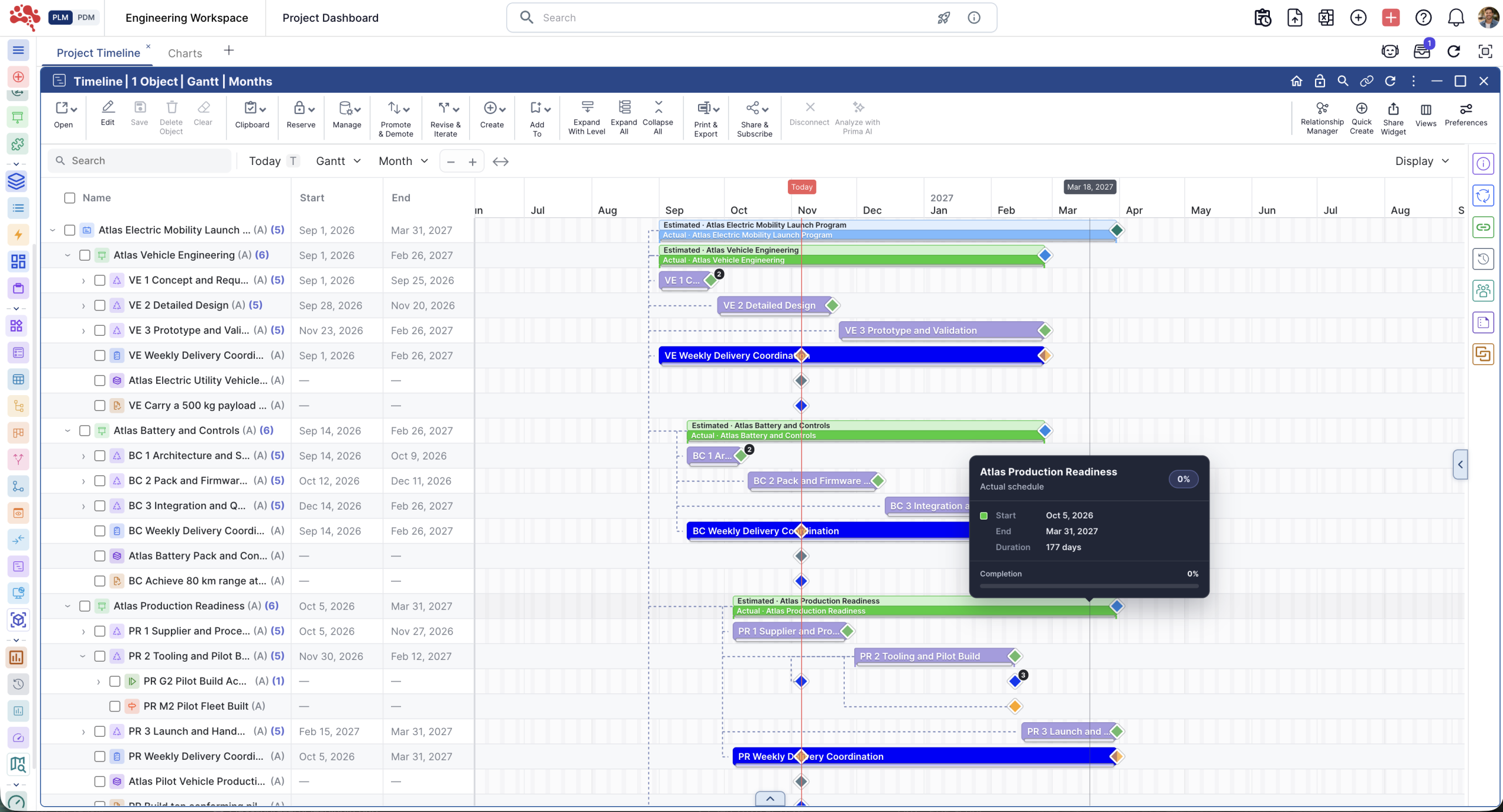
Use program and project management to connect phases, milestones, and delivery tasks with the product work they support.
Review ownership, dependencies, and open actions with the teams doing the work. Keep launch discussions connected to current product records and planned checkpoints.
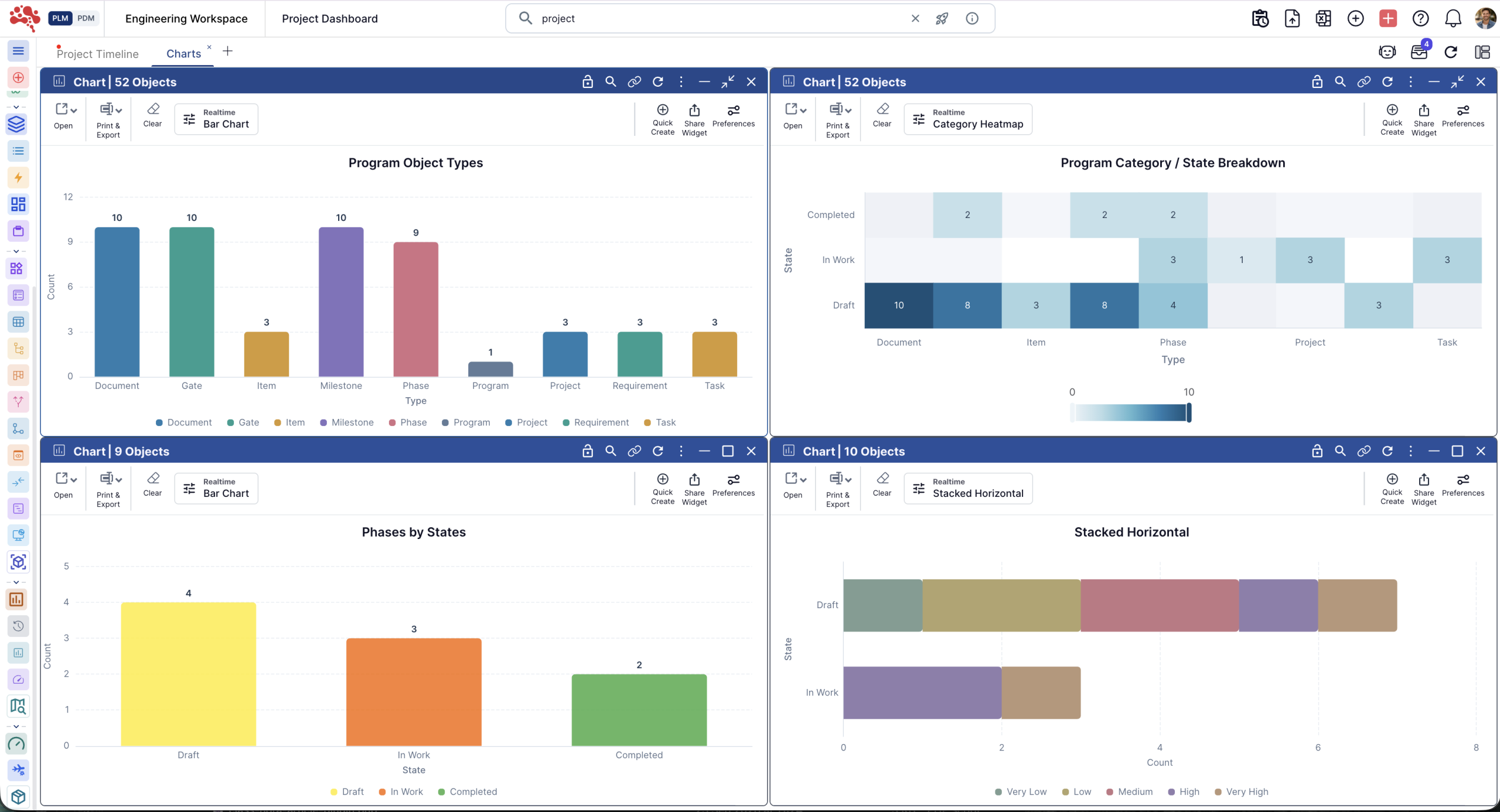
Ask better questions of the product data.
Use charts and advanced reporting to review task progress, change status, and lifecycle trends in shared dashboards.
Filter the review scope, group records by relevant attributes, and inspect the underlying information. Give each review a clear product, configuration, and reporting scope.
Know what was agreed.
See what changed.
Create a baseline at a meaningful product checkpoint and compare later states with that reference. Review how the selected product structure and related information have evolved before agreeing the next step.
A baseline records a state at a point in time. Your review and approval process determines whether that state is approved for release.
Make the review concrete.
Keep the handoff connected.
For a customer-specific variant, the conversation can move from “Are we ready?” to the product questions that need an answer.
Requirements
Which customer needs are covered, and which remain open?
Configuration
Which options, configured BOM, and revisions are in scope?
Changes & issues
What still needs a decision, action, or approval?
Release checkpoint
Which reference state, review outcome, and milestone are we using?
Product management in PLM.
Your questions, answered.
How does PLM help product managers?
PLM connects the product definition with its requirements, items, BOMs, documents, configurations, changes, and delivery work. Product managers can review the records behind a decision and keep engineering, manufacturing, and quality discussions tied to the same product context.
How does Nora IPLM support configuration management?
Define product families with shared parts, modules, features, and options. Configuration rules use dependencies, exclusions, and effectivity to control valid combinations. A selected configuration produces a 100% configured BOM from the family’s 150% BOM, with links to its source structure and revisions.
What is the difference between a variant, a revision, and a baseline?
A variant represents a particular combination of product options. A revision identifies an evolution of a controlled record. A baseline captures selected product or project information at a particular time so teams can compare later states. These concepts work together when reviewing a product’s scope and history.
Can product managers connect customer needs to engineering work?
Yes. Capture ideas and feedback, define requirements with priorities and owners, and connect requirements to product records, projects, and changes. Those relationships help reviewers understand which need a design decision addresses and what may be affected when the need changes.
Why should product managers work with BOMs?
A BOM connects product scope to its parts and assemblies. The engineering BOM describes the designed structure; the manufacturing BOM organizes the production structure. Reviewing these definitions alongside requirements and configurations helps product managers discuss scope, reuse, variant differences, and downstream handoffs with the responsible teams.
How can teams review product changes and release readiness?
Use linked change records, affected items, review workflows, tasks, and milestones to examine the work still open. Compare the current product definition with a baseline from a previous review. Release decisions should consider the selected configuration, requirement status, unresolved issues, and the approvals required by the team’s process.
Can product managers use dashboards and charts?
Yes. Nora IPLM’s Chart Widget supports chart views and interactive reporting on connected lifecycle data. Teams can review task and change status, group records by relevant attributes, filter the scope, and inspect the records behind a result. The report’s scope and definitions should match the product review.
Your next product decision.
Its full context, in reach.
Explore how Nora IPLM connects requirements, product configurations, BOMs, changes, and delivery work for your team.