Engineering Change Management Software for Controlled Product Changes
Connect Engineering Change Requests (ECRs), Engineering Change Orders (ECOs), affected items, BOMs, CAD and documents, approvals, implementation, and traceability in one controlled process. Nora IPLM engineering change management software keeps every decision connected to the product context teams need to move changes forward.
Built for engineering, manufacturing, and product teams that need controlled, traceable change.
Control the change process without losing product context.
Engineering change management software helps teams capture proposed product changes, evaluate their impact, route reviews and approvals, coordinate implementation, and preserve a traceable history of what changed and why. Instead of managing critical change decisions across spreadsheets, email threads, and disconnected files, teams can work from controlled records linked to the product definition.
In Nora IPLM, the change process can connect ECRs and ECOs with affected items, revisions, BOMs, CAD files, documents, configurations, tasks, approvals, and implementation evidence. This keeps evaluation and execution tied to the product information being changed.
Every change starts with shared context.
Bring engineering change requests, approvals, and supporting product data into one shared record. Connect the change to affected items, revisions, BOMs, CAD files, documents, and product configurations so reviewers can understand the scope before a decision is made. Effective BOM management keeps product structures aligned as changes are reviewed, approved, implemented, and released. Track what changed, why it changed, and who owns the next step.
- Connect changes to affected parts, BOMs, and documents.
- Keep decisions and revision history accessible.
- Give teams a clear view of status and ownership.
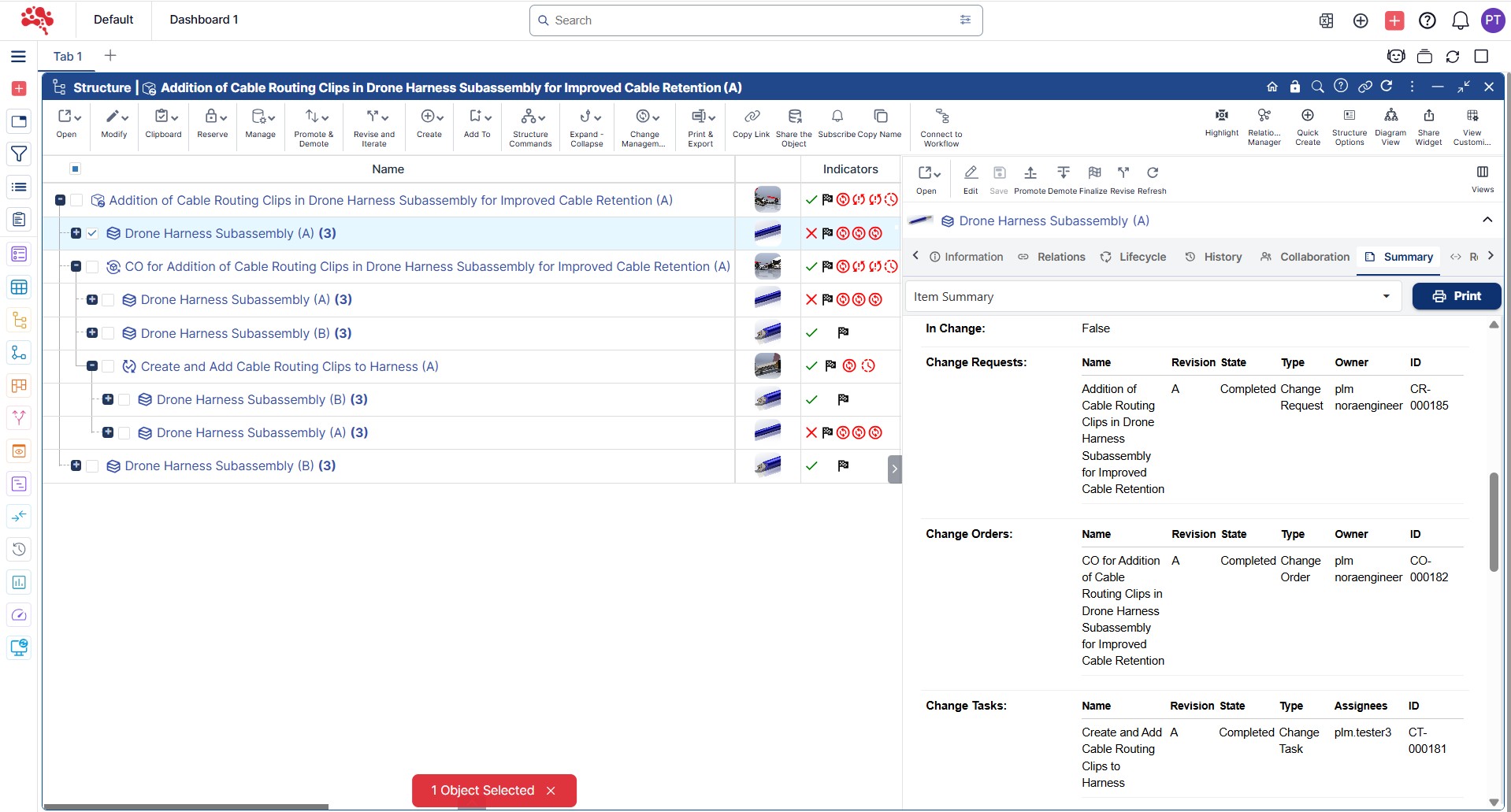
One workspace.
Every next step in view.
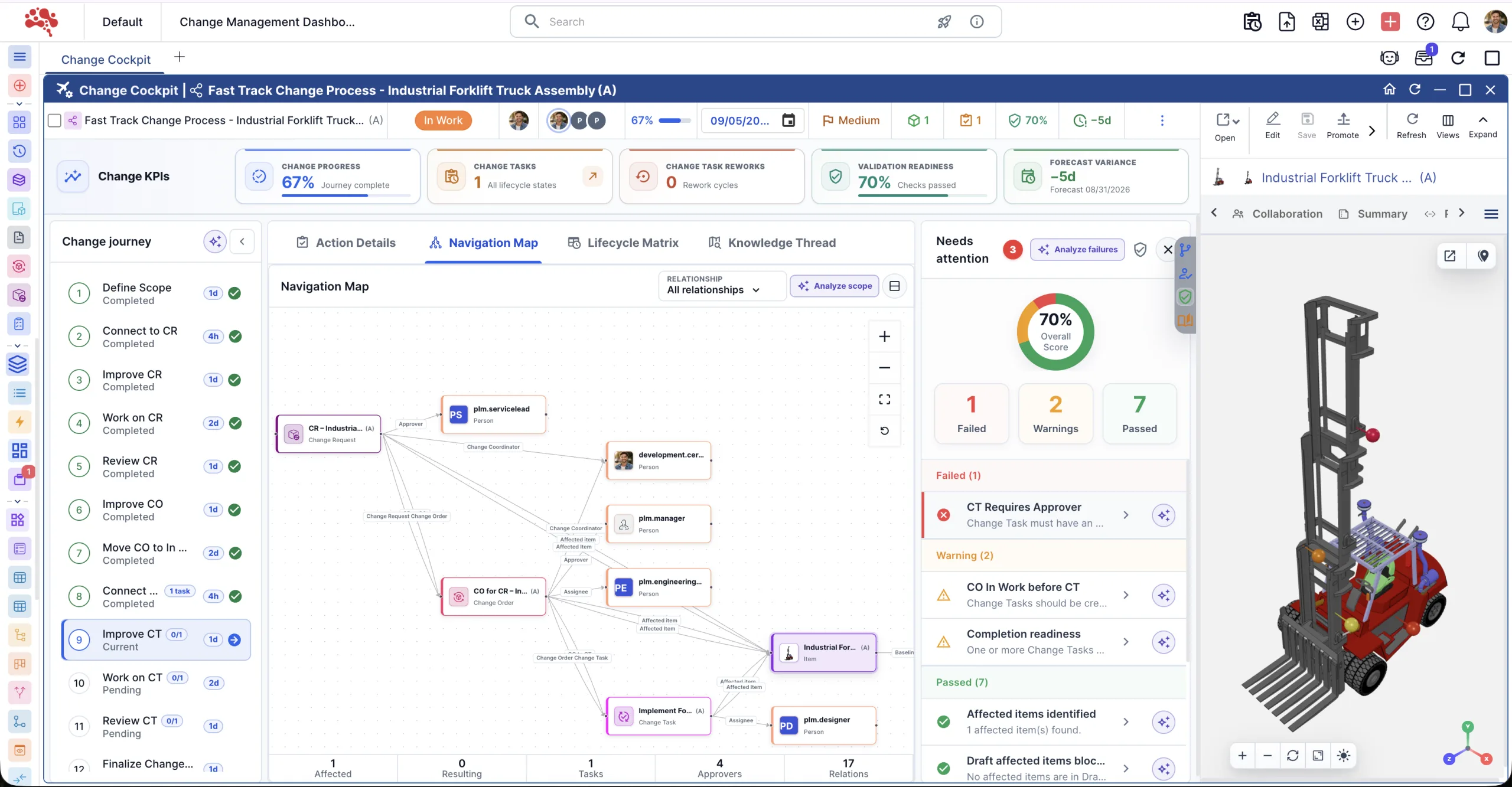
Bring the change journey, affected objects, readiness checks, and approvals into one operational view. See what is complete, what is blocked, and which action comes next. Instead of tracking status across spreadsheets, email, and disconnected records, teams can work from one change workspace tied to the active product context.
Explore Change Cockpit
Keep the whole change connected
Navigate affected items, requests, orders, tasks, and evidence within the active Change Context.
Resolve blockers before moving on
Review required information, ownership, risk, and approval state across the change journey.
Act with lifecycle context
Assign responsibility, manage approvals and rework, and take valid actions from the current phase.
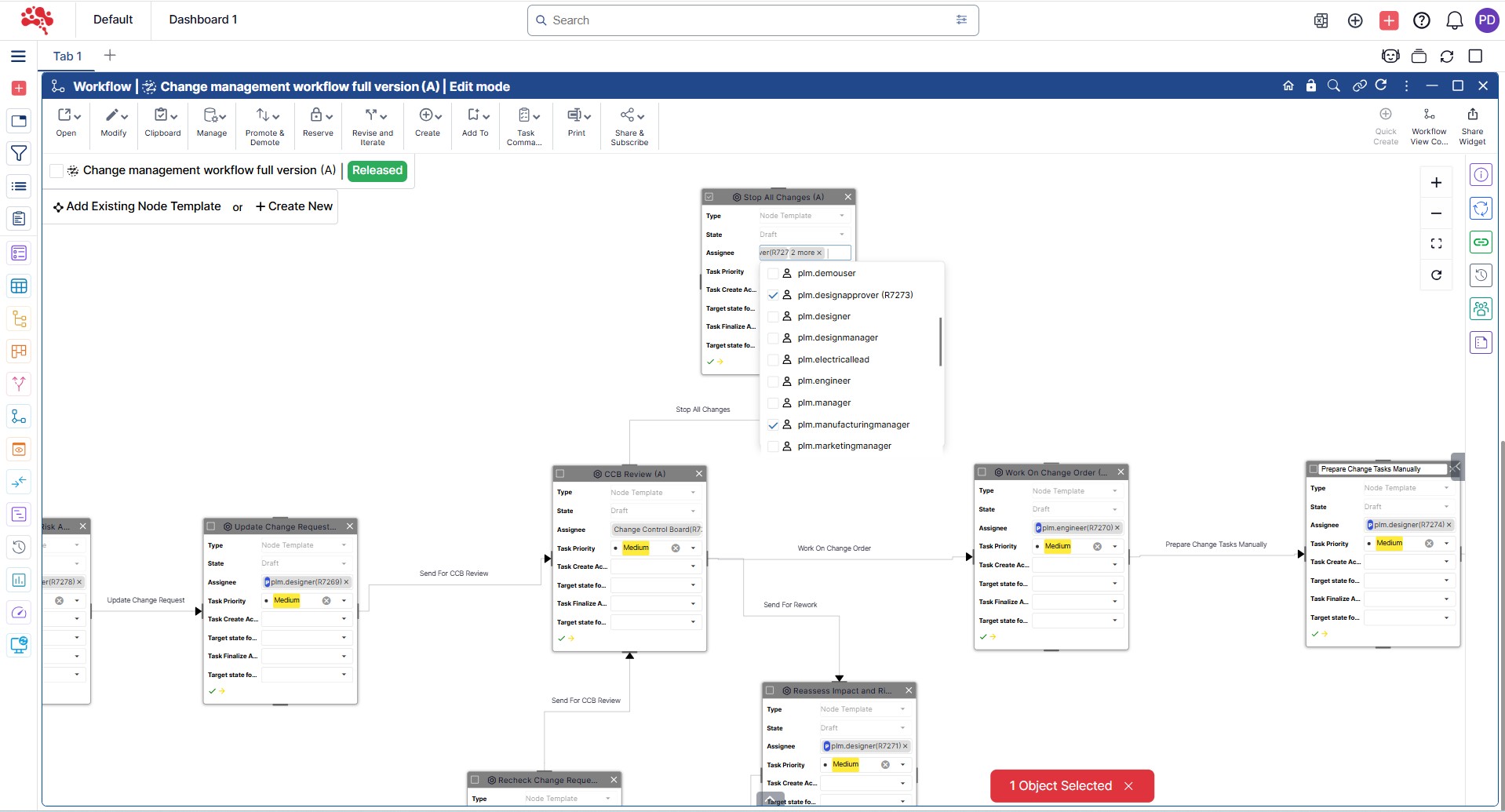
A controlled path from request to release.
Configure workflows around your change process. Route reviews, assign responsibilities, and coordinate implementation without losing the product context behind each decision.
- Capture & assessDefine the request and review affected product data.
- Review & approveRoute decisions to the right owners and approvers.
- Implement & verifyTrack change tasks and record the completed work.
How an ECR becomes an ECO.
Separate the decision to change from the work required to implement it. Nora IPLM keeps both stages connected to the affected product information, approvals, ownership, and resulting revisions.
Engineering Change Request
Capture the problem, improvement, or proposed change. Review feasibility, affected product data, impact, risk, and required approvals before deciding whether the change should move forward.
- Define the reason and scope
- Identify affected items and structures
- Assess impact, risk, and feasibility
- Review and record the decision
Engineering Change Order
Turn an approved change into controlled implementation. Coordinate the engineering work, update affected definitions, verify completion, and preserve the resulting revision and release history.
- Authorize the approved change
- Assign engineering change tasks
- Implement and verify updates
- Release the approved definition
Need the distinction at a glance? Compare ECR vs ECO.
The detail behind controlled change.
Explore the controls that connect product impact, accountable decisions, and implementation, alongside the broader platform features available across Nora IPLM.
01Change Control and Lifecycle Management
Control every change from request to release.
Route reviews, capture sign-offs, and track implementation in one closed-loop process. Keep ownership and decisions connected to the product record.
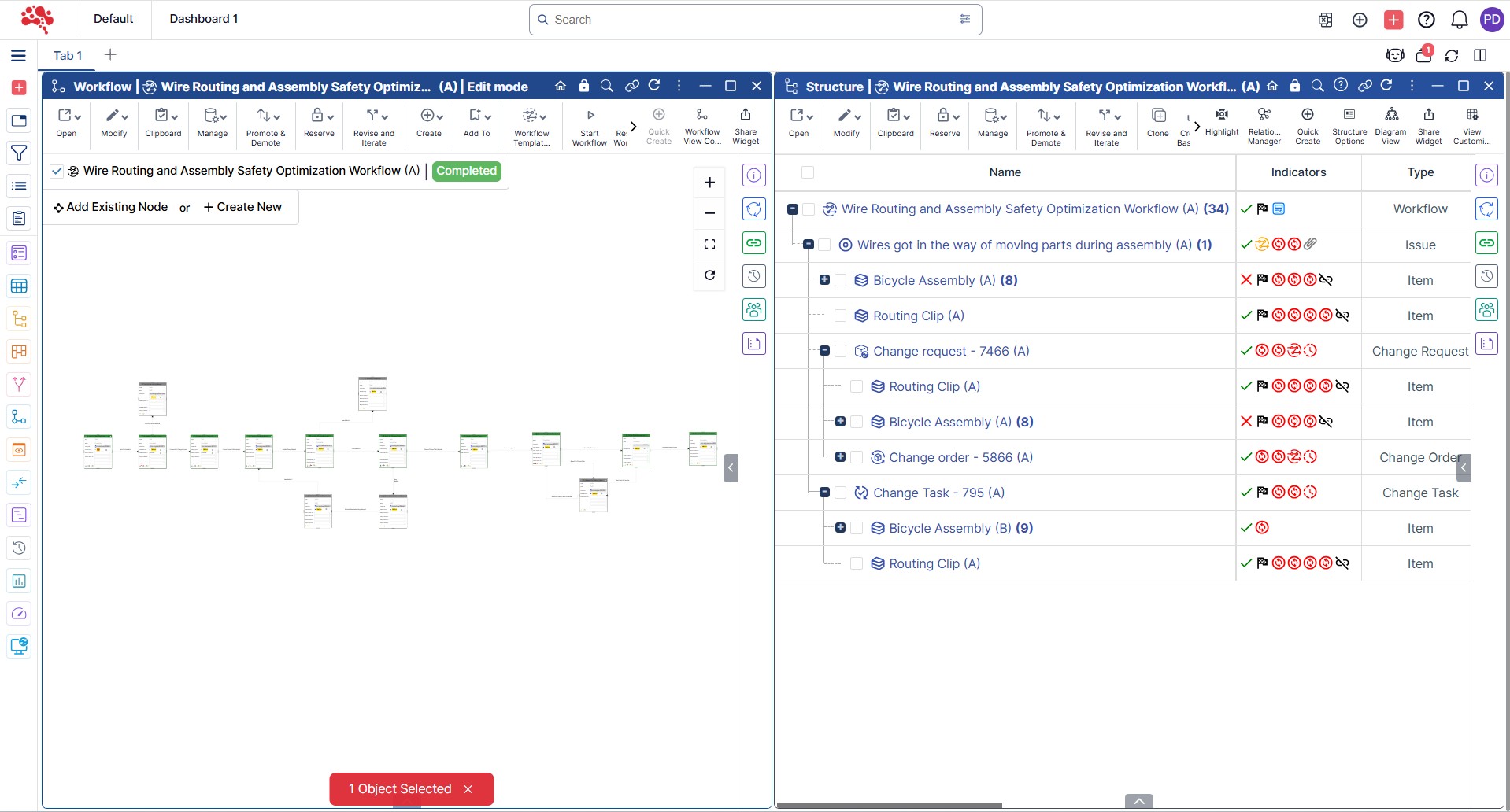
Change Control Management
Implement and manage controls for changes to maintain consistency and minimize disruptions.
Approval and Signoff Management
Manage the approval and signoff process for changes for compliance and proper authorization.
Closed-Loop Change Process
All change requests are reviewed, approved, implemented, and verified with a closed-loop process.
CM2 Compliance
Follow CM2 standards for rigorous configuration management and disciplined change control.
Change Task Management
Create, assign, and track tasks related to changes to ensure timely completion and resolution.
Standalone Change Tasks for Quick Change
Create standalone change tasks for quick, minor changes without the need for full change management processes.
02Impact Analysis and Risk Planning
Understand the impact before you commit.
Review affected product data, compare baselines, and plan for downstream risks. Give reviewers the evidence to make informed change decisions.
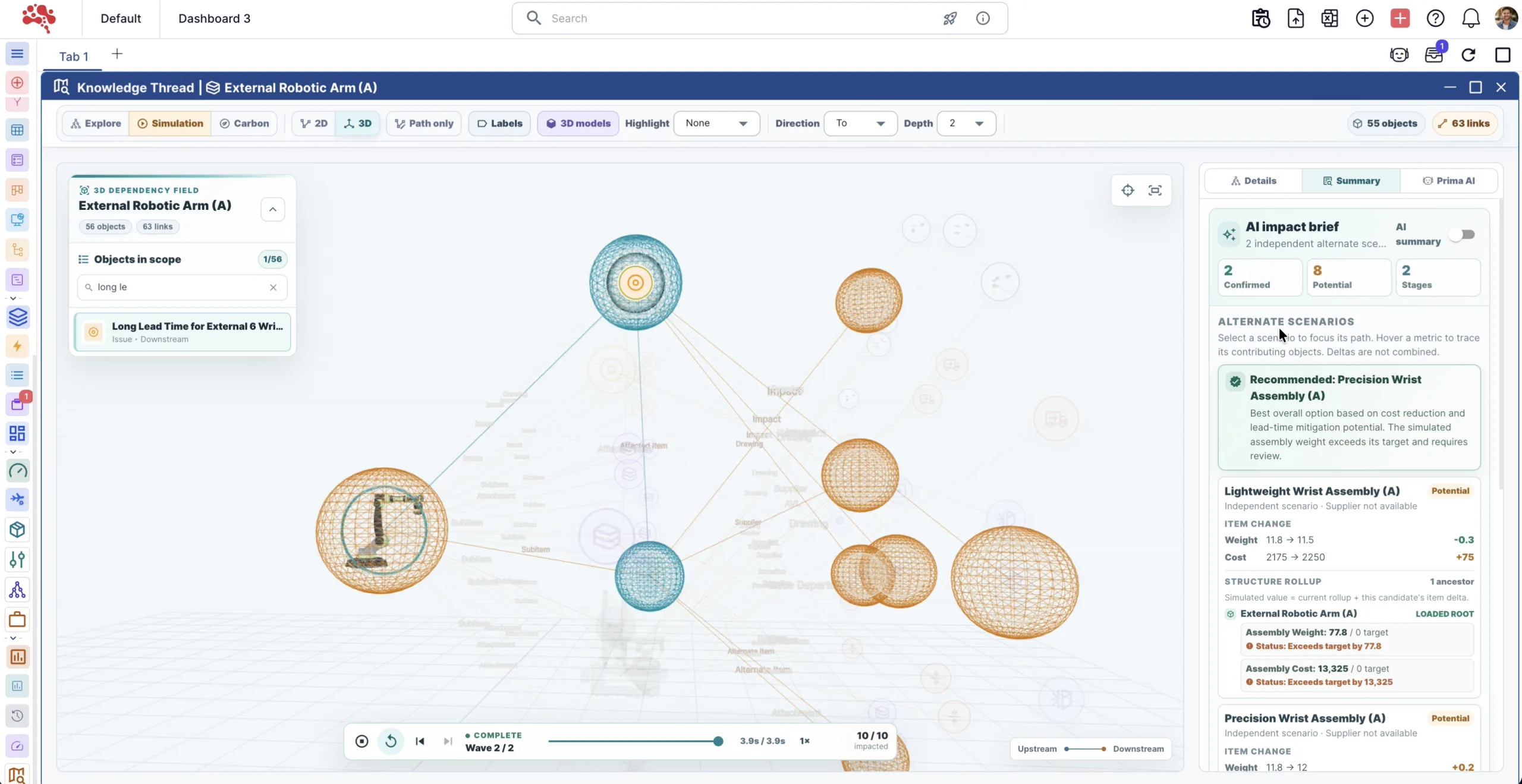
Impact Assessment and Management
Review affected product data and assess the downstream impact of a proposed change.
Use Baselines for Change Impact Comparison
Create and use baselines to compare and analyze the impact of changes on product configurations and variants and requirements.
Change & Impact Analytics
Analyze change data to gain insights into trends, impacts, and outcomes for better decision-making.
Change Implementation Plan
Create and manage detailed implementation plans for each change to streamline execution and communication.
Change Indicators in BOMs
Identify affected items within BOM structures so teams can see where a change applies.
Risk Assessment and Management
Record change risks, evaluate their significance, and plan mitigation before implementation.
03Workflow Execution and Change Reporting
Turn approved changes into accountable work.
Assign change tasks through configured workflows and follow their progress. Keep decisions, ownership, and implementation history available for review.
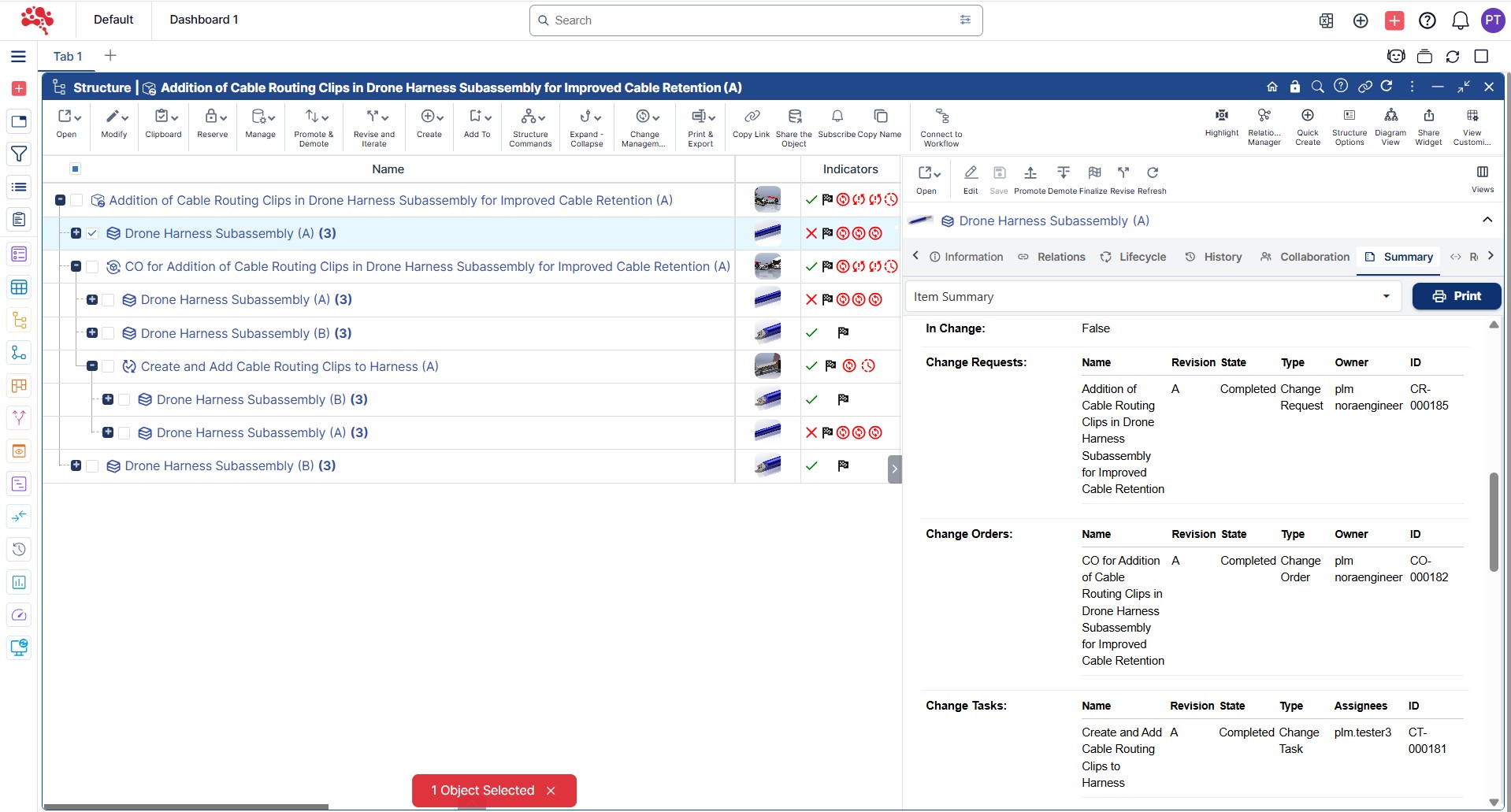
Workflow-Based Task Assignment
Automatically assign tasks based on predefined workflows to streamline change management processes.
Task & Assignee-Based Change Reporting
Generate reports based on change tasks and assignees to track progress and responsibilities efficiently.
Customizable Change - Workflow Relationship Setup
Define and manage relationships between change workflows to streamline processes and enhance coordination.
Export the Change Reports to Excel
Export detailed change reports to Excel for easy sharing, analysis, and record-keeping.
Full Change Logs and History
Maintain a comprehensive log of all changes, capturing details like author, date, and status for full traceability.
What stays connected during an engineering change.
Change control is stronger when the decision record is connected to the product definition and the work required downstream. Nora IPLM keeps the relevant product records and lifecycle context accessible throughout the change process.
Items & revisions
Track the product records and revision state affected by the change.
02BOMs & structures
See where changed parts and assemblies sit within product structures.
03CAD & documents
Keep design files and supporting documentation connected to the change.
04Configurations
Understand how a proposed change relates to product variants and baselines.
05Requirements
Keep product needs and affected requirements visible during evaluation.
06Tasks & ownership
Turn approved decisions into accountable implementation work.
07Manufacturing context
Carry approved product changes into downstream manufacturing structures.
08Approvals & history
Preserve owners, decisions, status, sign-offs, and traceable change history.
Review a connected engineering change workflow in Nora IPLM.
Explore the product experience or start a trial with your own change process.
Understand the context.
Explore the impact.
Why change context matters
Explore why connected change information matters for engineering change management.
Read about Change ContextExplore change impact with AI
See how AI engineering change impact simulation can support PLM decisions.
Explore AI impact simulationYour engineering change resource library.
From the first request to a verified change order: practical guides for every stage of the process.
Engineering Change Management Guide
Learn how leading engineering teams evaluate, approve, and implement product changes while maintaining traceability, compliance, and cross-functional alignment across the product lifecycle.
Read Guide →Engineering Change Request (ECR) Guide
Understand how teams capture proposed changes, assess feasibility, define required information, and decide whether a request should move forward.
Read Guide →Engineering Change Order (ECO) Guide
See how approved changes are planned, assigned, verified, and executed with stronger implementation control and end-to-end traceability.
Read Guide →ECR vs ECO: What’s the Difference?
Compare evaluation versus execution, clarify when each record type should be used, and avoid workflow confusion between requests and orders.
Read Guide →Engineering Change Process Best Practices
Learn which workflow standards help teams improve visibility, accelerate approvals, reduce rework, and maintain product integrity throughout change execution.
Read Guide →Connected to the rest of your product work.
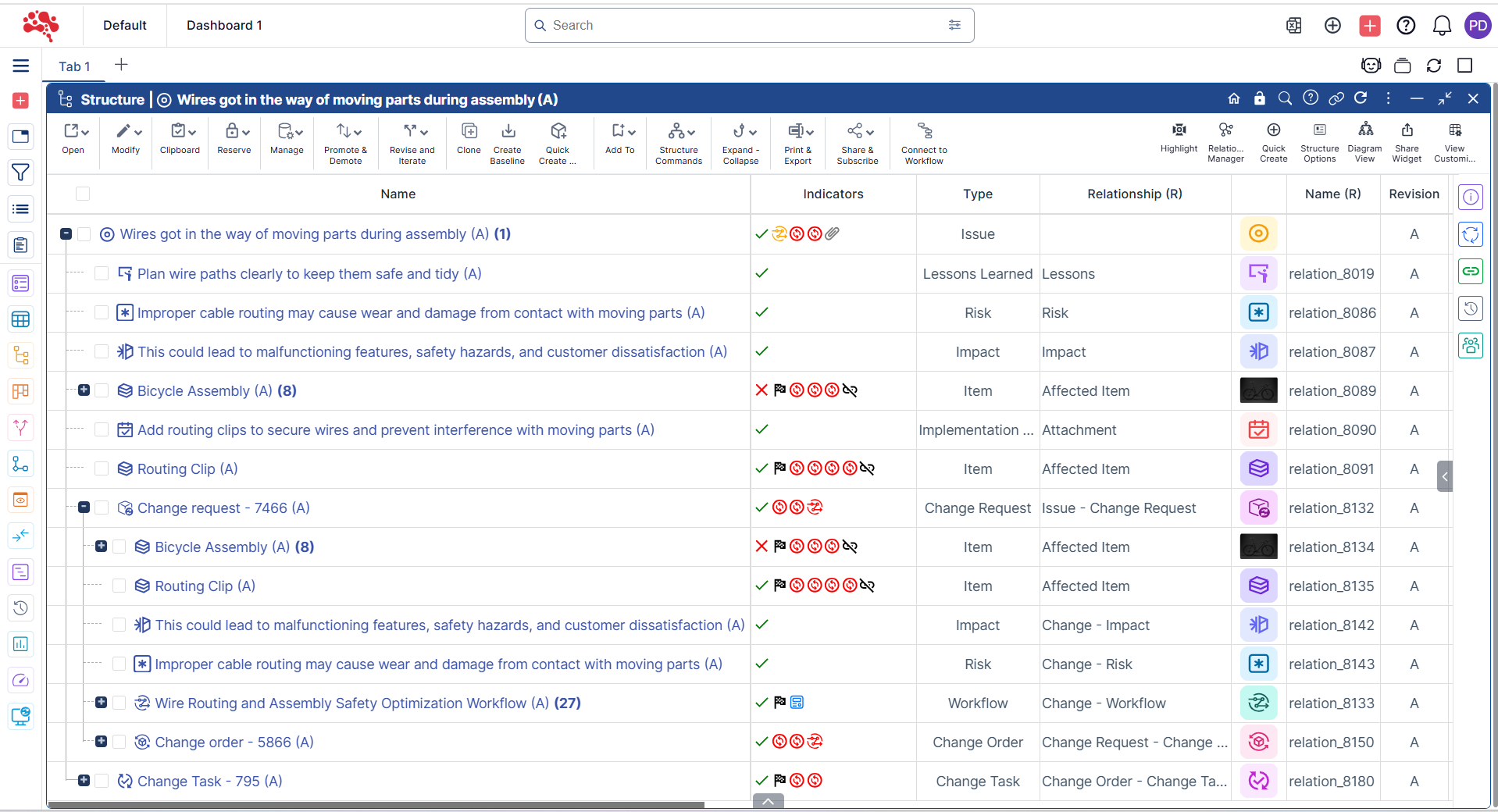
Transforming Issue and Risk Management
Boost project success with streamlined issue and risk management in Nora IPLM.
Discover MoreStreamline Engineering Change Management
Connect engineering updates, revisions, and approvals to keep every change controlled and traceable, including downstream manufacturing structures such as the MBOM.
Discover More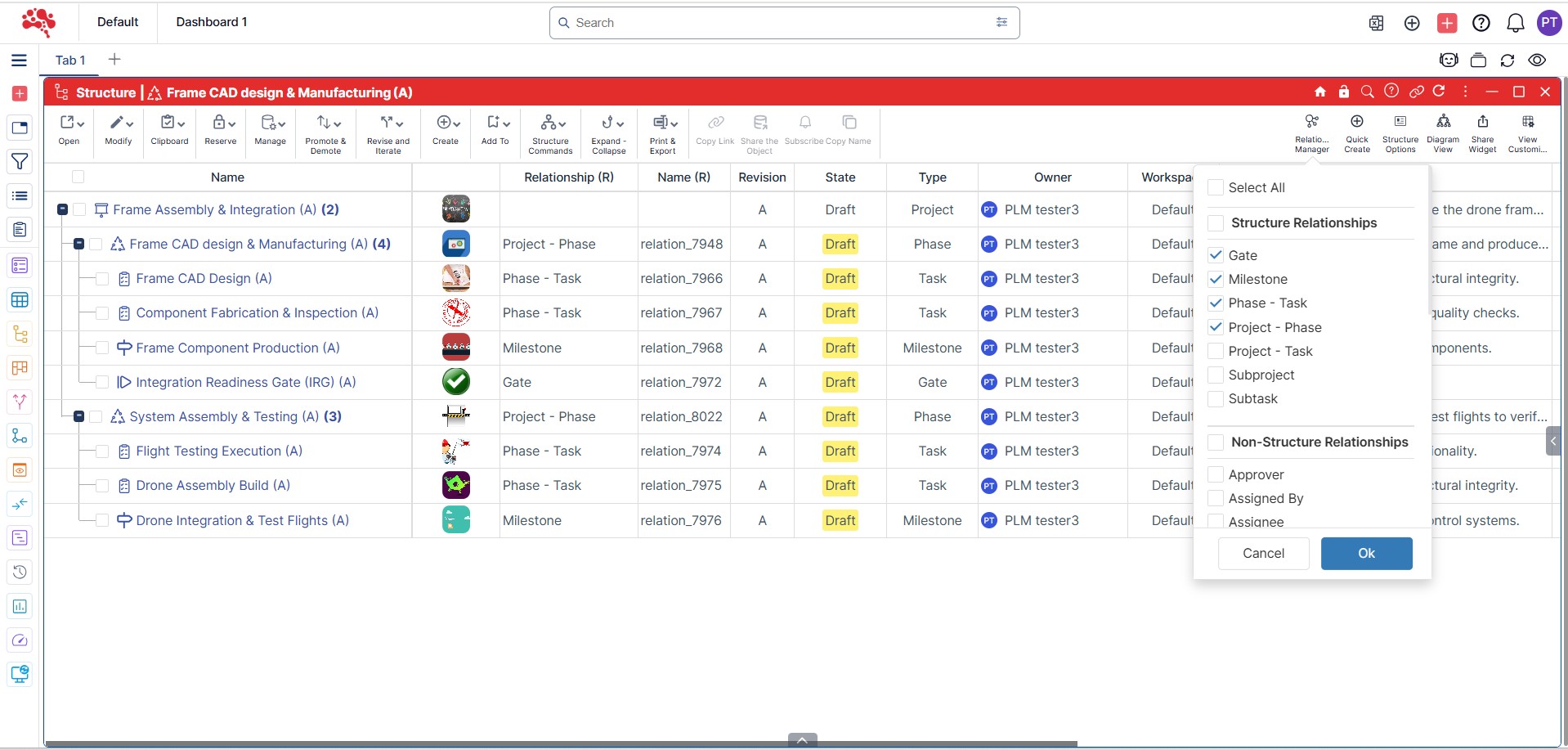
Product Lifecycle Management
Efficiently manage, collaborate, and innovate across every stage of your product lifecycle.
Discover MoreGood questions. Clear answers.
What types of changes can be managed in Nora IPLM?
Nora IPLM supports Engineering Change Requests (ECRs), Engineering Change Orders (ECOs), product, BOM, document, CAD, manufacturing, and process-related changes. All changes are managed with full history and approvals.
How does Nora IPLM ensure controlled and traceable changes?
Every change in Nora IPLM follows defined workflows with assigned owners, approvals, and audit trails, ensuring that no change is implemented without proper review and authorization.
How does Change Management integrate with items, BOMs, and documents?
Changes in Nora IPLM are directly linked to affected items, BOMs, documents, and CAD data, providing full impact visibility before and after implementation. For manufacturing changes, the same context can extend into MBOM management.
How does Project Management support change control in Nora IPLM?
Project Management in Nora IPLM helps plan, track, and execute approved changes by organizing related tasks, timelines, and responsibilities within a project. This ensures that change implementation activities are coordinated, progress is visible, and nothing is missed during execution.
Can existing change data be migrated into Nora IPLM?
Yes. Historical change records and ongoing change data can be imported from spreadsheets or legacy systems to maintain continuity and traceability. Connected integrations help extend that continuity across your engineering environment.
What is engineering change management software?
Engineering change management software provides a controlled system for capturing proposed product changes, assessing impact, routing reviews and approvals, coordinating implementation, and maintaining a traceable record of decisions and revisions. In Nora IPLM, change records can stay connected to the product data and lifecycle context affected by the change.
What is the difference between an ECR and an ECO?
An Engineering Change Request (ECR) is used to propose and evaluate a potential change, including its reason, feasibility, impact, and approval decision. An Engineering Change Order (ECO) is used to authorize and control implementation after a change is approved. See the ECR vs ECO guide for a detailed comparison.
Can engineering changes be connected to BOMs, CAD files, and product revisions?
Yes. Nora IPLM can connect change records with affected items, BOM structures, CAD and documents, product configurations, revisions, tasks, and approvals so teams can review product impact and preserve context through implementation.
See Engineering Change Management in Nora IPLM.
See how ECRs, ECOs, product impact, approvals, change tasks, and release history stay connected in one engineering change management workspace.