Part List Summary Report
Every Part. One Consolidated View.
A clear, flattened list of every leaf component with total rolled-up quantity for accurate engineering, procurement, and manufacturing planning.
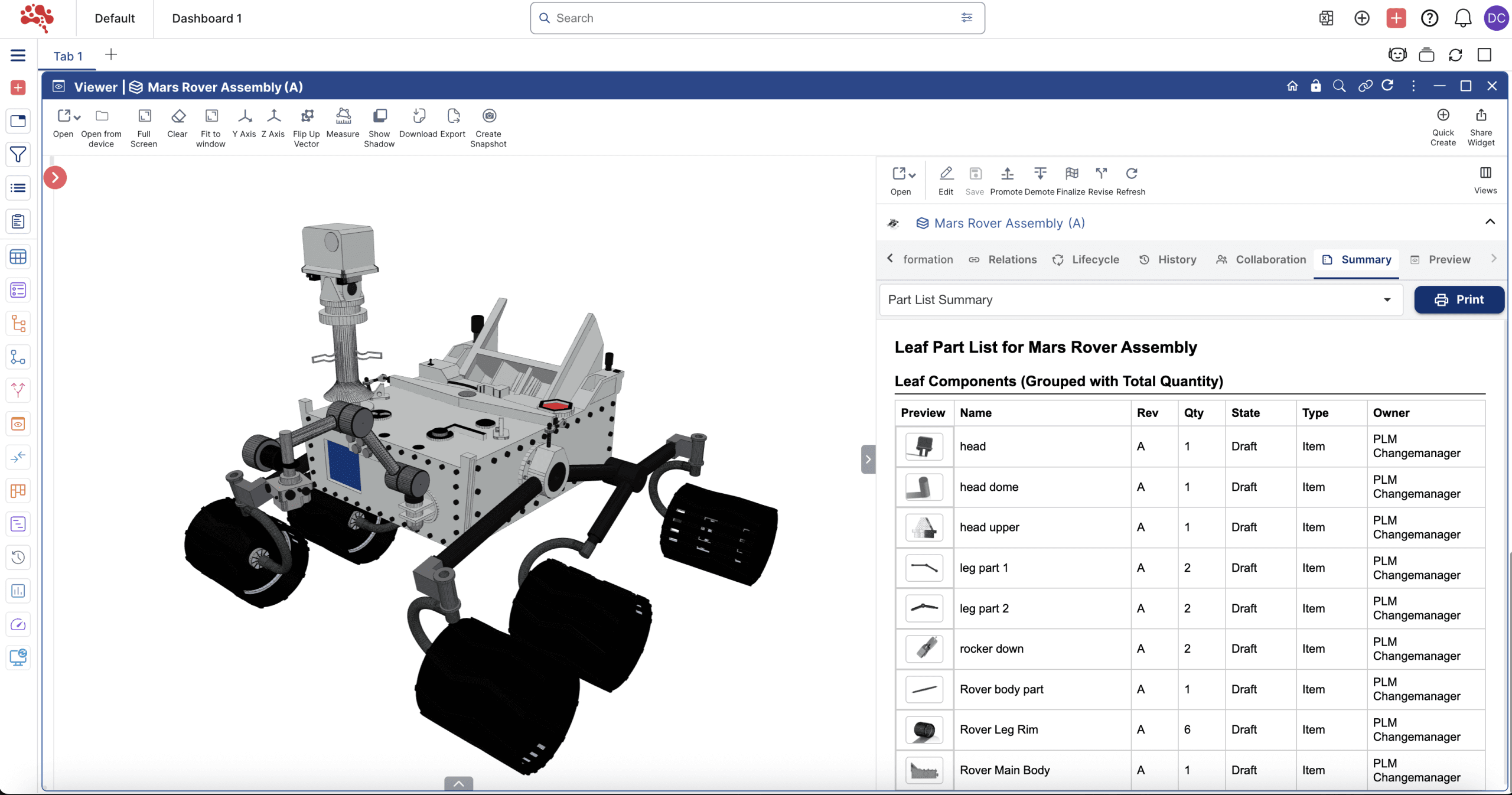
Discover all parts at a glance.
The Part List Summary Report gives you a flattened view of all downstream components in an assembly and groups identical parts into single entries with total quantity rollups.
Access part-list reporting from the Summary area, and use BOM Management and Reporting and KPIs to keep product structures and reports connected.
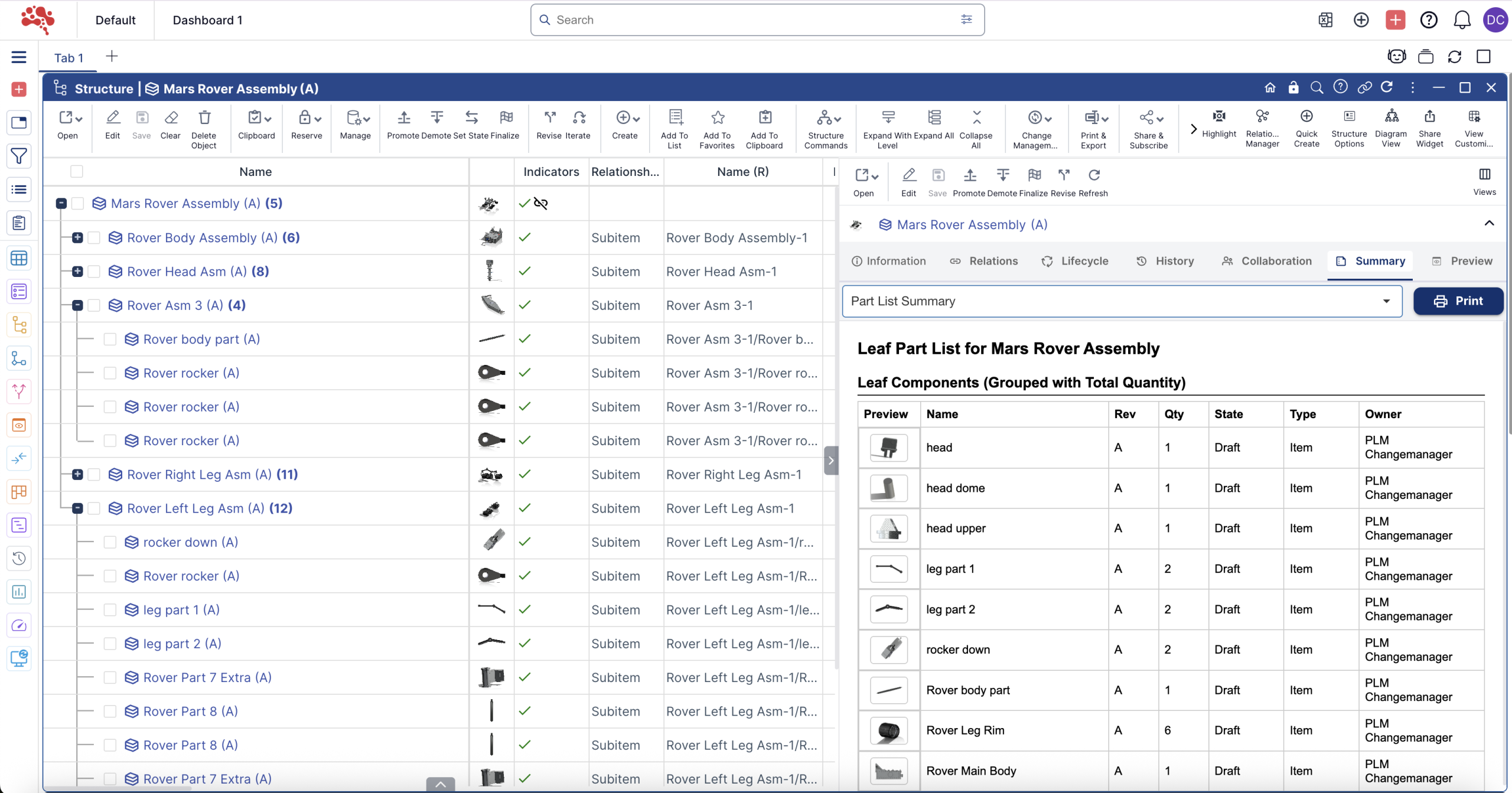
From complex assembly structures to clear part requirements.
Understand the full component demand without manually following every BOM branch or combining duplicate parts in a spreadsheet.
Flatten Nested BOM Levels
Read leaf components across the full assembly without manually opening every subassembly.
Consolidate Duplicate Parts
Group identical components into a single entry while preserving their total consumption.
Calculate True Demand
Multiply quantities down each branch and add reused parts from different parents.
Keep Structure Context
Connect the flattened result to the relevant part records, owners and lifecycle details.
Explore the Part List Summary Report.
Four views. One connected product structure.
Switch between the original report views to inspect flat components, structure details, quantity rollups and the navigator.
Flat part breakdown
See the leaf components from each assembly branch in one combined list.
Explore the full workflow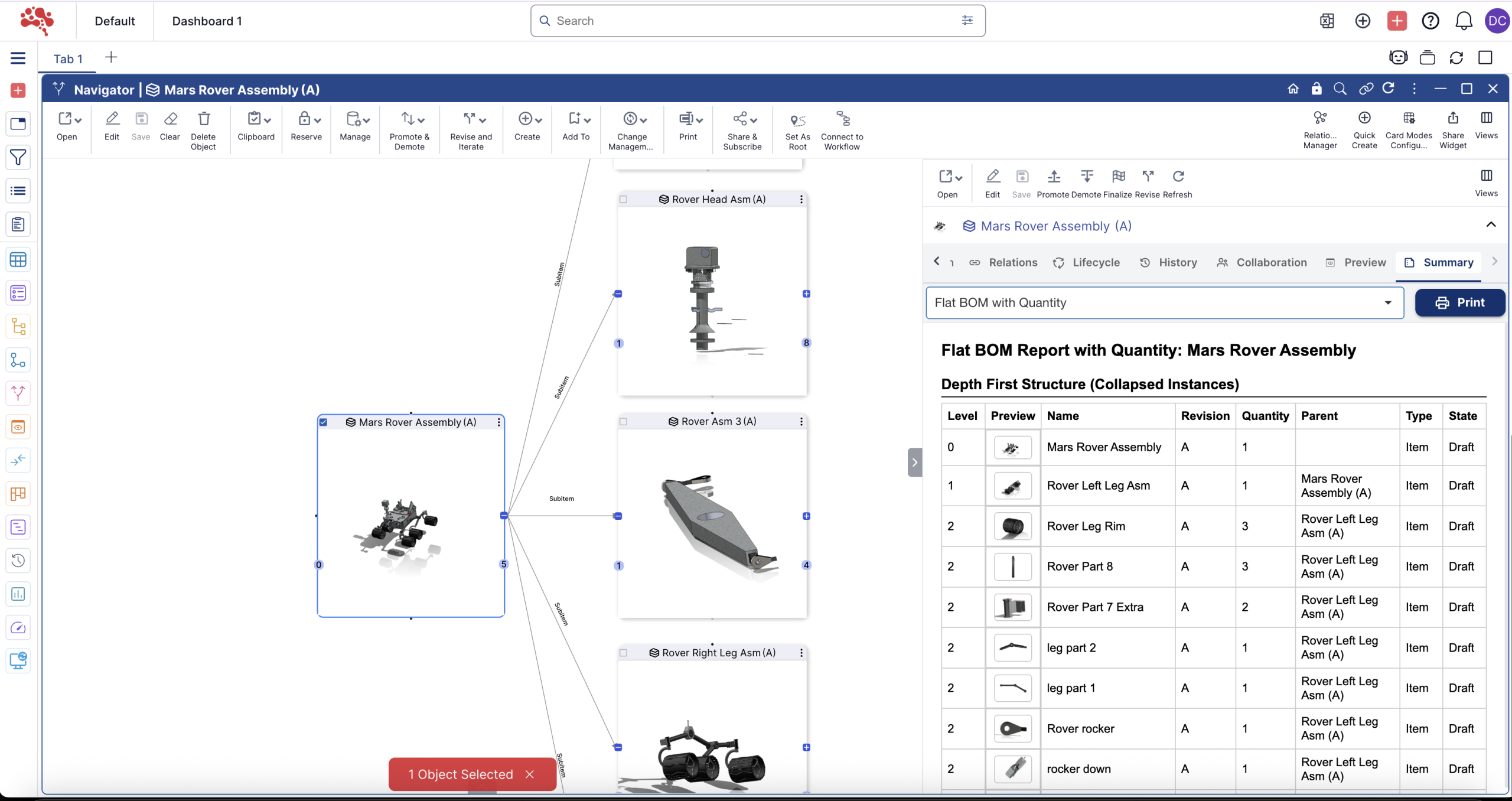
Structure information
Examine the assembly context behind the consolidated part list.
Explore the full workflow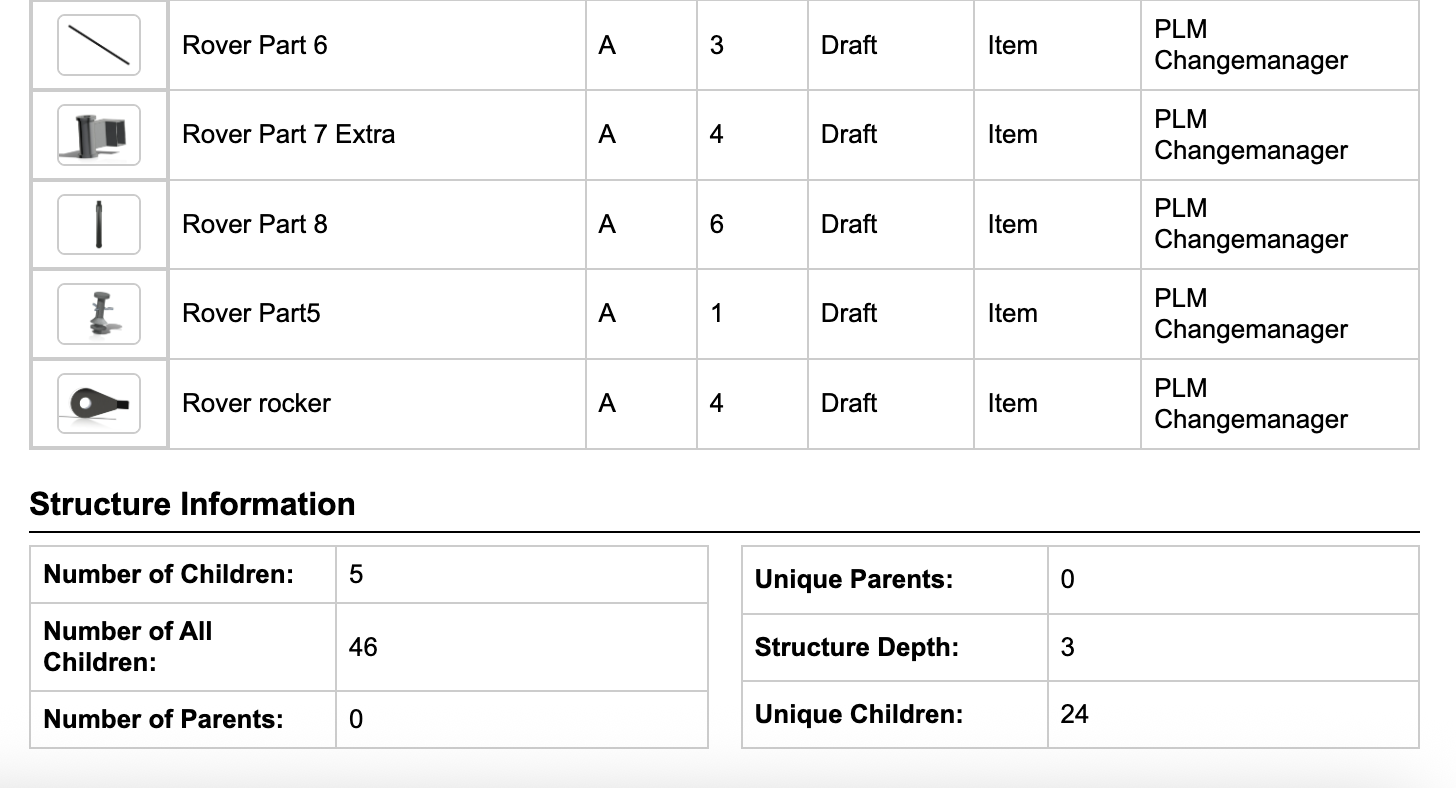
Quantity rollup
Review inherited quantities and totals for repeatedly used components.
Explore the full workflow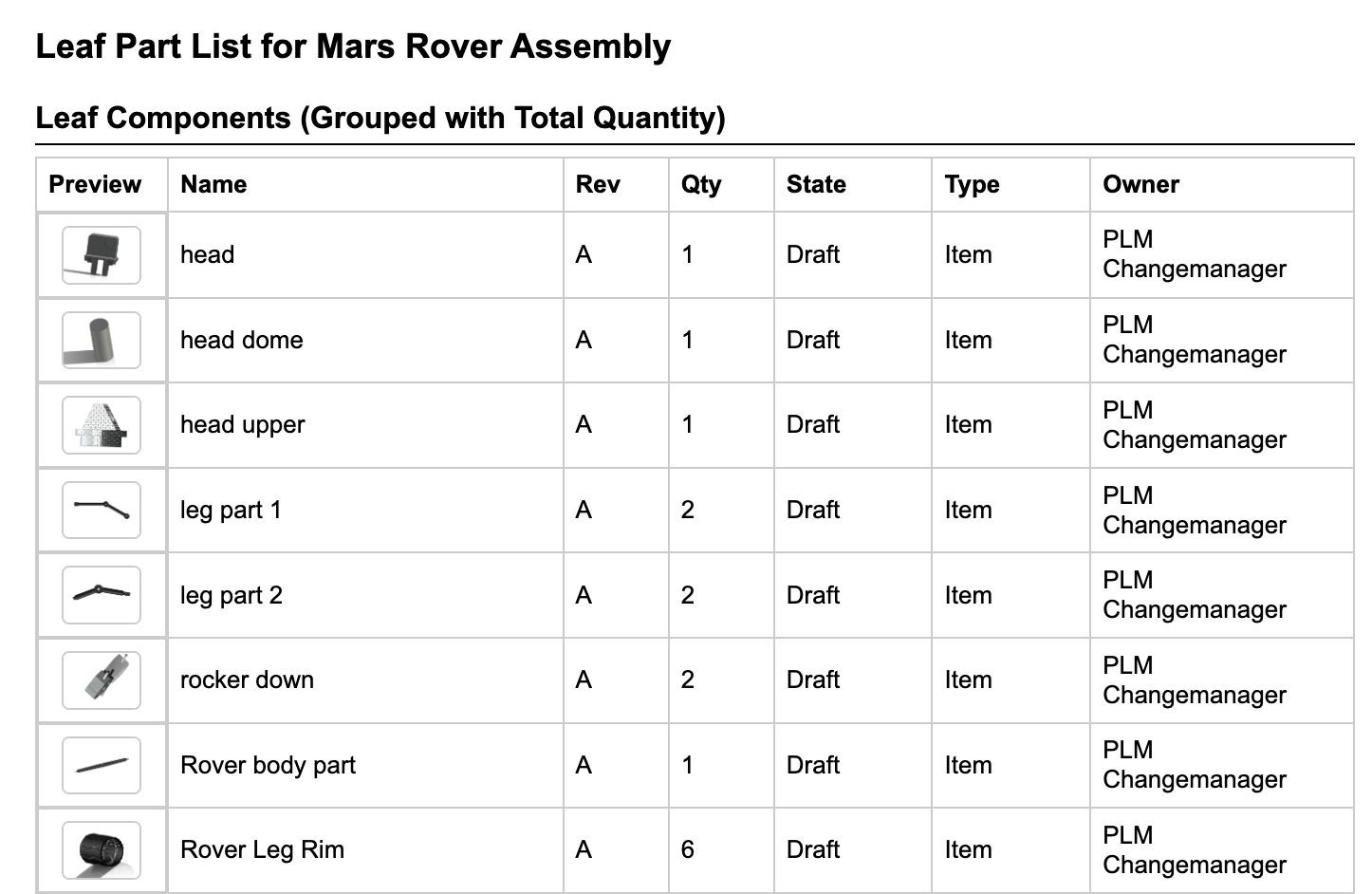
BOM Navigator
Understand the full hierarchy and the positions of the contributing parts.
Explore the full workflow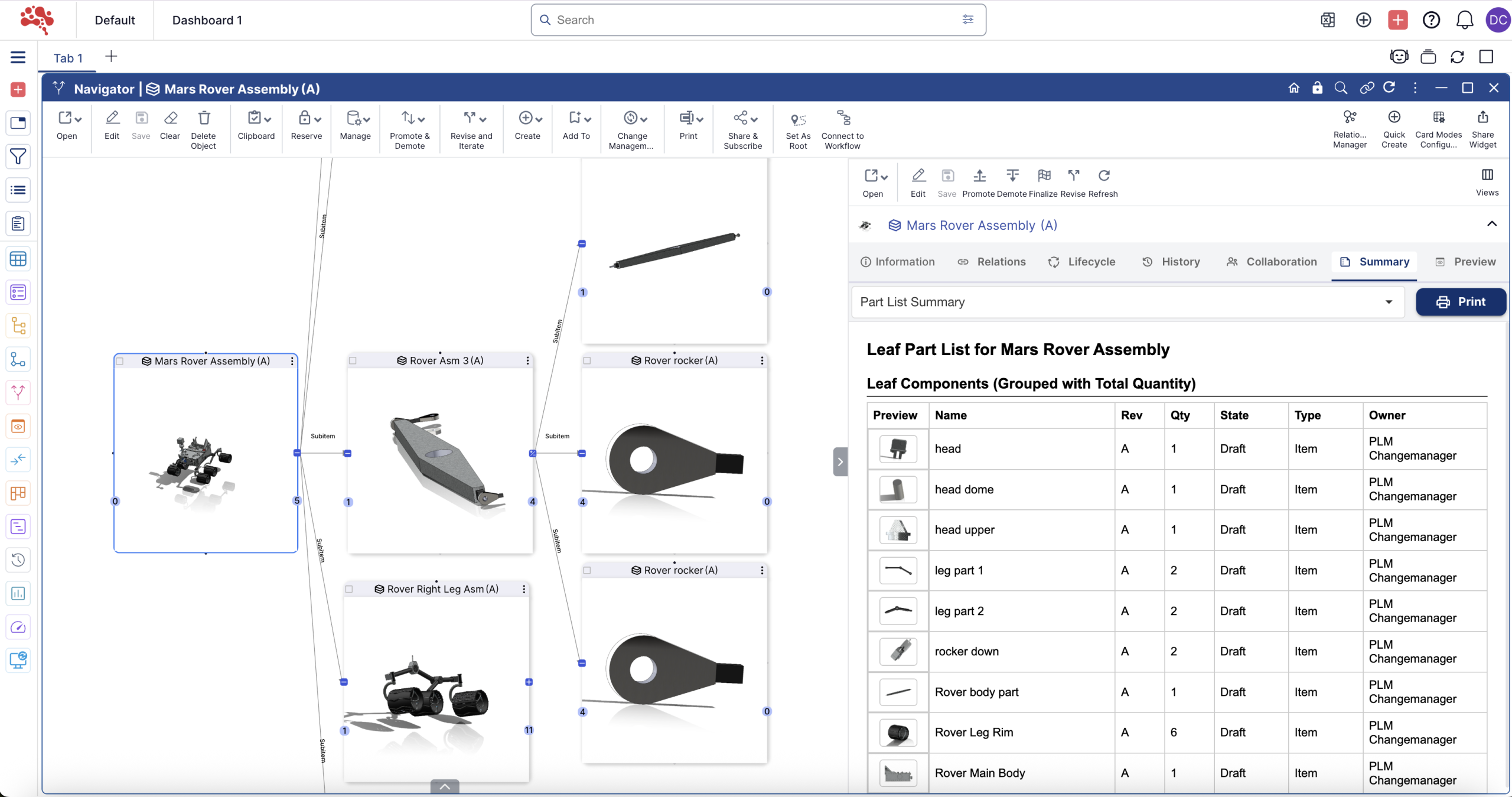
Generate a Part List Summary Report.
Five connected steps from BOM to export.
Follow the report workflow using the normal webpage scrollbar. The left screenshot stays steady while the steps advance.
Open the Summary tab
Select an item or assembly and navigate to the Summary area.
- Use the current item or assembly as the reporting scope.
- Keep the BOM context attached to the product record.
Choose Part List Summary Report
Select the report that produces a flattened list of leaf components.
- Generate the list from the product structure.
- Group repeated components into consolidated entries.
Review part and structure details
Check the part identities, their revision details and relationship context.
- Review name, revision, type, lifecycle state and owner.
- Use the structure information view to understand the contributing assembly.
Verify total required quantities
Confirm the rolled-up totals across all assembly branches.
- Check quantities multiplied through each parent path.
- Combine repeated parts into a single total for planning.
Export the consolidated report
Create a clean part requirement list for the relevant teams.
- Verify leaf components and calculated quantities.
- Export the report for procurement and manufacturing planning.
Everything needed in a consolidated part list.
Keep quantity data, component metadata, assembly relationships and planning-ready exports connected.
Flattened Leaf Parts
Collect the lowest-level components from the full assembly into one list.
Precision in Quantity Rollup
Multiply quantities through parent structures and calculate total part requirements.
Repeated Component Grouping
Consolidate reused parts appearing in different BOM branches.
Controlled Part Metadata
See component names, revisions, lifecycle states, type and responsible owners.
Structure and Viewer Context
Use the navigator, structure diagram and 3D product viewer to identify parts.
Export-Ready Information
Give procurement, engineering and manufacturing consistent part quantities.
Use item records and the Structure Widget to explore the controlled source behind the report, or read about multi-level BOM management.
What the Part List Summary Report includes.
A readable view of the information described in your existing reporting page.
| Information area | Part List report detail | Value to engineering teams |
|---|---|---|
| Component identity | Part name, type and revision | Recognize each distinct leaf part. |
| Rolled-up quantities | Multipliers and cumulative counts across branches | Understand actual required component quantities. |
| Repeated parts | Identical parts grouped into one entry | Avoid double-counting demand. |
| Lifecycle context | Part state, revision and ownership | Review the controlled item before making purchasing decisions. |
| Structure statistics | Children, unique parts, parent references and depth | Understand reuse and complexity in the original assembly. |
| Visual inspection | Structure diagram, navigator and product viewer | Locate components within the physical product. |
| Planning output | Exportable flattened part list | Support procurement, costing and build preparation. |
Example: 8 + 6 = 14 bolts across two BOM branches.
An illustrative quantity calculation showing how repeated leaf components combine across assembly branches. This demonstration does not use live product data.
See how rolled-up quantities are calculated
A bolt is used in two separate assembly branches. Each branch quantity is multiplied and the results are added into one consolidated part total.
Start with the two assembly branches.
One part list line, one quantity total
The Part List Summary Report combines identical leaf components even when they appear under different parents. The original assembly hierarchy remains available.
Explore the original Part List screenshots.
Nine report, structure, quantity, navigator and product viewer images from the original page, with fullscreen viewing.
Part List With 3D Viewer
Mars Rover BOM Structure
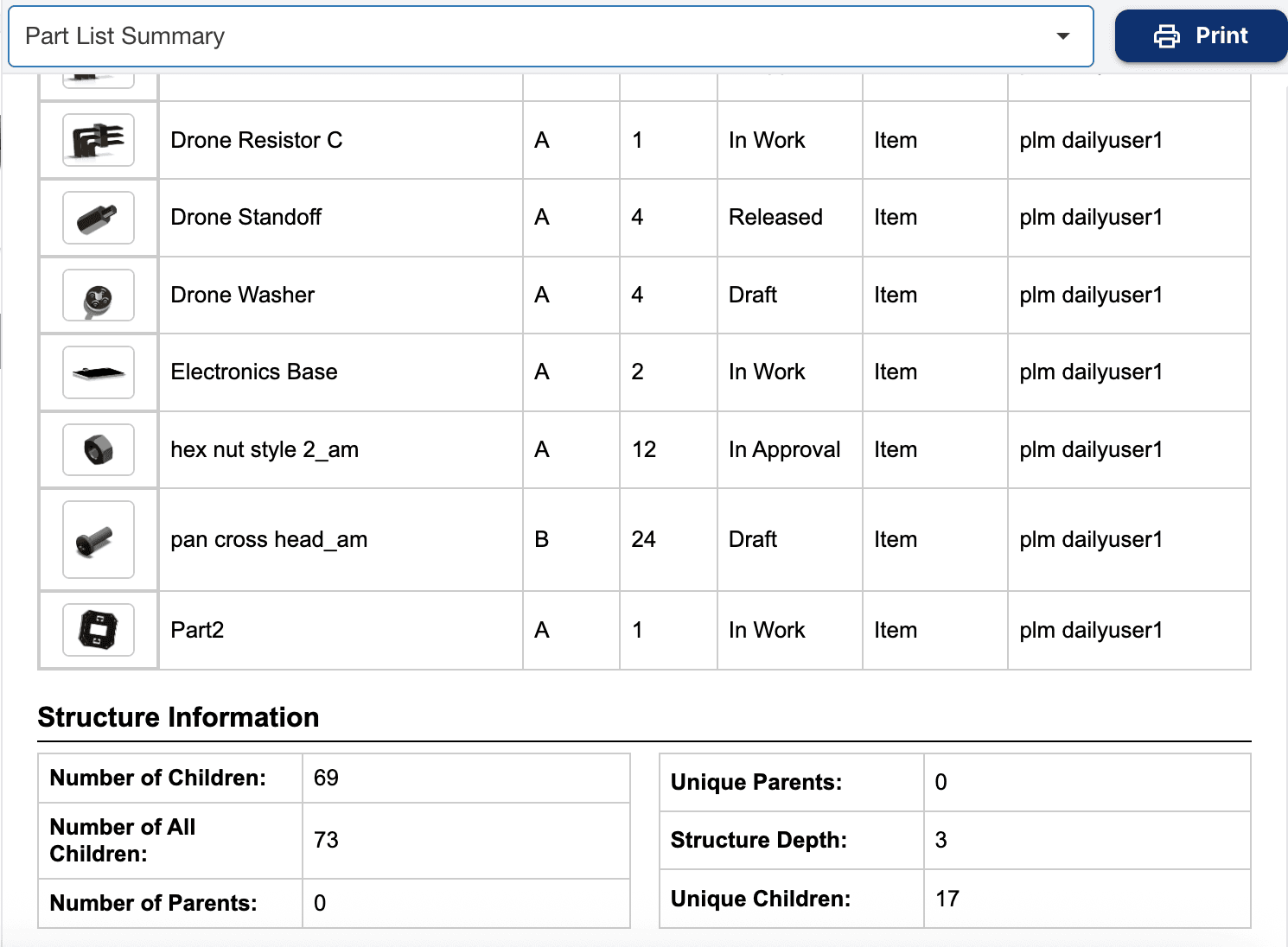
Flattened Part List
Structure Details
Quantity Rollup
BOM Navigator
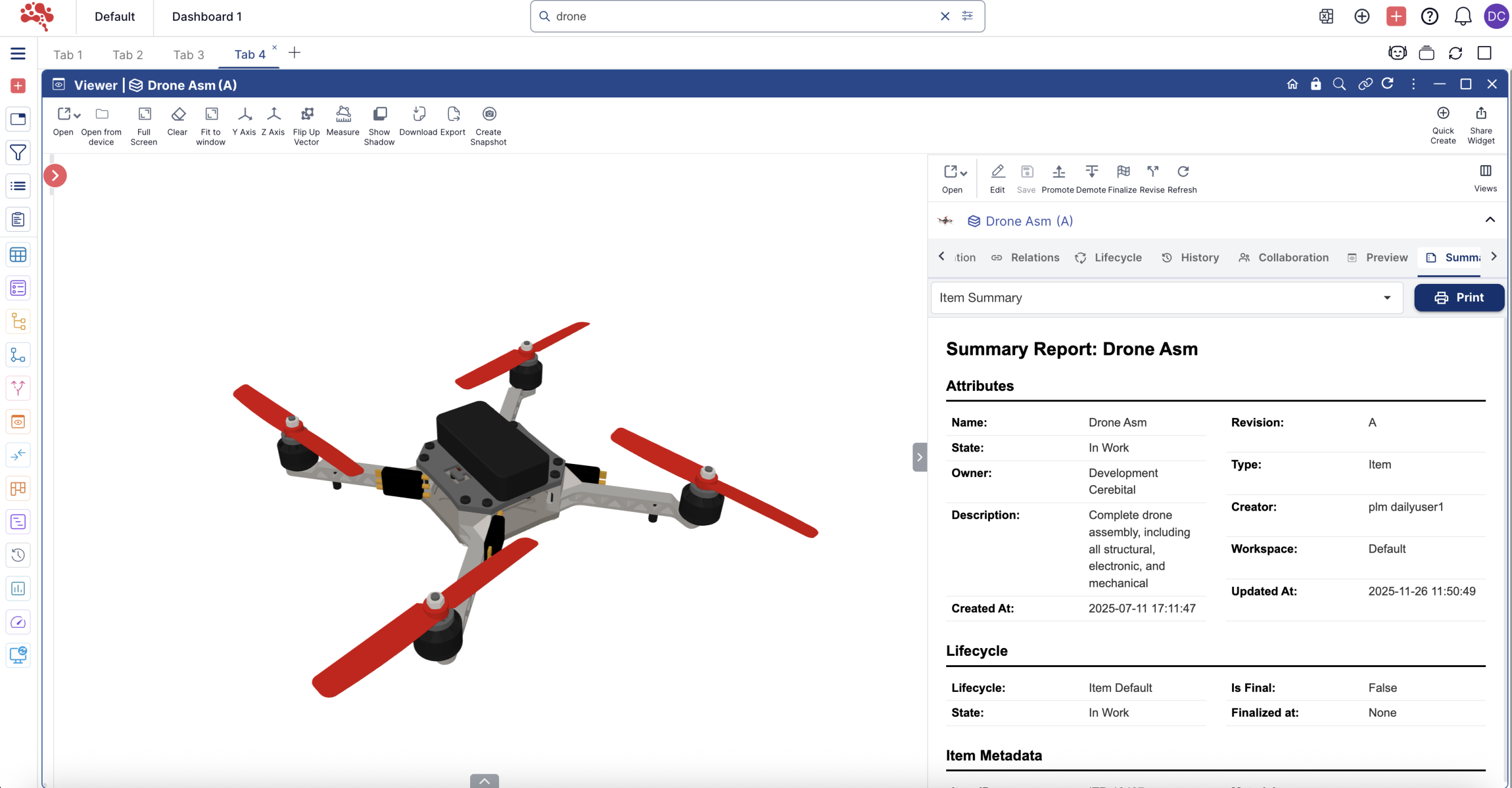
Product Viewer
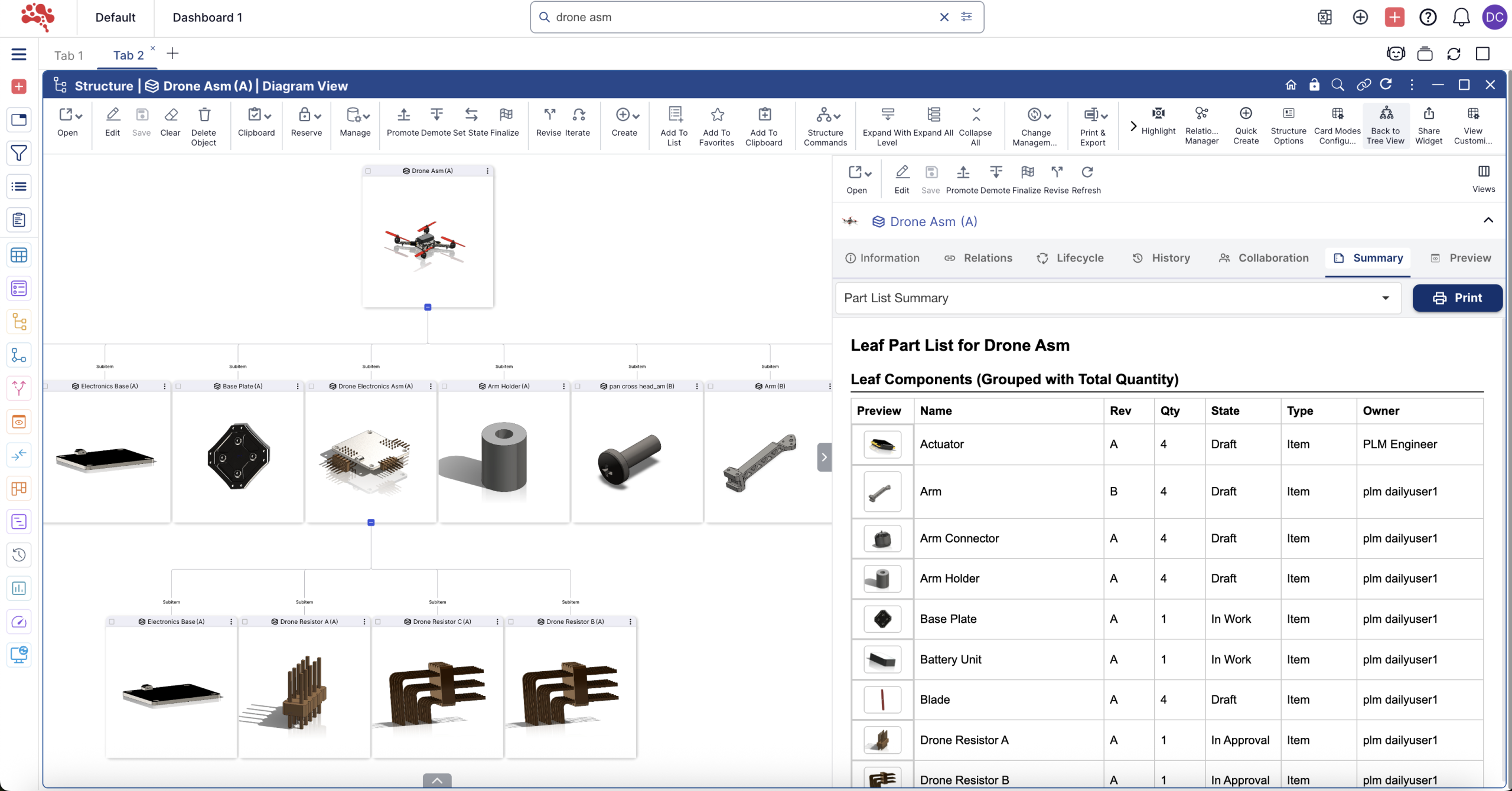
Full Structure Diagram
Assembly Structure Depth
Built for procurement, engineering and manufacturing.
One consolidated part list helps teams plan material, verify reuse and prepare production without losing the original BOM hierarchy.
Procurement
See required quantities without expanding every assembly or combining duplicate parts manually.
Engineering
Validate structure depth, part reuse and the full set of leaf components.
Manufacturing
Review a production-ready list of required parts and quantities.
- Flattened part requirements
- Quantity multipliers
- Structure statistics
- 3D identification
- Cross-team planning
- Report export
For manufacturing-specific structures, explore MBOM Management. The report itself does not replace the underlying BOM history.
Related Part List and BOM Resources
Continue into revision control, flat-mode structure navigation and practical BOM management use cases.
Revision and Iteration Management
Track item and assembly revisions in the controlled product definition.
Explore resourceHow to Use Flat Mode in the Structure Widget
Inspect a product hierarchy in flat view before reviewing consolidated quantities.
Explore resourceModern BOM Management
Explore more connected engineering and operational product structures.
Explore resourceHybrid BOM Management
See how design and manufacturing views work together across functions.
Explore resourcePart List Summary
Report FAQs
Answers about flattened leaf components, inherited quantities, available fields and who benefits from the report.
What is a flattened part list?
It is a consolidated list of leaf components in an assembly. Repeated instances of the same part are grouped together rather than shown as separate entries in each BOM branch.
How are quantities calculated for repeated parts?
The report applies quantity multipliers along the assembly hierarchy and accumulates quantities for identical leaf parts across different branches.
What information is available for each component?
The report includes component name, total rolled-up quantity, revision, type, lifecycle state, owner and an optional thumbnail preview.
Which teams benefit from the report?
Procurement uses the list for material requirements, engineering for reuse and structure validation, and manufacturing for build preparation.
Turn complex BOMs into clear part requirements.
Every quantity, in one view.
Use the Nora IPLM Part List Summary Report to check rolled-up totals and prepare production, purchasing and cost planning.