Metrics Widget.
See what needs attention.
Monitor key counts, KPIs, and performance signals in one clear view. Set visual thresholds, spot bottlenecks early, and keep product teams focused on what matters most.
See Your Key Metrics at a Glance
The Metrics Widget in Nora IPLM gives teams visibility into product performance, progress, and key KPIs. Track goals, identify bottlenecks, and make faster, data-driven decisions without switching between tools.
Metric Cards & KPIs
Present important counts and performance indicators in a simple dashboard. Track engineering changes, open issues, pending approvals, and release readiness at a glance.
Select a sample KPI card to explore its details, or let the dashboard cycle through metrics.
Engineering changes
24 change records are being tracked. Seven are waiting for engineering review.
Interactive demonstration with sample values, not live account data.
Flexible Data Sources
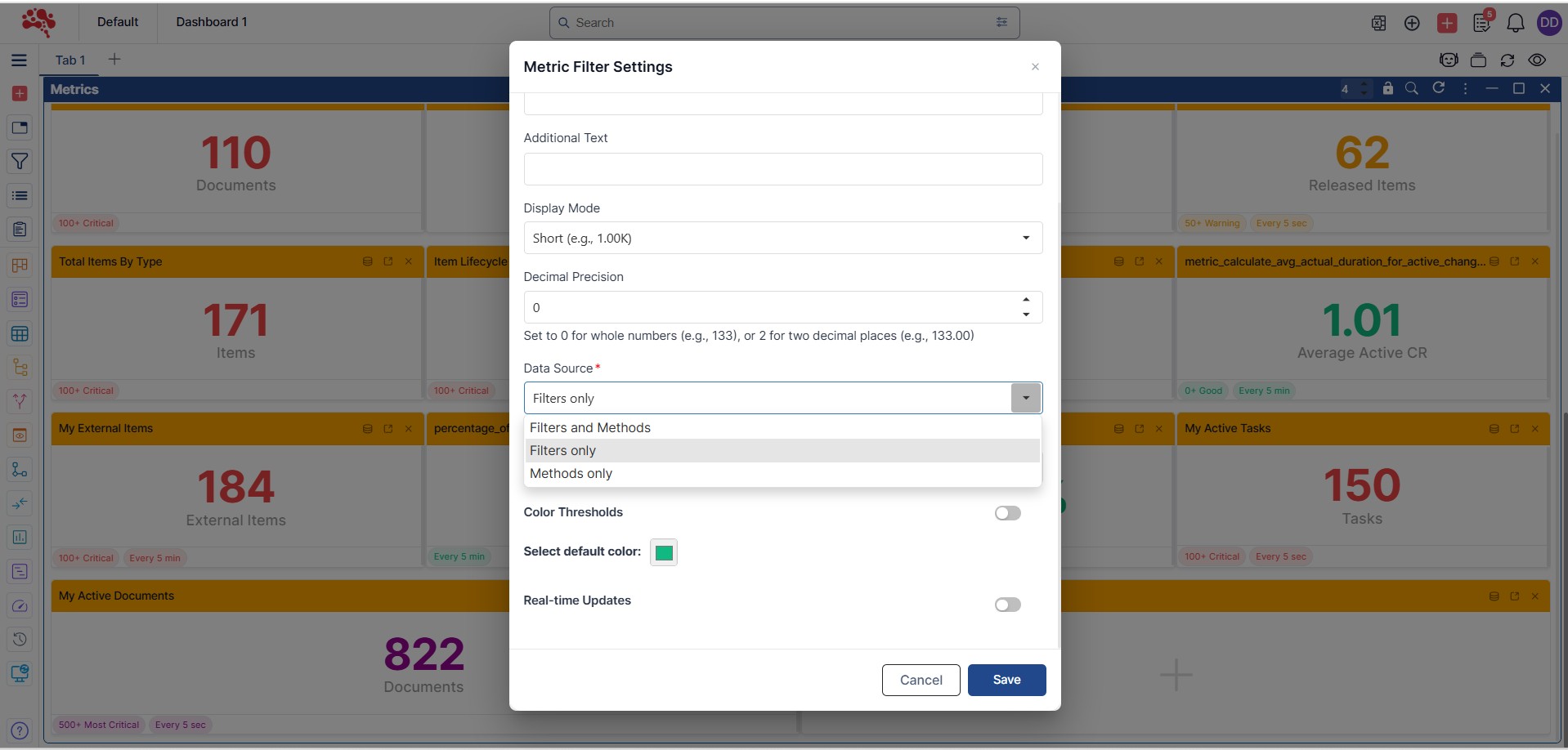
Choose whether metric data comes from custom filters or predefined methods so each team sees the information most relevant to its work.
Select the screenshot to enlarge the data-source settings and inspect the available options.
Custom Thresholds
Define multiple threshold levels with personalized labels and colors to make changing conditions and alerts easy to recognize.
Watch the demonstration to see how threshold levels, labels, and colors are configured.
Card Layout & Formatting
Control how many metric cards appear per row, and personalize labels, number formats, decimal precision, and descriptions for clear, tailored insights.
Watch the video to explore how the number of metric cards per row can be adjusted.
Benefits of the Metrics Widget with Nora IPLM
The Metrics Widget helps engineering and product teams monitor progress, track shared goals, and identify bottlenecks. Consistent KPIs make it easier to act on the latest information across product structures and BOMs.
Metrics Widget Features and Capabilities
Bring key counts and indicators into one readable dashboard. Configure data sources, visual thresholds, card layouts, and refresh settings to help every team make decisions with clarity.
Try Now for 30 DaysDecision Support
Help managers and teams act quickly when thresholds are breached.
User-Friendly Setup
Configure relevant metrics with minimal setup, even for non-technical users.
Cross-Functional Visibility
Give engineering, manufacturing, and other teams the metrics most relevant to them.
Consistent KPI Definitions
Keep everyone aligned around the same KPI definitions and shared performance indicators.
Configure the Metrics Widget for Your Workflow
Choose flexible data sources, create visual thresholds, adjust dashboard card layouts, and fine-tune number formats. Nora IPLM lets teams adapt metrics to their workflow without losing clarity.
Choose Your Data Sources
Choose the information behind each metric using custom filters or predefined methods. Set up different metrics for individual dashboard tabs, so engineering and product teams can monitor the records, workloads, and performance indicators most relevant to their daily work.
Set Thresholds and Alerts
Create multiple threshold levels to make changes in metric values easier to interpret. Assign a meaningful label and color to each level, such as normal, warning, or critical, so teams can recognize conditions that may need closer attention without inspecting every underlying record.
Arrange Metric Cards
Decide how many metric cards appear side by side in each row to suit the dashboard and the information being monitored. Organize related KPIs into a clean, readable layout so engineering, manufacturing, and product teams can compare important values quickly.
Customize Values and Refresh
Tailor each metric card with clear labels, helpful descriptions, number formats, and decimal precision. Configure whether real-time updates are enabled to balance the need for current information with performance considerations, while keeping the dashboard consistent and easy to understand.
Frequently Asked Questions
How do teams use the Metrics Widget day to day?
Teams rely on it to:
- Monitor execution health
- Track workload and backlog
- Prepare for reviews and stand-ups
- Ensure nothing critical is overlooked
It acts as an always-visible performance pulse.
How does this help managers and leaders?
Managers can quickly assess:
- What needs attention now
- Whether processes are moving
- If teams are overloaded or blocked
No reports, exports, or manual counting required.
Can metrics be configured for different needs?
Yes. Metrics adapt based on the context, whether you’re viewing projects, changes, tasks, workflows, issues, or manufacturing structures explained in what an MBOM is, ensuring relevance across roles.
How is access to metric data controlled?
Metrics follow Nora IPLM’s role-based permissions. Users only see counts and indicators they’re authorized to view.
When is the Metrics Widget most valuable?
- Daily check-ins
- Management reviews
- Execution monitoring
- Risk and backlog detection
Every KPI in view.
Every decision with clarity.
Turn product data into actionable insight with flexible metrics, visual thresholds, and dashboard updates tailored to your teams. Explore Nora IPLM modules for connected product development.