History Widget.
Know what changed and why.
The Nora IPLM History Widget brings product revisions, updates, and decisions into one traceable history. See what changed, who made the update, and when it happened.
The History Widget that Powers Agile Product Teams
History Widget in Nora IPLM system is a powerful tool for tracking and recording all actions taken during the product lifecycle. It enhances traceability, accountability, and collaboration, while also serving as a critical tool for change management, compliance, and auditing.
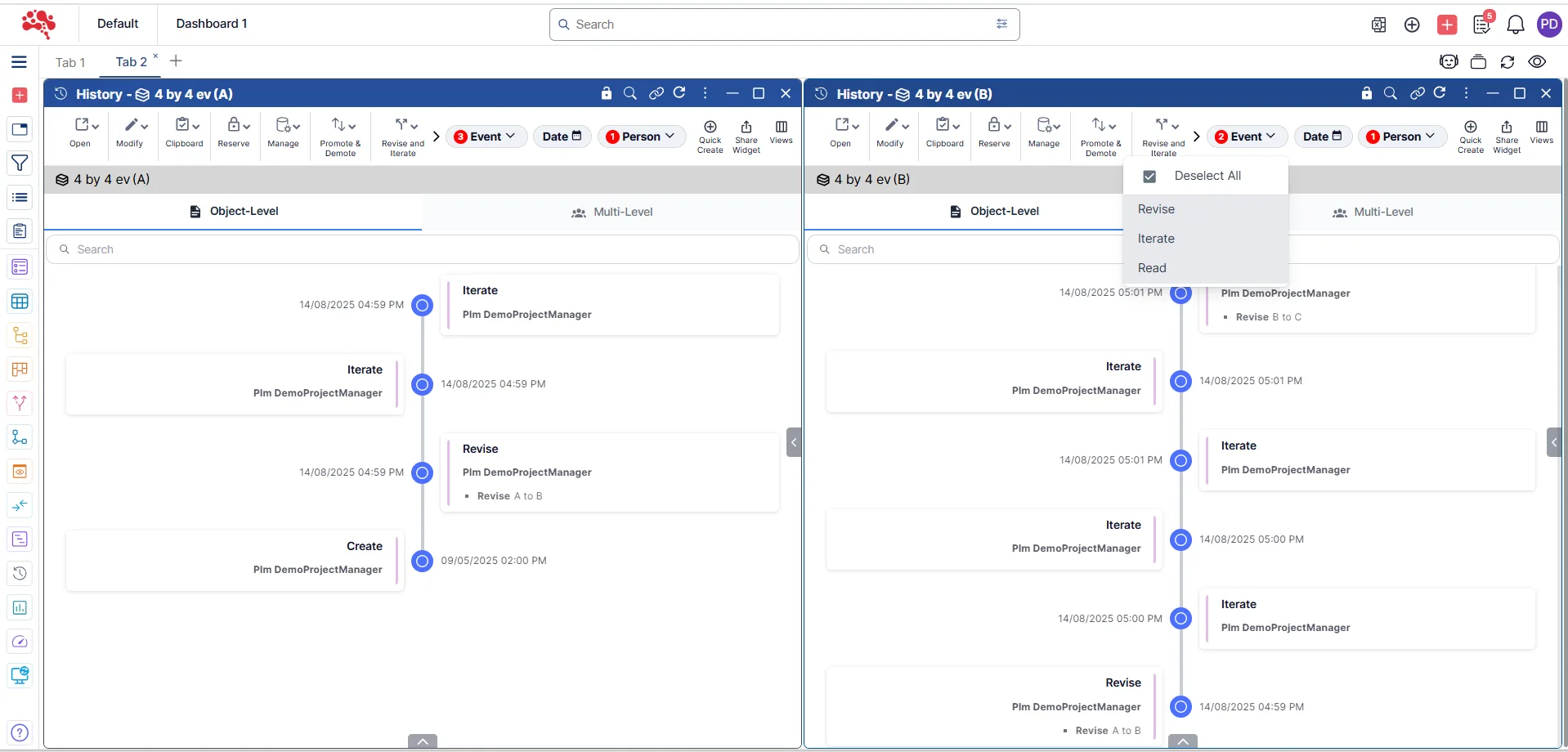
Chronological List of Events
Displays a timeline or list of events in reverse chronological order (most recent events at the top), including changes, approvals, updates, and comments.
Select the screenshot to enlarge the history timeline and review recorded events.

User Information
Shows the user or team responsible for each action, helping to track who made specific changes or updates.
Open the screenshot to see how the History Widget identifies who performed each action.

Links to Related Records
Each history entry may include links to related documents, parts, objects, or connected integrations that were modified or referenced during the action. This could include CAD files, BOM updates, compliance reports, etc.
Enlarge the view to explore how history entries connect to related product records.

Action Descriptions
Each historical entry includes a description of the action, such as, Product updates or revisions, Change requests submitted or approved, and more.
Select the image to inspect the descriptions associated with recorded changes.
History Widget for Collaboration and Performance Tracking
The Nora IPLM History Widget enhances collaboration by giving teams a shared view of all product changes and updates. It improves communication through clear, time-stamped records and supports performance tracking by revealing patterns, progress, and areas for improvement over the product’s lifecycle.
History Widget Features and Capabilities
The Nora IPLM History Widget enhances collaboration by giving teams a shared view of all product changes and updates. It improves communication through clear, time-stamped records and supports performance tracking by revealing patterns, progress, and areas for improvement over the product’s lifecycle.
Try Now for 30 DaysTeam Collaboration
Provides a way for team members to see what actions have been taken by others, keeping everyone in the loop and reducing the risk of duplication or missed steps.
Review history
Helps different teams across product configurations and variants (design, engineering, manufacturing) understand how decisions were made across structures described in what an MBOM is, facilitating better collaboration and reducing confusion during the development process.
Monitor Progress
The widget can show the history of milestones, approvals, or key decisions, helping teams track the overall progress of a product from development to final release.
Accountability
By displaying the user responsible for each action, it ensures that there is clear accountability for changes and approvals throughout the product lifecycle.
What the History Widget Looks Like in Nora IPLM
Explore the History Widget interface to review every recorded change, update, and action throughout your product’s lifecycle.
Chronological List of Events
Follow product activity in reverse chronological order, with the latest actions displayed first. Review updates, revisions, approvals, and comments in one history view to understand how a record has evolved and what happened most recently.
User Information
See which user or team member is associated with each recorded action, so the history provides accountability alongside the event details. Use this context to trace changes back to the people responsible and support clearer collaboration across product teams.
Link to Related Documents or Items
Move from an activity entry to the product information connected to that action, including documents, parts, and other records. Related integrations and BOM updates can help teams understand the broader impact of changes without losing the history context.
Action Descriptions
Read the details of each logged action to understand what changed and why the event matters. Descriptions can help distinguish product updates and revisions from change requests, approvals, and other recorded activities during the product lifecycle.
Frequently Asked Questions
What problem does the History Widget solve?
The History Widget provides a reliable record of exact data changes, helping teams understand what was modified without relying on memory or conversations.
How is this different from a timeline or activity view?
A timeline shows events.
The History Widget shows precision – the actual data changes behind those events. It’s built for verification, not storytelling.
What kind of visibility does it provide?
The widget shows data-level change details, including:
- Previous vs updated values
- Status and lifecycle changes
- Ownership or responsibility updates
- Revision-related modifications
Why is this important in a PLM environment?
PLM systems are systems of record.
The History Widget ensures data integrity by making changes transparent, traceable, and verifiable, so teams can trust what they see.
When do teams rely on the History Widget most?
- Reviewing engineering or product changes
- Investigating issues or discrepancies
- Validating approvals and decisions
- Supporting audits and compliance checks
Every change recorded.
Every decision in context.
Trace product revisions, understand decisions, and keep every team aligned with the complete history.