MBOM Cockpit
MBOM Cockpit: Manage EBOM and MBOM in one view.
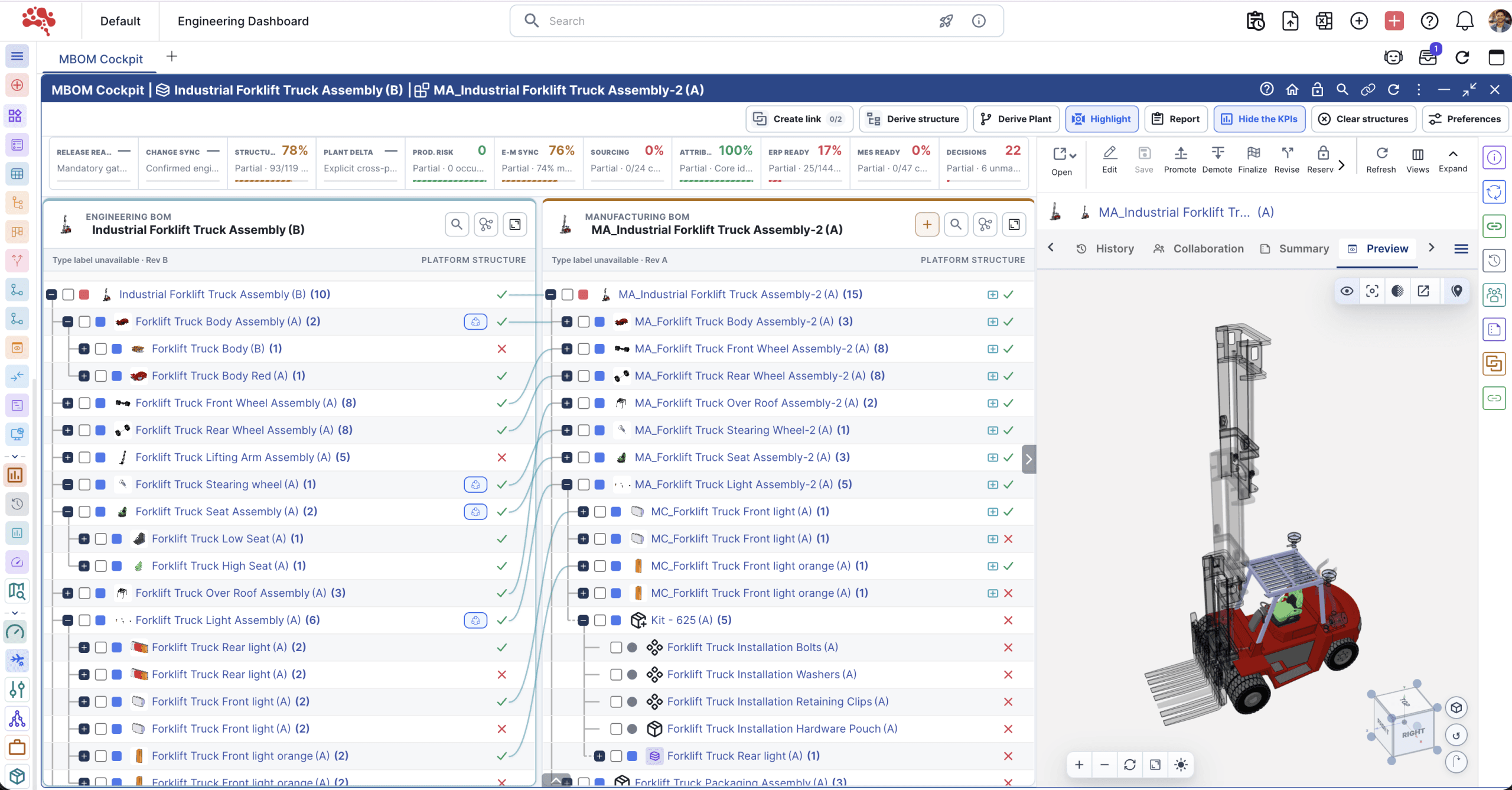
Build your manufacturing bill of materials alongside the engineering BOM. Derive manufacturing structures, connect specific usages, inspect the product in 3D, and review the evidence before release.
 ⛶
What Is Manufacturing BOM (MBOM) Software?
Manufacturing BOM (MBOM) software helps manufacturing teams create, manage and maintain the product structure required to build a finished product. It connects engineering product definition with manufacturing-specific assemblies, quantities, relationships and production context so teams can prepare an accurate manufacturing bill of materials without relying on disconnected spreadsheets or manual translation.
In a PLM environment, MBOM management also helps preserve the relationship between the engineering BOM (EBOM) and the manufacturing BOM. This makes it easier to derive manufacturing structures from engineering data, compare both structures, trace specific occurrences, review engineering changes and assess whether the MBOM is ready for downstream manufacturing processes.
Nora IPLM MBOM Cockpit brings EBOM and MBOM structures into one visual workspace so engineering and manufacturing teams can compare, derive, connect and review product structures with traceable correspondence.
EBOM vs MBOM: Why Both Structures Need to Stay Connected
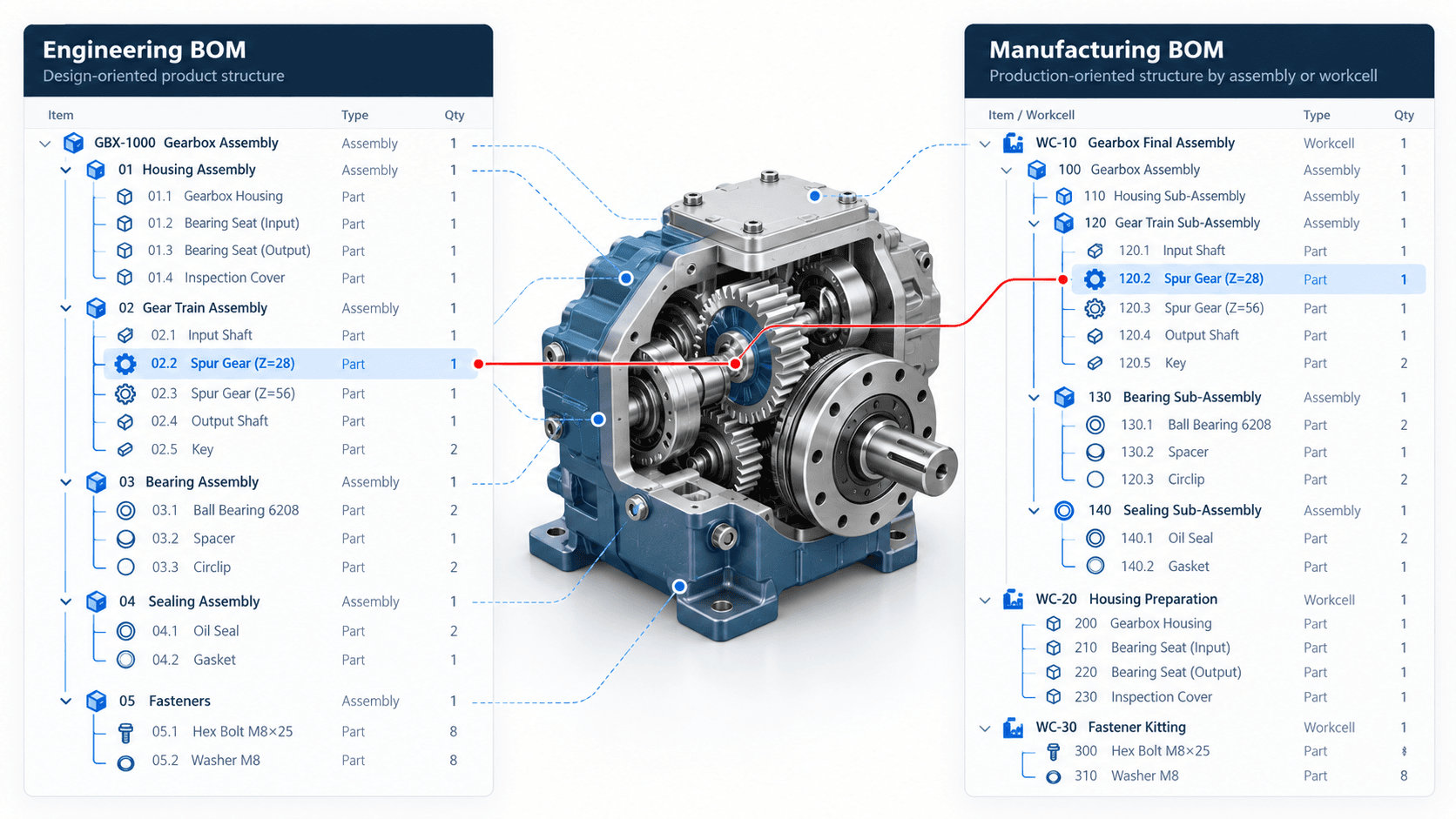
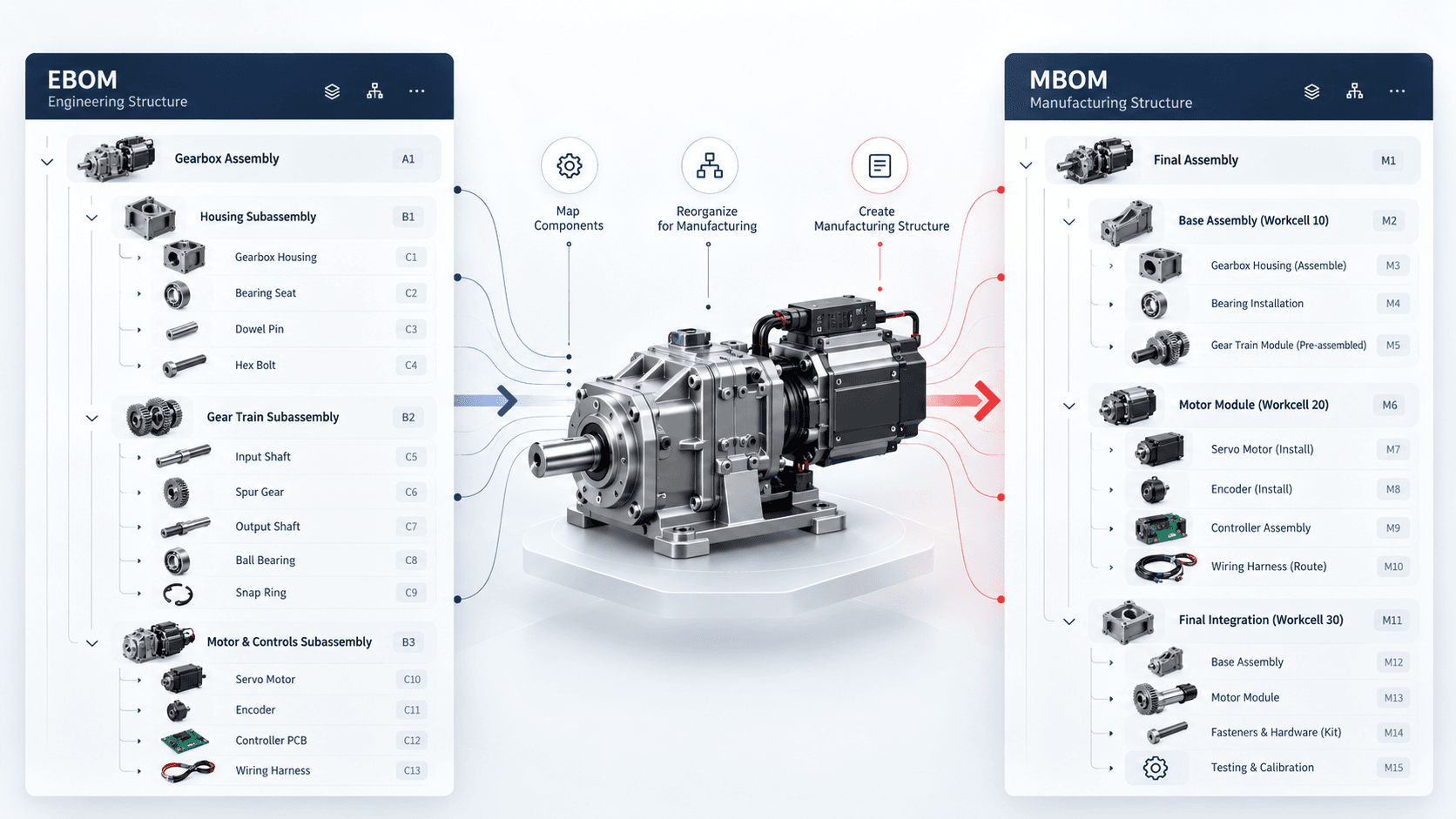
The engineering BOM represents how the product is designed, while the manufacturing BOM represents how the product will be organized and built for production. Because the two structures serve different purposes, they do not always have a one-to-one hierarchy. The important requirement is traceability: manufacturing teams need to understand which engineering items and occurrences correspond to each manufacturing structure and where differences still need review.
Keeping EBOM and MBOM data connected helps reduce manual reconciliation, makes engineering changes easier to assess and gives manufacturing teams a clearer path from product design to release readiness.
 ⛶
From EBOM to MBOM: A Connected Manufacturing BOM Workflow
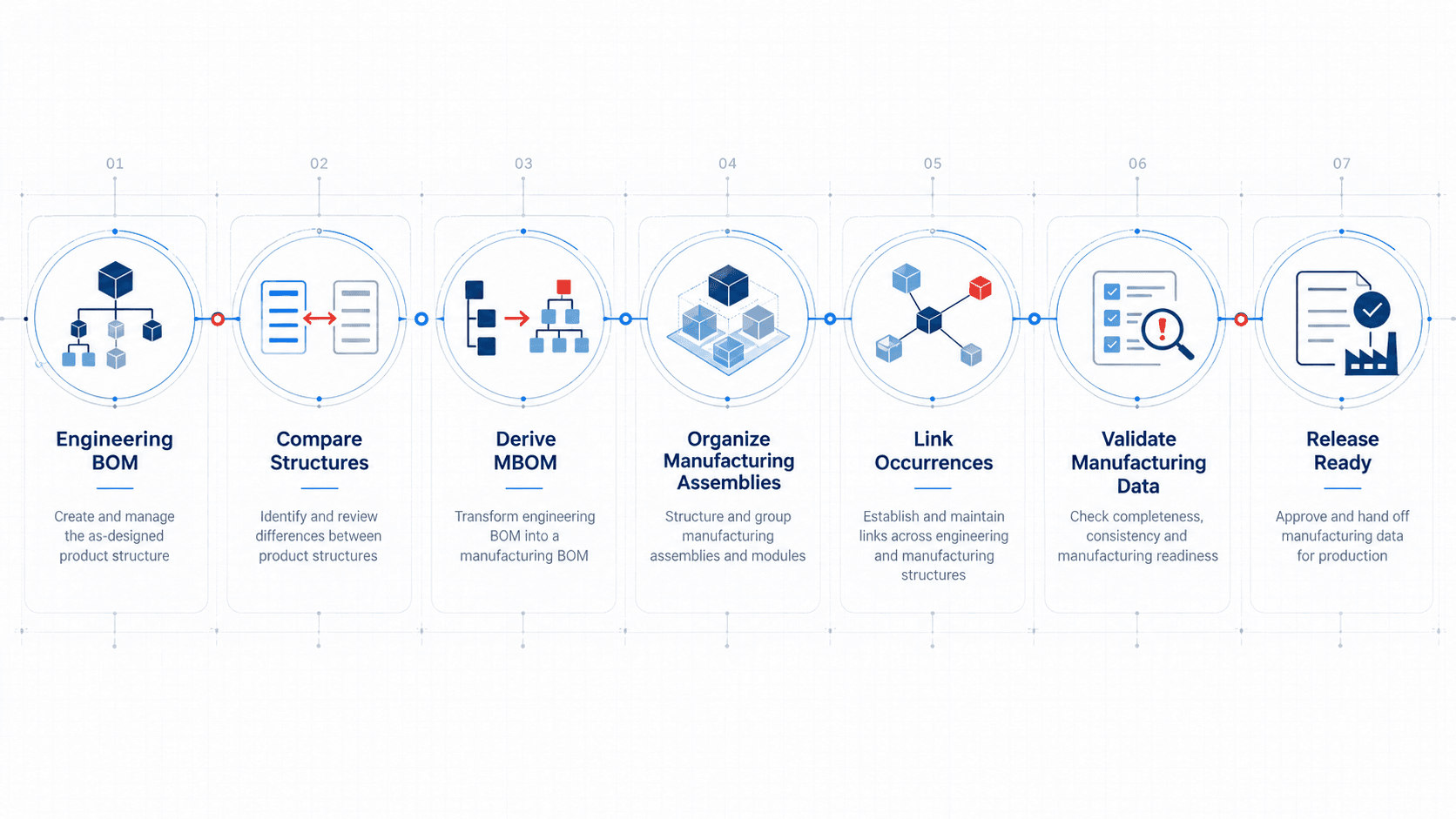
Creating an MBOM is more than copying an engineering structure. Manufacturing teams often need to reorganize assemblies, add manufacturing-specific groupings, connect individual occurrences and validate whether the resulting structure contains the information required for production.
Load the engineering BOM and the manufacturing structure in the same workspace.
Compare engineering and manufacturing structures side by side.
Derive or reorganize manufacturing assemblies based on production needs.
Create scope and occurrence relationships between corresponding engineering and manufacturing usages.
Review unmapped items, quantity differences, structural gaps and open manufacturing decisions.
Validate manufacturing information and release-readiness evidence before downstream handoff.
 ⛶
The existing MBOM Cockpit capabilities shown below support this workflow with visual comparison, 3D context, manufacturing-structure derivation, occurrence linking and status reporting. Explore connected BOM management and Product Lifecycle Management.
Compare, derive, and review with the product in view
Move from comparison to organization and traceability in one focused product workspace.
⛶3D preview with direct EBOM comparison
Compare EBOM and MBOM side by side with a live 3D preview in the same cockpit. Highlight a manufacturing occurrence against its corresponding engineering geometry to see how the MBOM relates to the designed product.
With Highlight enabled, engineering parts without a manufacturing counterpart appear transparent, making gaps easier to see. The preview uses the engineering model and available correspondence for loaded rows.
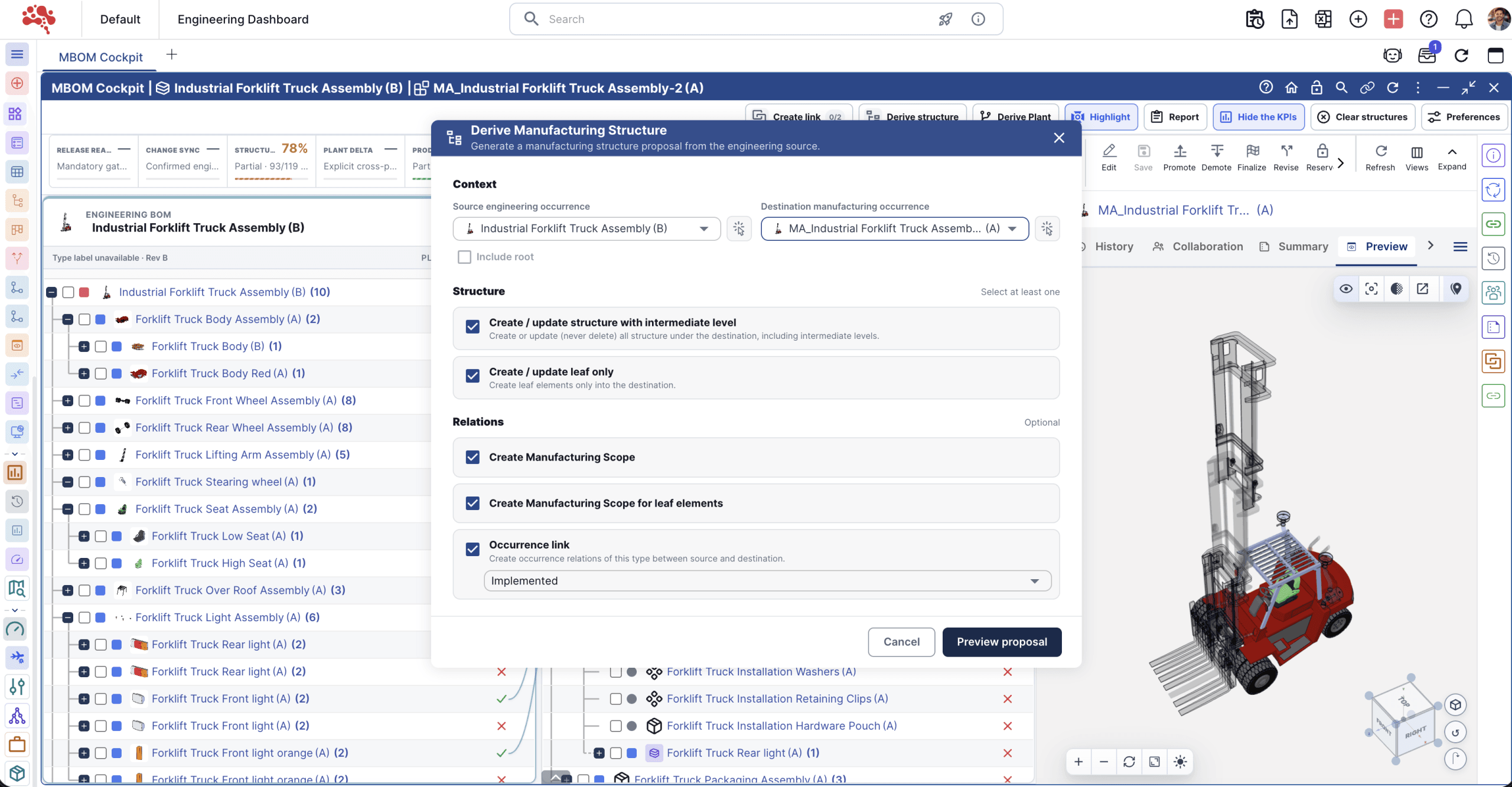 ⛶
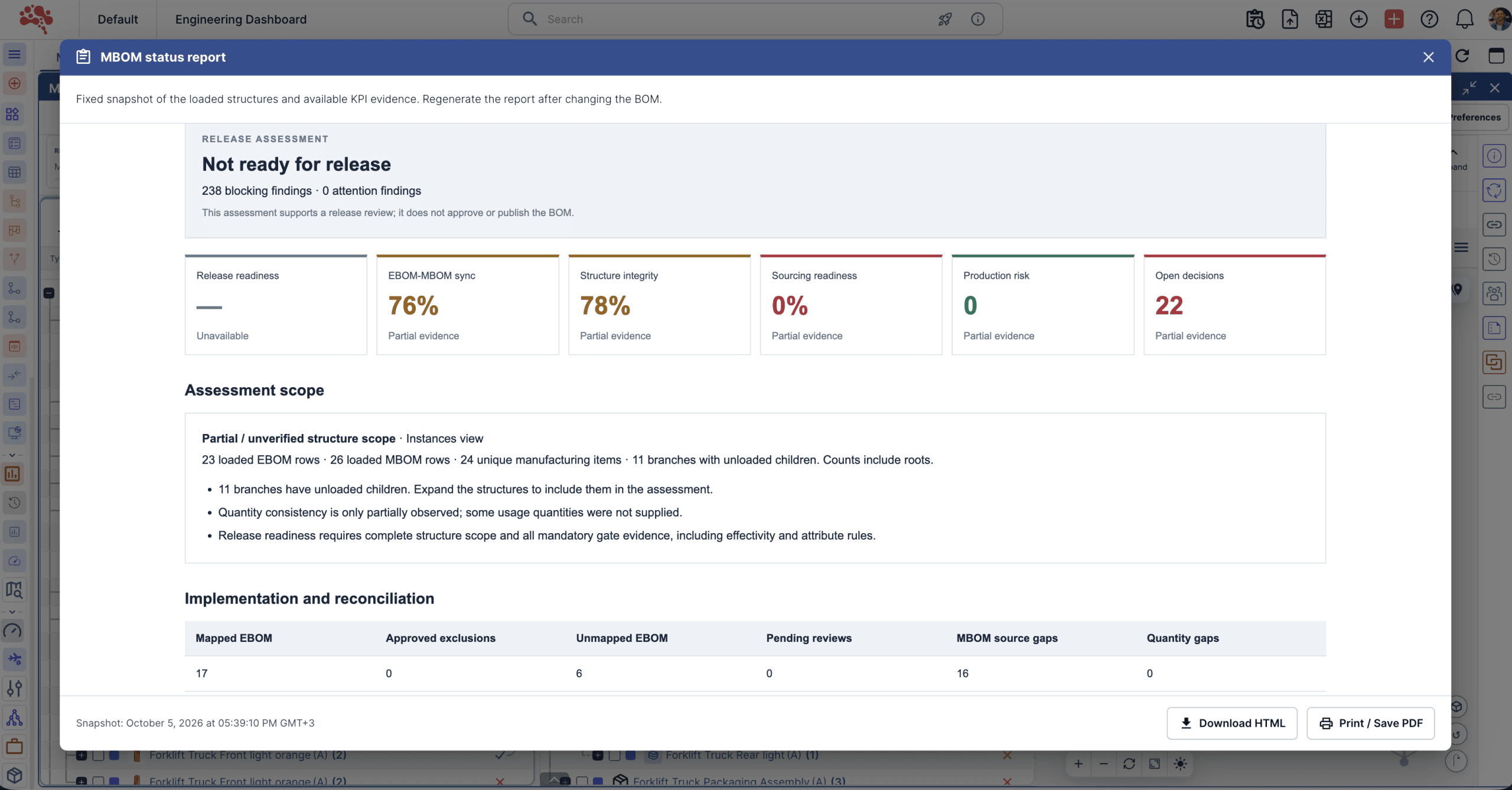
Derive a manufacturing structure from engineering
Choose the engineering source and manufacturing destination, then configure structure creation, manufacturing scope, and occurrence links before previewing the proposal.
Explore derivation options
Start from an engineering occurrence and choose a manufacturing destination, or select an available type for a new MBOM root. Configure hierarchy, Manufacturing Scope and occurrence relationships, inspect the proposal, then apply and review the resulting structure.
 ⛶
Review MBOM status and release readiness
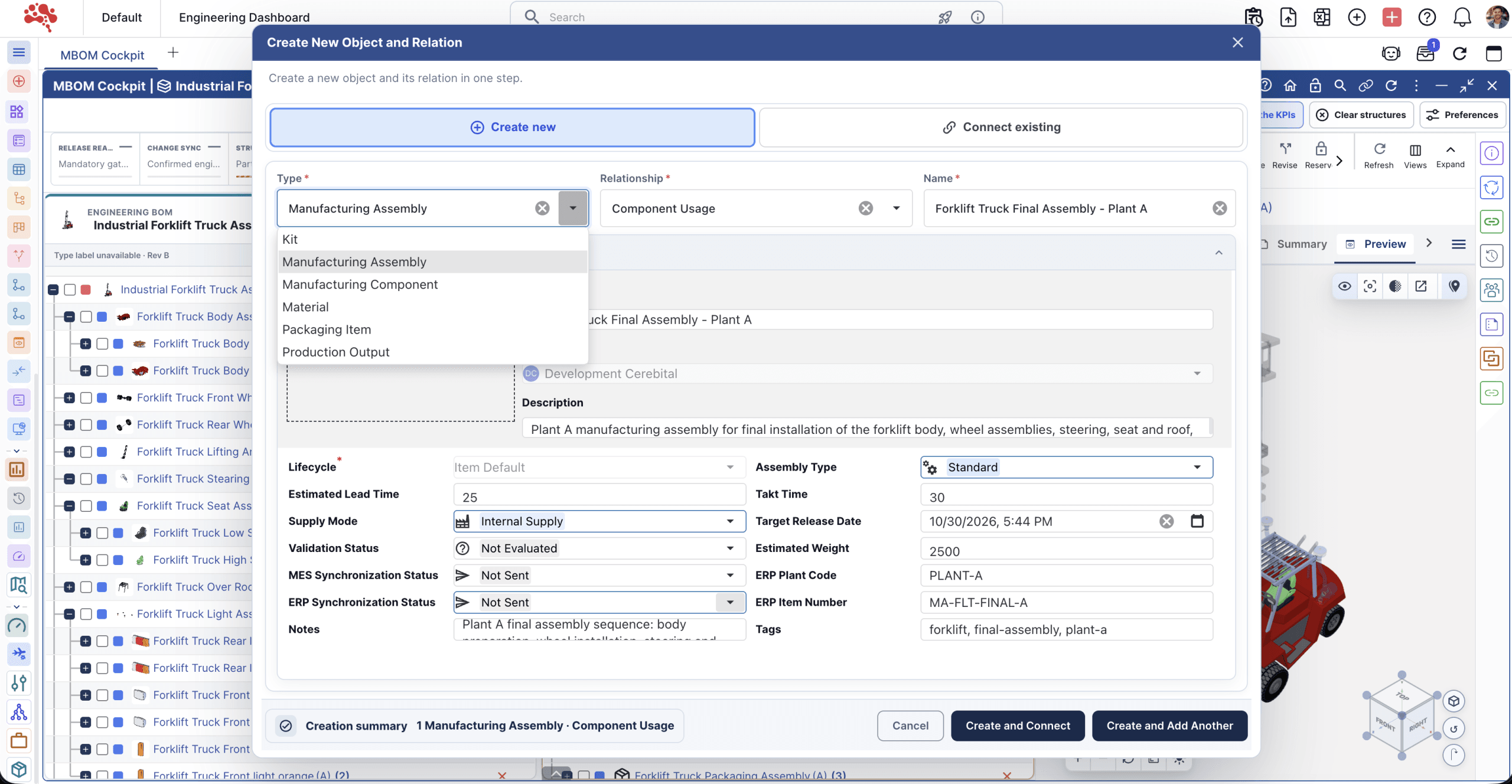
MBOM release readiness depends on more than having a manufacturing structure. Teams also need to verify that engineering correspondence is understood, the structure is valid, required manufacturing information is available and downstream integration requirements can be reviewed. The MBOM Cockpit status report brings this evidence together so teams can identify open gaps before manufacturing release decisions are made.
Generate a status report from the loaded structures and available KPI evidence. Review synchronization, structure integrity, open decisions, and implementation gaps alongside the assessed scope.
See what the report assesses
| Review area | Evidence and questions |
|---|---|
| Engineering correspondence | Mapped and unmapped occurrences, exclusions, pending reviews and quantity differences. |
| Structure integrity | Parent chains, cycles, quantities, units and relationship semantics. |
| Manufacturing information | Sourcing decisions and mandatory manufacturing attributes. |
| ERP and MES readiness | Identifiers, plant/item fields, units, traceability and synchronization states. |
| Risk and effectivity | Lead-time, effectivity, synchronization, scrap and criticality findings. |
 ⛶
Create and connect manufacturing assemblies
Add a manufacturing assembly, define its production context, and connect it to the structure in one step.
From product structure to manufacturing context
Inspect individual usages, connect their manufacturing counterparts, and choose the view that makes the next decision clearer.
Switch between instances and rolled-up quantities
Use Instances to inspect each occurrence as a separate row. Switch to Rolled-up to group matching occurrences and total their quantities. Apply a consistent structure view across engineering and manufacturing.
Link an existing occurrence or add it as a child
Connect selected engineering and manufacturing occurrences in Instances view. Choose Link only or Add as child & link, then review the relationship type before confirming.
Follow connections across both structures
Display saved link lines between visible rows, highlight related paths, and use temporary hover connectors to follow a correspondence.
Find a component and focus your workspace
Search each loaded BOM independently. Focus the engineering or manufacturing side when a large hierarchy needs more room, then return to both structures.
Common MBOM Management Use Cases
Connected manufacturing BOM management supports the work between engineering definition and manufacturing release.
 ⛶
EBOM-to-MBOM Transformation
Derive a manufacturing structure from engineering data while reorganizing the hierarchy around how the product will actually be assembled.
EBOM and MBOM Reconciliation
Compare both structures to identify unmapped occurrences, structural differences, quantity mismatches and other gaps that require review.
Manufacturing Assembly Planning
Create manufacturing-specific assemblies and relationships that do not necessarily exist in the engineering structure.
Engineering Change Impact Review
Use correspondence between EBOM and MBOM structures to understand which manufacturing items or usages may be affected by an engineering change.
Manufacturing Release Readiness
Review structure integrity, required manufacturing information, synchronization evidence and open findings before release.
ERP and MES Preparation
Assess whether required identifiers, plant/item information, units, traceability and integration-related data are available before downstream transfer.
Complex Product Manufacturing
Maintain traceable engineering-to-manufacturing correspondence for multi-level products with repeated components and complex assembly structures.
Configurations and Variants
Keep manufacturing structures connected with product configurations and variants.
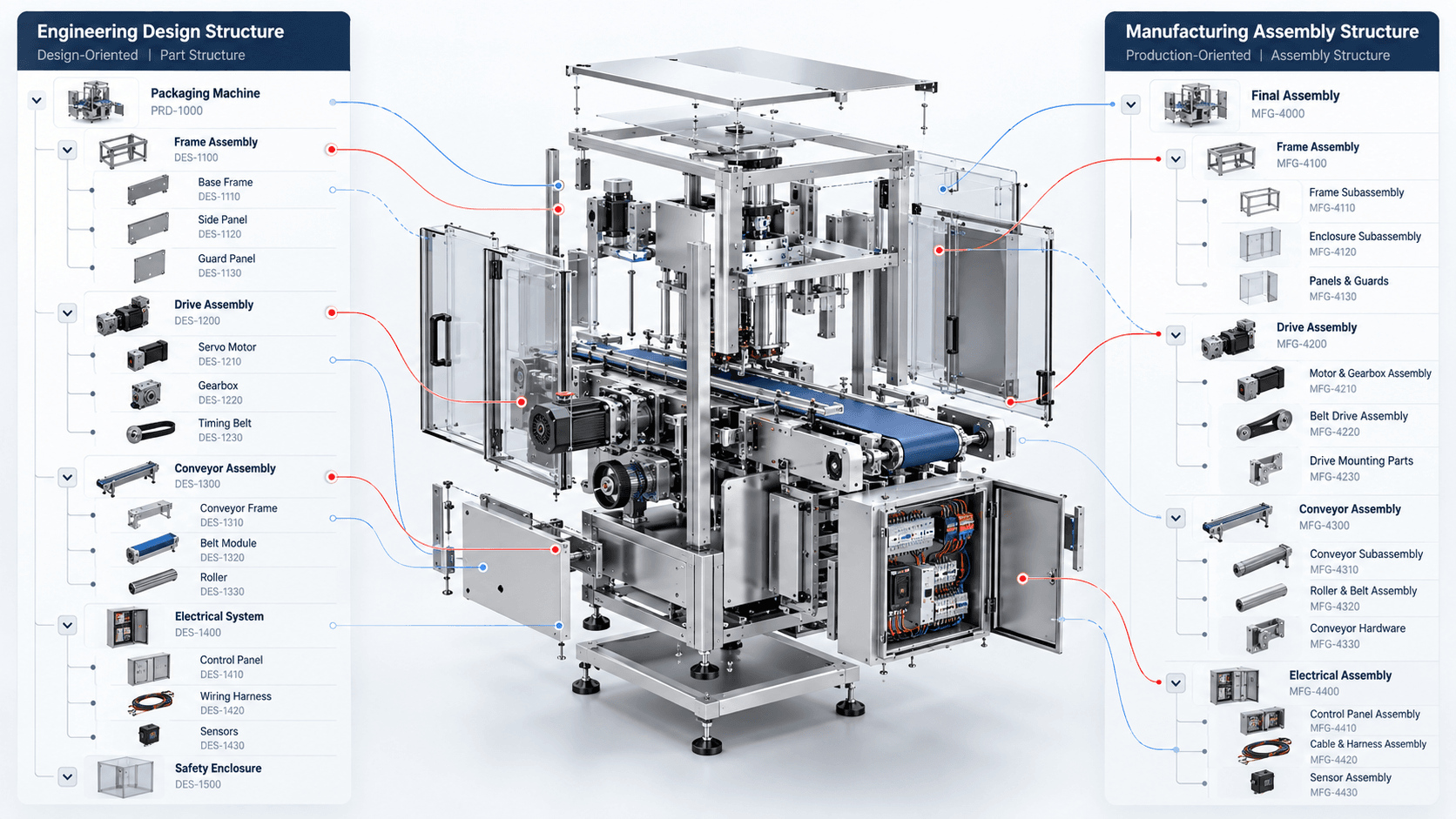
Example: Converting an Engineering BOM into a Manufacturing BOM
Consider an industrial machine whose EBOM is organized around design assemblies. Manufacturing needs a different structure that reflects how the machine will be assembled on the shop floor. The manufacturing engineer loads the EBOM, creates or selects an MBOM root and derives the initial manufacturing hierarchy.
The engineer then reorganizes manufacturing assemblies, links specific engineering occurrences to their manufacturing counterparts and uses the 3D product view to inspect correspondence. Before release, the MBOM status report is used to review unmapped engineering content, structural integrity, manufacturing information and available ERP/MES readiness evidence.
 ⛶
From structure comparison to release review
Load structures
Open the relevant EBOM and MBOM roots.
Shape the MBOM
Derive or organize the manufacturing hierarchy.
Connect and inspect
Link specific usages and follow their correspondence.
Review status
Assess loaded BOM evidence and outstanding findings.
Frequently Asked Questions
A few practical details before your first walkthrough.
Do I need an existing MBOM to get started?
You can load an existing manufacturing root or use Create MBOM root when the manufacturing side is empty. The derivation dialog also lets you select an available manufacturing root type when no destination structure is loaded.
Why link occurrences rather than just part numbers?
The same engineering item can appear more than once in a product. An occurrence link identifies the specific usage and its manufacturing counterpart, so correspondence remains meaningful within each assembly context.
When should I use Instances instead of Rolled-up?
Use Instances for individual usage tracing and occurrence-link creation. Use Rolled-up for grouped occurrences and total quantities.
Does an ERP or MES readiness indicator publish the BOM?
These report checks assess available data and supplied synchronization states. They do not perform a transfer.
What should I bring to an MBOM Cockpit demo?
Bring an engineering structure, a manufacturing structure if you have one, and an example of the correspondence or assembly organization you want to improve.
What is MBOM software?
MBOM software helps teams create, organize and maintain the manufacturing bill of materials required to build a product. In PLM, it can also keep the MBOM connected with engineering structures, revisions, changes and downstream manufacturing information.
What is manufacturing BOM management?
Manufacturing BOM management is the process of creating, maintaining, validating and releasing the product structure used by manufacturing. It includes organizing manufacturing assemblies, managing quantities and relationships, maintaining traceability to engineering data and preparing the BOM for downstream production systems.
How do you convert an EBOM to an MBOM?
An EBOM-to-MBOM process typically starts with the engineering product structure and reorganizes it around manufacturing needs. Manufacturing-specific assemblies may be created, engineering occurrences are connected to their manufacturing counterparts and the resulting structure is reviewed for completeness and release readiness.
What is the difference between an EBOM and an MBOM?
An EBOM describes the product from an engineering and design perspective. An MBOM describes the structure needed to manufacture and assemble the product. The structures can differ, which is why traceable correspondence between them is important.
What is EBOM and MBOM reconciliation?
EBOM and MBOM reconciliation is the process of comparing engineering and manufacturing structures to identify missing mappings, quantity differences, structural gaps, pending exclusions and other inconsistencies that may require review.
Why are occurrence links important in EBOM-to-MBOM management?
The same item can appear multiple times in a product. Occurrence links identify the specific engineering usage that corresponds to a specific manufacturing usage, preserving traceability within the assembly context.
How does MBOM software support manufacturing release readiness?
MBOM software can help teams review structure integrity, engineering correspondence, required manufacturing attributes, open decisions and available downstream integration evidence before a release decision is made.
Can an MBOM be connected to ERP or MES systems?
Yes. MBOM data is commonly prepared for downstream ERP and MES processes. The exact transfer, synchronization and release flow depends on the configured integrations and manufacturing process.
Bring your product structure into the conversation
Bring a real product structure to a tailored walkthrough and see how Nora IPLM keeps engineering and manufacturing connected.