CATIA Integration for Nora IPLM
Sync your CATIA models, assemblies, and drawings with Nora IPLM without extra steps or manual uploads.

What is CATIA Integration in Nora IPLM?
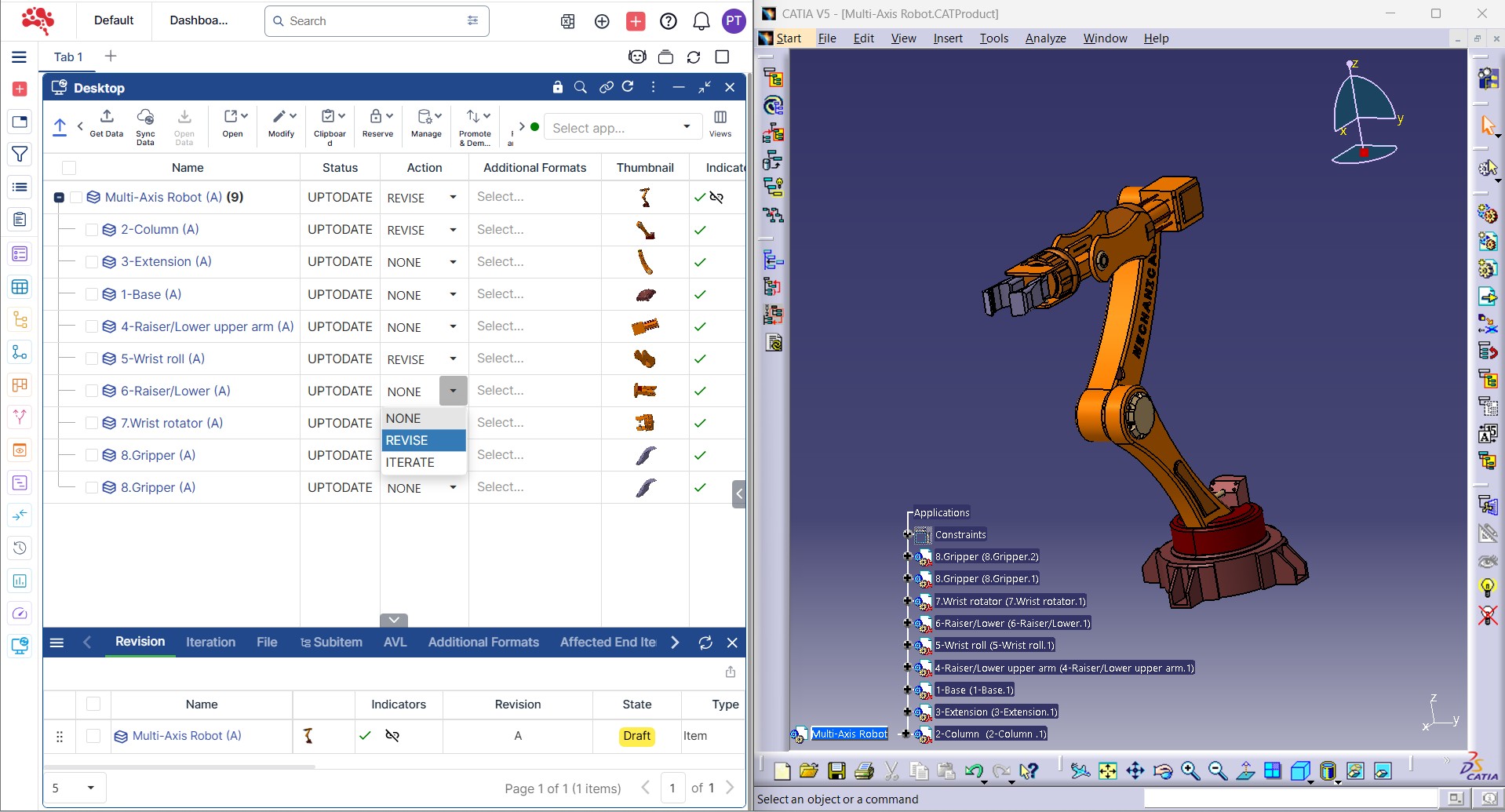
The CATIA integration in Nora IPLM runs through the Nora IPLM Windows Desktop Services application, supporting direct upload and synchronization of CATIA data into the cloud based PLM platform. The integration brings together:
- CAD file management with version history and revision tracking
- Sync of CAD metadata with PLM objects
- Linked CAD data across BOMs, documents, change requests, and workflows
- Support for complex structures, assemblies, and multi disciplinary items through hybrid BOM capability
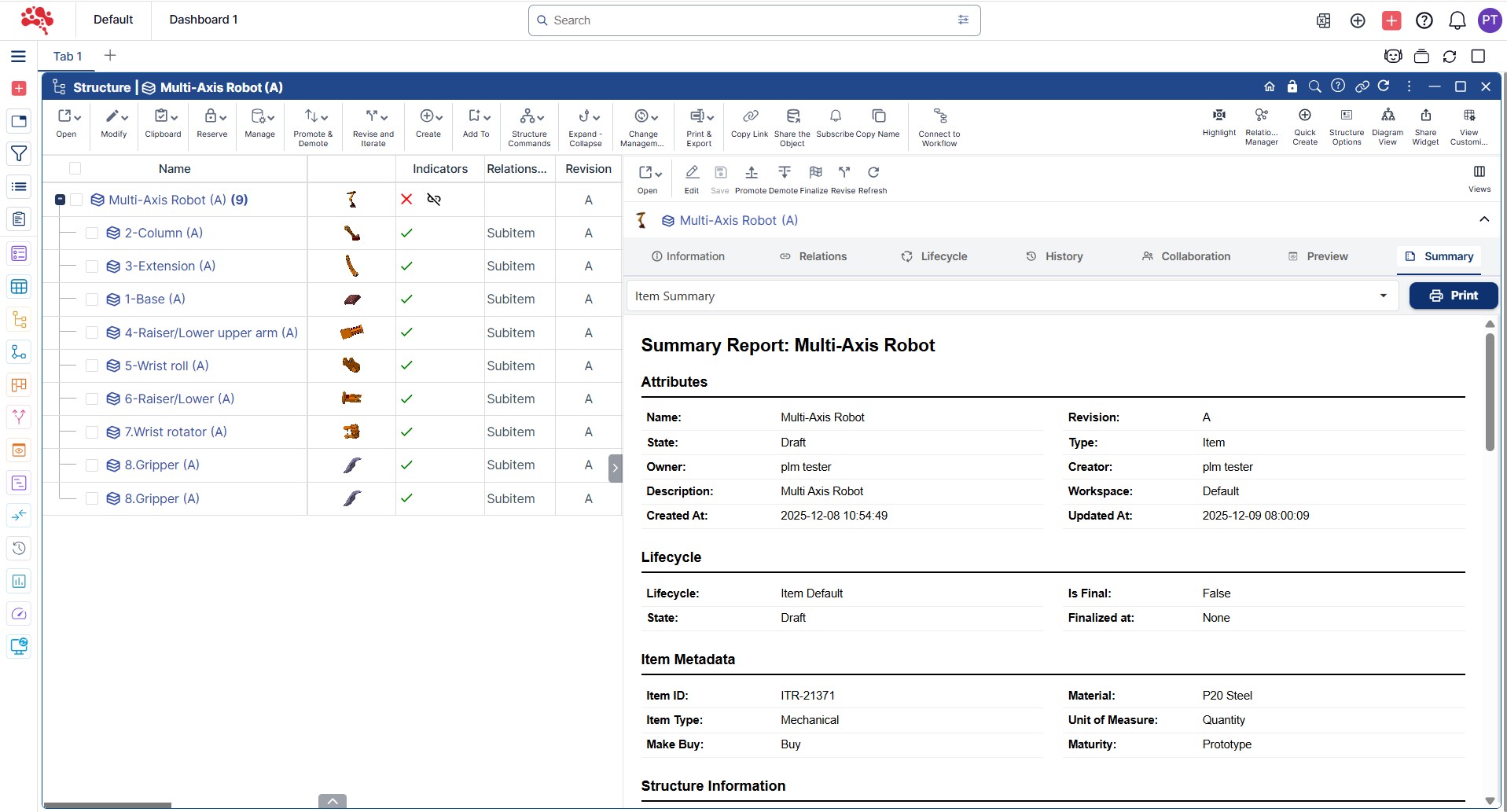
Single Source of Truth
All CATIA designs, BOMs, documents, and product data reside in one unified PLM system, avoids fragmented file storage or scattered mail/drive-based CAD data.
Automatic Version Control & Traceability
Every change in CATIA is captured, versioned, and traced, giving full history of design evolution, who made changes, when, and why, supporting audits, compliance, and rollback if needed.
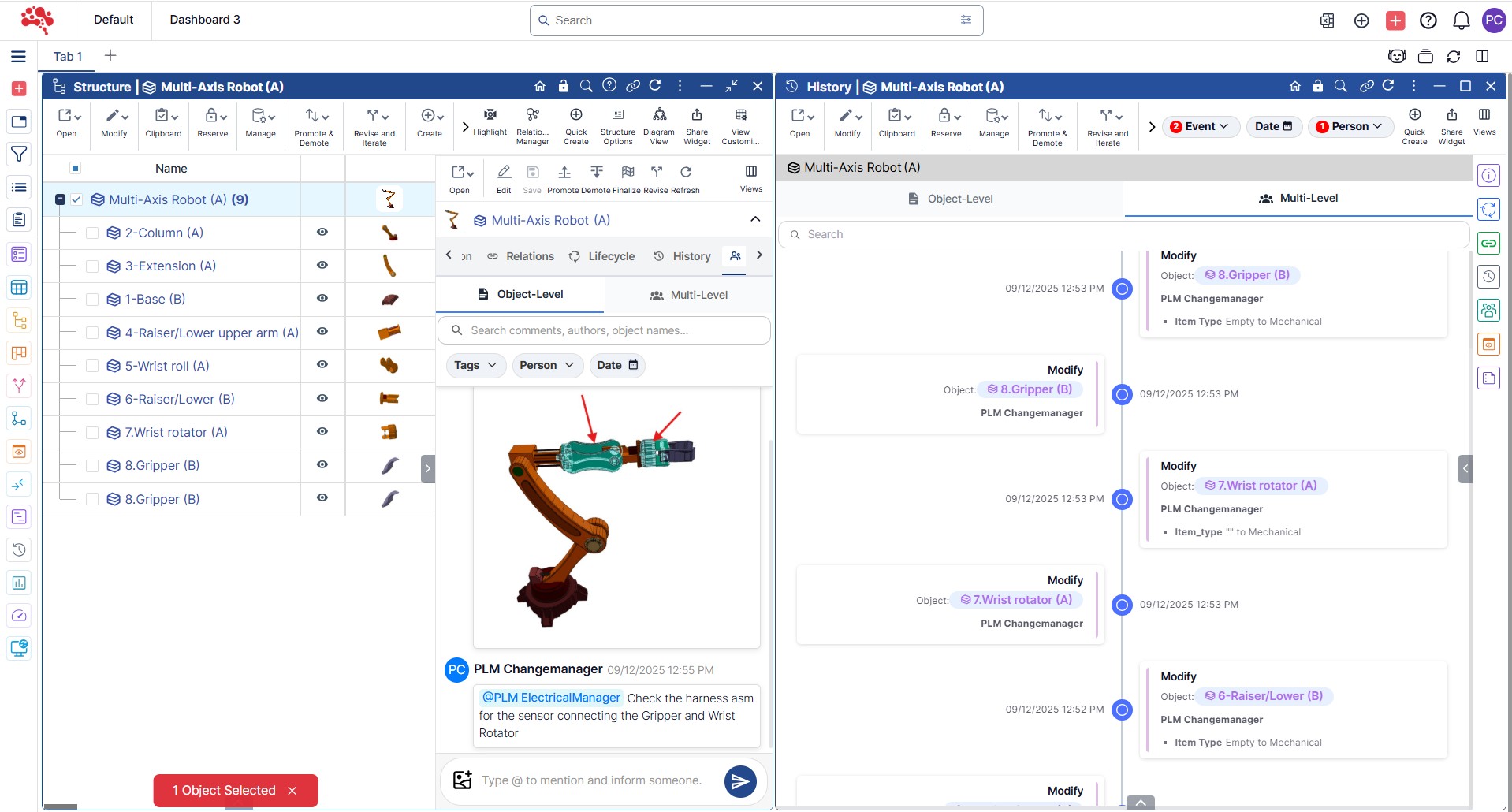
Effortless Collaboration Across Teams
All CATIA designs, BOMs, documents, and product data live in one unified PLM platform, removing fragmented storage and scattered mail or drive based CAD data.
Reduced Manual Overhead & Errors
Eliminates manual uploads, copying files across drives, manual BOM reconciliation – saving time and reducing risk of mistakes or outdated references.

How to Get Started with CATIA + Nora IPLM
Integrating CATIA with Nora IPLM is quick and straightforward. With a simple desktop install and account connection, your CAD data begins flowing seamlessly into the PLM. Start syncing designs, managing revisions, and collaborating across teams within minutes.

Install Desktop Services
First step is to install the Nora IPLM Desktop Services app on the workstation where CATIA is installed.

Connect & Configure
Connect the Desktop Services to your Nora IPLM account, & ensure CATIA is configured to work with it.

Design in CATIA
Work as usual in CATIA, create parts, assemblies, drawings. When you save, Nora IPLM captures the data and syncs to the central PLM repository.

Sync & Access Data
Access synchronized CAD data, BOMs, metadata and version history inside Nora’s web interface, along with change requests, docs and more.

Collaborate & Control
Collaborate across teams, manage changes, track revisions, and derive downstream deliverables all with full traceability and control.
Key Features of CATIA Integration
When CATIA and Nora IPLM work together, teams gain clearer visibility, cleaner data, and stronger process control. The features below highlight how the integration improves productivity across every stage of the product lifecycle.
Multi-CAD Support
Automatic Revision & Version History
Every save or change in CATIA gets versioned; prior versions remain accessible.
Metadata & Attribute Sync
Part numbers, material specs, metadata stay synchronized between CATIA and PLM.
Hybrid-BOM & Multi-Discipline BOMs
Manage mechanical, electrical, software components and their relationships consistently.
CATIA Integration for Connected CAD Data Management
Nora IPLM integrates deeply with CATIA to keep product data structured, consistent, and manufacturing-ready. Designers can work natively in CATIA while the PLM automatically manages revisions, synchronizes attributes, and maintains unified product structures. With support for multi-CAD environments and hybrid BOMs, teams across mechanical, electrical, and software stay aligned from concept to release.
Extend CATIA With Collaboration & Traceability

Nora IPLM bridges CATIA with broader engineering processes, making design data accessible and actionable for the entire organization. Automatic neutral-format generation supports CAD-independent collaboration, and linked documentation maintains a clear audit trail. With structured concurrency controls, multiple users can work simultaneously without compromising data integrity.
Linked Documents & Change Management
CAD designs linked to requirements, documents, change requests, workflows for full lifecycle traceability.
CAD-Independent Viewing & Collaboration
Automatic generation of neutral formats (e.g. PDF/3D-PDF/STEP/IGES) and lightweight viewer-friendly formats to enable review by stakeholders without CATIA.
Concurrent Engineering Support
Multiple users or teams can work on assemblies or components simultaneously, with versioning and access controls preventing conflicts.
Why Choose Nora IPLM + CATIA Integration
With CATIA and Nora IPLM working together, teams gain tighter control, better visibility, and faster collaboration. The integration ensures accurate data flow from design to manufacturing, making your entire engineering process more efficient and reliable.
For Teams Using CATIA (or Mixed CAD Environments):
The integration lets design and engineering teams continue using CATIA while benefiting from a robust PLM backbone, no disruptive tool-switching.
For Small to Mid-size Manufacturers:
Nora IPLM is designed to provide enterprise-grade PDM/PLM capabilities to SMBs, bridging the gap between heavy-duty traditional PLM systems and simpler file-sharing workflows.
For Cross-Discipline & Multi-Stage Product Development:
Whether you have mechanical, electrical, software components – or need to link designs to BOMs, docs, workflows, changes, Nora IPLM ensures consistency, traceability, and collaboration across the product lifecycle.
Scales with Your Business
To Reduce Errors, Save Time and Accelerate Development: By automating CAD file management, versioning, data synchronization and linking CAD to PLM objects, the platform reduces manual overhead, minimizes mistakes, and speeds up design-to-manufacture cycles.
Explore Our Other Integrations

Solidworks
Connect your SolidWorks environment directly to product development. Sync designs, revisions, and BOMs in real time without leaving SolidWorks.

CATIA
Connect your CATIA environment directly to product development. Sync designs, revisions, and BOMs in real time without leaving CATIA.

Creo
Connect your Creo environment directly to product development. Sync models, revisions, and BOMs in real time without leaving Creo.
Frequently Asked Questions
The integration connects CATIA directly to Nora IPLM so design data, revisions, metadata, and BOMs sync automatically into a centralized PLM repository. Teams gain traceability, structured workflows, and cross-functional access to CAD information without manual file handling.
No. You continue designing as usual in CATIA. Nora IPLM captures your parts, assemblies, and drawings during Save or Sync actions, ensuring the PLM always reflects the latest accurate design data.
You simply install the Nora IPLM Desktop Services application on the workstation running CATIA. Once connected to your account, the integration activates automatically and requires no additional setup inside CATIA.
Absolutely. The Nora IPLM platform supports lightweight 3D model display through its Viewer widget and preview features, including highlight and transparency options. It also generates neutral formats such as PDFs, 3D PDFs, STEP, IGES, and other lightweight viewer-compatible files, so teams in manufacturing, procurement, QA, and leadership can review models without CATIA installed.