Details Widget
Effortlessly view and manage object information through a structured, organized form interface that keeps data clear and accessible.
Explore the Capabilities of the Details Widget
Gain comprehensive control and organization with a user-friendly interface for all object types with Details Widget.
Display Object Specific Information
See all the details that matter: attributes, metadata, and type-specific information are displayed clearly, giving you a complete view of each object at a glance.
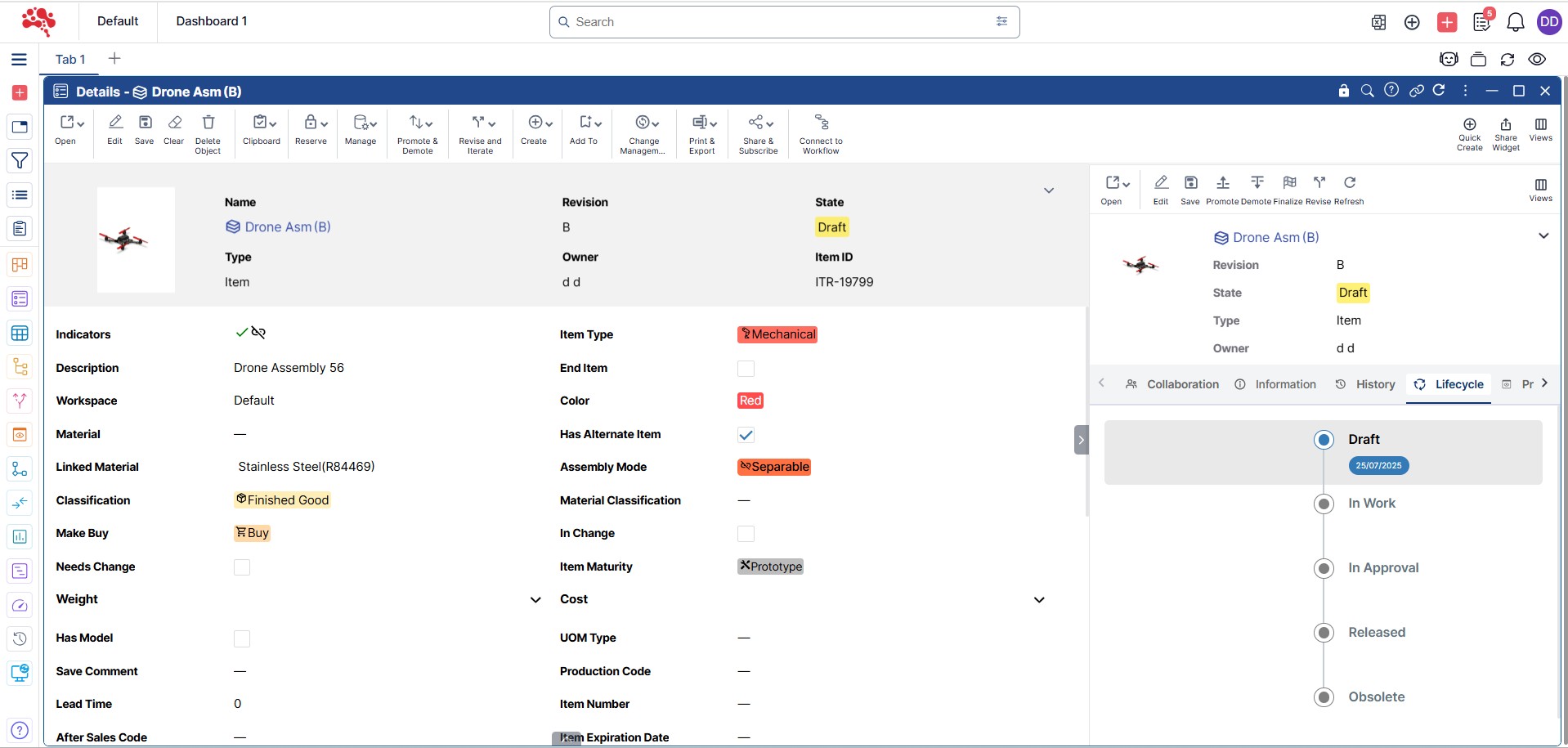
View and Edit Modes
Easily switch to edit mode from the command bar to update any object. With one click, save your changes and return to view mode, making edits fast, simple, and hassle-free.

View Relevant Attributes for Each Object Type
Access a clear and organized view of relevant attributes for each object type, with customizable forms that a wide range of attributes to enhance management and decision-making.
Manage Relations in Relation Fields
Easily build and manage connections between objects by selecting them directly in the Relation Fields.
Dynamic Fields for Real-Time Data Display
Display real-time data in Dynamic Fields, which update live from external sources, allowing the users to see the most up-to-date information.
View Versions & Iterations
Quickly access and explore every version of an object, so you always have the full history at your fingertips, effortlessly.
Easy Access
Open the Details widget your way: drag and drop, use the right-click menu, or double-click an object’s name for instant access.
Ways to Get More from the Details Widget
Details Widget at Work
Unlock the full potential of the Details widget by going beyond basic viewing. Edit objects with ease, explore versions and iterations, track lifecycle stages, and manage relations—all from a single, intuitive space. It’s everything you need to stay informed and in control.
Relations Pane
The Relations Pane shows all relationships connected to the object. You can manage and observe these relationships, ensuring full control over how objects relate to one another.
Single Object Focus
The Details Widget is designed to manage the detailed view of only one object type at a time, allowing you to concentrate on specific attributes and information without distraction.
Link with Other Widgets
Connect the Details widget with other widgets to see data come alive. Instantly sync information, navigate between related objects, and get a complete view of your product lifecycle.
Powerful Modules for Every Stage of Product Development
Nora IPLM modules are designed to work effortlessly in a one unified platform, helping teams to collaboration across the entire product lifecycle. From ideation to execution, each module brings clarity, control, and scalability without the complexity of traditional PLM systems.
Frequently Asked Questions
The Details Widget can display:
Key attributes and metadata
Status, owner, and lifecycle state
Linked items, documents, or changes
Revision and version information
This ensures users have full context without navigating multiple screens.
Yes. The Details Widget supports configurable layouts and fields, allowing organizations to tailor the information shown based on roles or use cases.
By consolidating all relevant information in one place, the Details Widget reduces navigation effort and helps users understand, review, and act on data faster.
Yes. Depending on permissions, users can update fields directly from the Details Widget, streamlining everyday PLM tasks.
Yes. The Details Widget follows role-based access control rules, ensuring users only view or edit data they are authorized to access.