Nora Prima: AI That Understands and Acts On Your Product Data & Processes
Nora Prima is the AI agent inside Nora IPLM that analyzes objects, understands relationships, and helps teams make decisions faster across the entire lifecycle.
It works directly on your real-time data, turning product information into actionable intelligence.
Your AI Assistant to Drive Real PLM and Engineering Work
Nora Prima is our operational AI agent built directly into Nora IPLM.
Instead of relying on prompts alone, Prima works on real product lifecycle data including objects, relationships, history and automated tasks to help you manage your BOMs, revisions, changes, tasks, suppliers and more.
It transforms your PLM environment from a system that stores information into a system that helps teams understand, decide, and act.
Prima enables teams to move from data to product intelligence.
Dynamic Context Management
Understanding the actual context is one of the key aspects and challenges of any AI tool. We built Prima to automatically understand context across the platform to streamline your operations.
Prima automatically detects:
Open widgets in the active tab
- Available objects in the open widgets
Selected objects
Objects’ rmetadata, elationships, dependencies, revisions and states.
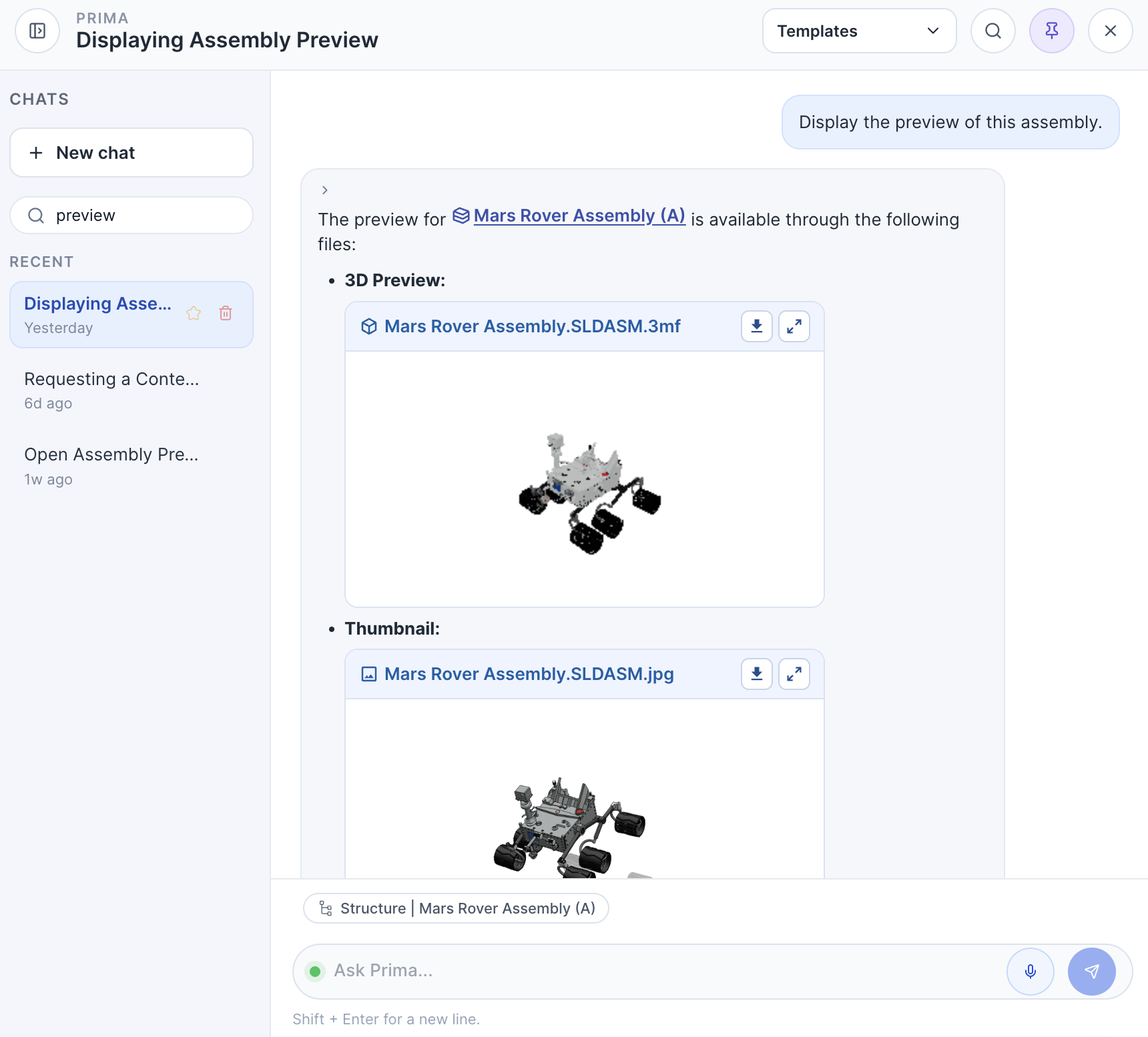
This allows Prima to analyze multiple data points at once instead of isolated records. You can select any of these available contexts or even drop your own objects directly onto the agent interface to analyze them. In addition, using the platform-level “Analyze with Prima” command opens the agent interface and lets you work on the selected objects immediately.
Examples:
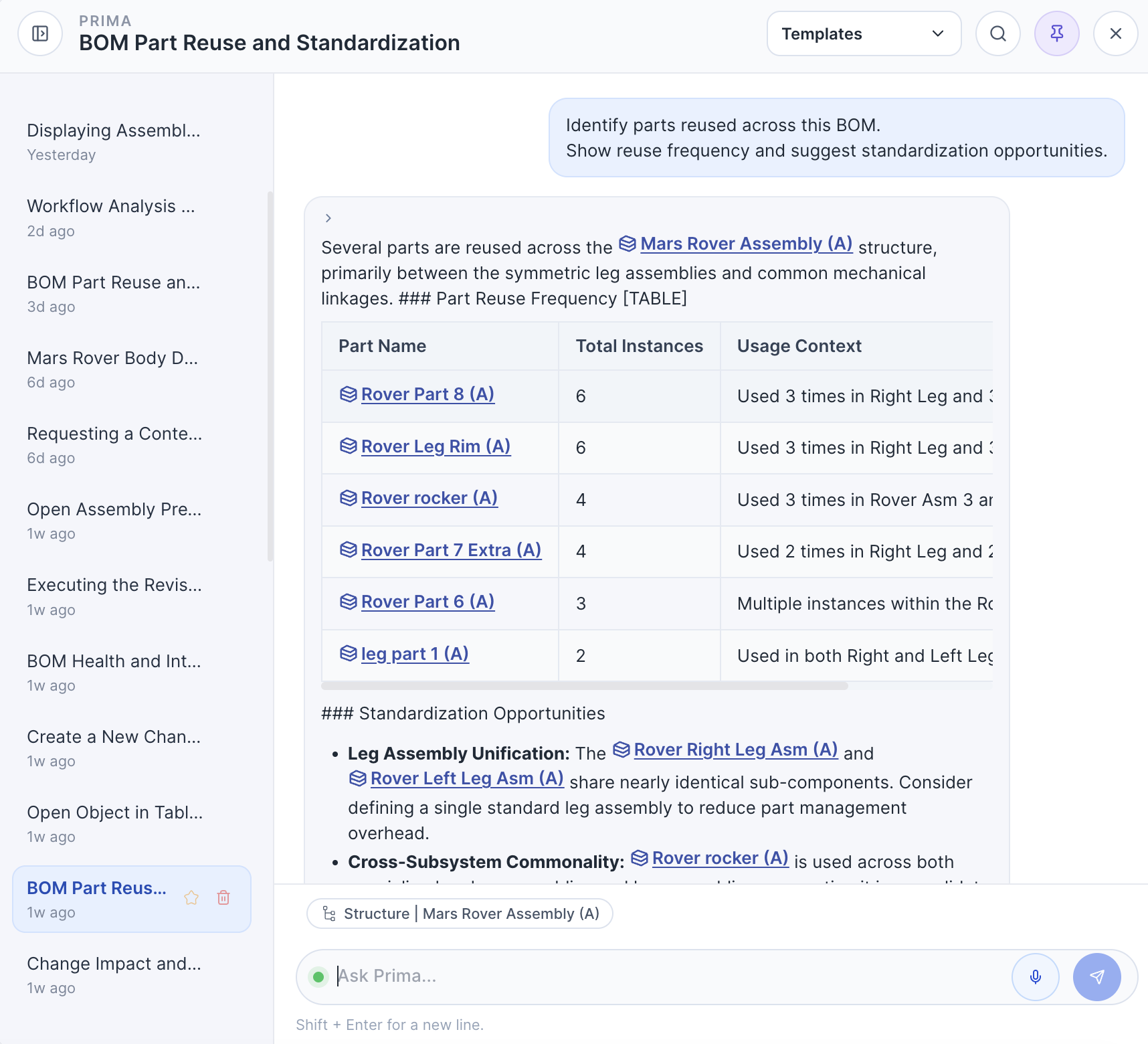
Analyze a BOM together with requirements
Explain the impact of a change request
Detect risks across suppliers and tasks
Compare revisions with lifecycle context
You can also run search queries directly on the Prima interface and ask it to analyze the results.
This context awareness is what makes Prima an AI agent rather than a chat interface.
What you can do with Prima
AGENT capabilities across product lifecycle work.
Analyze
Evaluate product data across the lifecycle.
- BOM health and structure integrity
- Requirement coverage
- Data quality issues
- Risk detection
- Impact analysis
Generate
Reduce manual documentation work.
- Summaries
- Reports
- Design reviews
- Change explanations
- Knowledge drafts
Explain
Understand decisions and changes.
- Why something changed
- Revision differences
- Lifecycle transitions
- Root cause explanations
Navigate
Explore product knowledge faster.
- Find objects
- Highlight relationships
- Surface insights
- Query lifecycle information
Track
Track lifecycle progress and operational signals continuously.
- Monitor change status
- Follow requirement completion
- Track quality trends
- Watch risk movement over time
- Flag stalled workflows
What makes Prima useful in real PLM workflows
Dynamic context selection: Prima understands the objects and widgets in the the active tab, so you can analyze multiple data points together (BOM + change + tasks + documents and more).
Chat history that stays usable: keep multiple chats active, search across all previous chats, search within the current chat, and highlight results to pick up work quickly.
Platform-level RAG and enterprise-level RAG: pull answers from shared knowledge and enterprise-specific knowledge bases, based on what the user can access.
Permission-aware retrieval: responses respect the current session and access rights of the user.
PLM prompt templates: guided “one-click” prompts for common workflows like BOM health, change impact, reuse detection, risk checks, and more.
Actionable outputs: Prima can control widgets, search for data, run analyses, and present results in clean table formats.
Flexible UI: pin Prima to the right side or use it as a floating assistant.
Voice input: speak a request when you are reviewing data hands-free.
AI that operates inside your PLM governance
Prima works within your existing PLM rules, permissions, and lifecycle logic.
It inherits user access rights and workspace roles, respects tenant boundaries, and grounds every analysis in real product data including objects, relationships, states, history, and revisions.
This allows teams to use AI without exposing sensitive data, bypassing governance, or losing traceability.
Key capabilities
Permission-aware retrieval
AI only accesses data available to the current user sessionTenant isolation by design
Data never crosses tenant boundariesLifecycle-grounded reasoning
Analysis based on real objects, structure, revisions, and historyReusable analysis templates
Standardize how teams run AI across projects and workflowsTraceable AI outputs
Results remain linked to source objects and lifecycle context
Prima in the interface
Prima is embedded directly into the Nora IPLM interface.
Users can:
Pin Prima to the right side
Use floating mode
Use voice input
Search chat history
Highlight answers in widgets
Run commands like “Analyze with Prima”
This allows AI to become part of daily workflows.
Prompt Templates
Run repeatable AI workflows across your lifecycle data
Prompt Templates in Nora Prima provide structured starting points for common PLM tasks. Instead of writing prompts from scratch, teams can select a template designed for BOM analysis, change reviews, reuse detection, document summaries, and reporting.
Each template is lifecycle-aware, permission-aware, and designed to produce structured outputs such as tables, prioritized lists, and summaries with references.
Templates help standardize how teams use AI across engineering, operations, quality, and program management, so results remain consistent and review-ready.
How Prompt Templates work
Templates are organized by workflow area and can be accessed directly from the Prima interface.
When a template is used, Prima automatically applies the current context from the active tab and open widgets, allowing analysis across multiple related objects at once.
Users can run templates instantly, refine them, or create their own variations for organization-specific workflows.
Current template categories
BOM Management
Analyze BOM health, compare structures, detect reuse opportunities, and identify risks related to structure integrity, missing attributes, and readiness.
Change Management
Generate change impact analysis, summarize affected items and assemblies, identify dependencies, and propose next actions.
Task and Project Management
Surface delayed work, summarize execution status, detect bottlenecks, and create standup-ready summaries.
Document Intelligence
Extract key attributes, generate summaries, highlight inconsistencies, and link findings to lifecycle objects and revisions.
Quality and Compliance
Check completeness, surface missing approvals, summarize evidence, and prepare review-ready outputs.
Analytics and Reporting
Generate lifecycle rollups, program summaries, trend analysis, and structured tables for decision-making.
Why Prompt Templates matter
Prompt Templates reduce variability in how AI is used across teams and make advanced analysis accessible without prompt engineering.
They enable faster onboarding, repeatable workflows, and clearer outputs that stakeholders can trust and act on.
By combining templates with dynamic context selection and governed retrieval, Nora Prima turns AI from an exploratory tool into a standard part of daily PLM work.
AI Automations (In Development)
AI that runs continuously, not only on request
AI Automations will extend Nora Prima from interactive analysis to continuous lifecycle monitoring.
Automations will allow teams to schedule recurring checks, generate routine summaries, and surface risk signals automatically based on lifecycle data, relationships, and permissions.
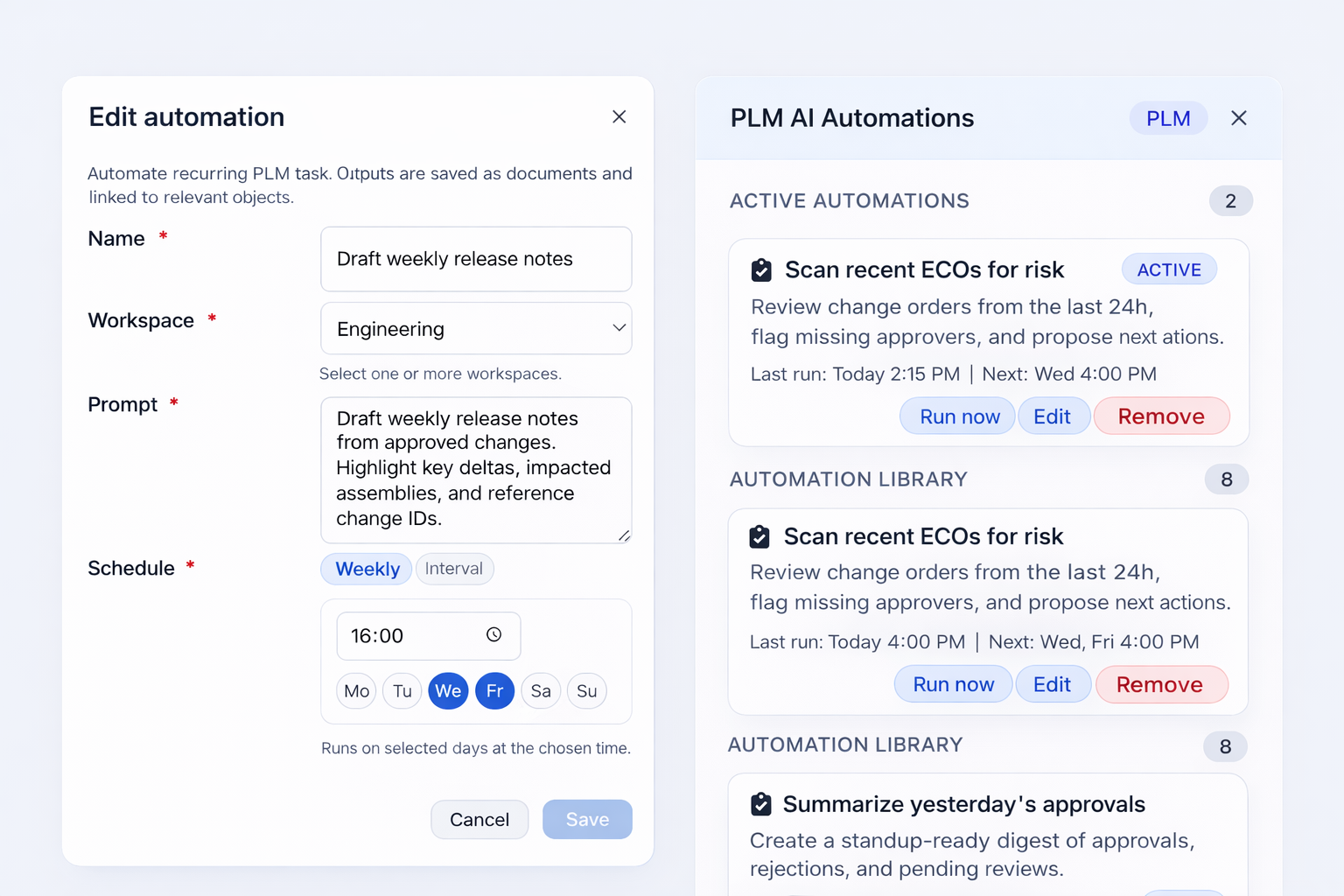
Each automation is designed as a reusable workflow that can be added from a library, configured, scheduled, and executed on demand.
How AI Automations will work
Automations run using the same lifecycle grounding as Prima prompts. They operate on real PLM context, respect access rights, and produce traceable outputs with references to affected objects.
Teams can activate automations for daily monitoring, weekly reporting, or targeted operational checks, reducing manual review effort while improving visibility.
Automations can be executed on schedule or triggered manually with immediate results.
Example automation use cases
Scan recent ECOs for risk
Review change orders created within a defined timeframe, identify missing approvers, detect incomplete information, and propose next actions.
Draft release notes automatically
Generate release summaries based on approved changes, top deltas, impacted assemblies, and references to lifecycle records.
Summarize approvals and reviews
Create standup-ready digests of approvals, rejections, and pending decisions across workflows.
Surface data quality gaps
Identify missing attributes, inconsistent states, invalid values, and items requiring attention across structures and objects.
Monitor lifecycle readiness
Detect items approaching release with incomplete data, missing relationships, or unresolved change dependencies.
Why AI Automations matter
Many PLM activities are repetitive and review-driven. AI Automations shift these activities from manual checks to continuous monitoring.
They help teams detect risk earlier, maintain data quality, standardize reporting, and reduce operational overhead.
By combining AI analysis with scheduled execution, Nora Prima enables organizations to move from reactive reviews to proactive lifecycle management.
AI architecture behind Prima
Prima works in a fully integrated way because Nora IPLM is designed as an AI-native PLM platform built for intelligence at the foundation.
The platform connects product data, relationships, workflows, and lifecycle states into a structured environment where AI can operate reliably.
This enables:
- Platform-level knowledge retrieval through centralized RAG
- Tenant-specific intelligence through tenant-level RAG
- Contextual recommendations
- Secure AI boundaries
- Explainable insights
Instead of analyzing disconnected data and files, Prima analyzes connected product knowledge.
Why Prima is different
Most AI tools operate on text and they have trouble turning the scattered data into meaningful analysis and action.
Prima operates on product lifecycle data, built on an entirely connected and AI-native infrastructure.
Key differences:
Context aware instead of prompt driven
Works on structured product knowledge
Multi-object reasoning
Embedded in workflows
Lifecycle understanding
AI controls and analyzes platform data directly
As a result, teams gain reliable insights and move forward with greater confidence throughout the lifecycle.
Frequently Asked Questions (FAQs)
What is Nora IPLM?
Nora IPLM is an Innovation and Product Lifecycle Management (IPLM) platform designed to help businesses manage product development from concept to completion. With advanced features like BOM management, real-time analytics, and workflow automation, Nora IPLM empowers teams to innovate and streamline product management processes efficiently.
How is IPLM different from traditional PLM?
IPLM (Innovation and Product Lifecycle Management) integrates innovation management with traditional PLM processes. While PLM focuses on product lifecycle, IPLM adds a layer of innovation management, supporting ideation, concept development, and cross-functional collaboration at the early stages of product development.
What are the key features of Nora IPLM?
Key features of Nora IPLM include:
- Advanced BOM Management: Manage complex bill of materials with ease.
- Workflow Management: Automate workflows and streamline approvals.
- Real-Time Analytics: Gain insights into product performance and timelines.
- Collaboration Tools: Facilitate cross-functional collaboration with seamless communication.
Is Nora IPLM cloud-based?
Can I try Nora IPLM?
Yes, and you have two options:
The Sandbox Version: You can explore the platform without needing to log in. Just visit https://sandbox.noraplm.com/ and test various features and functionalities in a real-world environment.
Free Trial: Sign up for our Free Trial at no cost to create your own platform and access all features. Your dedicated platform is exclusively yours and completely free for 30 days. After 30 days, you’ll need to enter a valid payment method to continue using it.
Can Nora IPLM be customized for my business needs?
Yes, Nora IPLM offers unmatched flexibility, allowing you to configure workflows, attributes, types, processes, and permissions to fit your specific business needs. Please contact us with any additional inquiries.
Who is Nora IPLM designed for?
Nora IPLM is built for businesses of all sizes, from startups to enterprises, looking to enhance their product lifecycle management processes. It is ideal for product teams, project managers, operations teams, and innovators who want to optimize workflows and drive innovation.
Is Nora IPLM right for small teams or startups?
Yes. Nora IPLM is designed to scale from small teams to larger enterprises. It offers lower upfront cost, easier setup, and flexible usage without the overhead of legacy PLM systems.
Does Nora IPLM support remote and global teams?
Absolutely. The platform is cloud-based, secure, and built for distributed collaboration with role-based access controls and real-time updates.
Can Nora IPLM support PDM processes?
Yes. Nora IPLM supports Product Data Management (PDM) processes by helping teams organize, control, and track all product-related information. From version-controlled CAD files to bill of materials and document approvals, Nora IPLM offers complete traceability and secure data access across design and engineering workflows.
Why do businesses prefer Nora IPLM for their PLM?
Businesses prefer Nora IPLM because it combines the power of traditional PLM with the flexibility and innovation needed today. It is fast to deploy, easy to use, and accessible for growing teams, while still offering robust features like workflow management, traceability, secure collaboration, and integration with tools such as ERP and CAD. Nora IPLM also provides transparent pricing and a sandbox experience that requires no account to get started.