MBOM Management.
Ready for manufacturing.
Create, manage, and release manufacturing bills of materials (MBOMs) for every manufacturing context, with persistent traceability to engineering and the flexibility each plant needs.
Manufacturing BOM management.
Engineering context at every step.
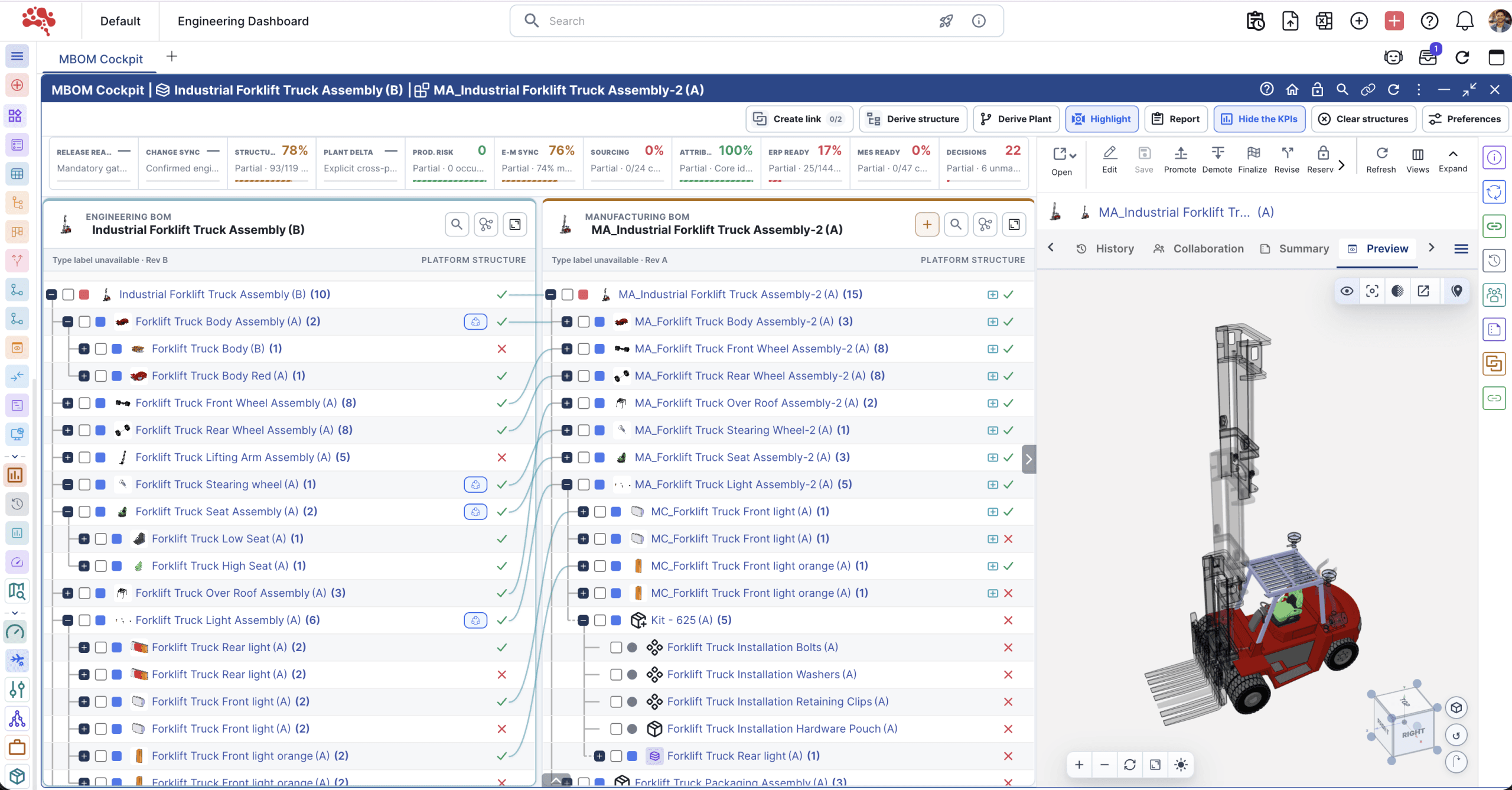
Link engineering and manufacturing structures, work with individual occurrences, and derive an MBOM you can shape around the build. Review both BOMs with 3D product context in the same workspace.
EBOM–MBOM workspace
Bring the engineering BOM, manufacturing BOM, and 3D product preview into the same workspace. Use assembly paths, linked counterparts, and visual context together when reviewing the manufacturing definition.
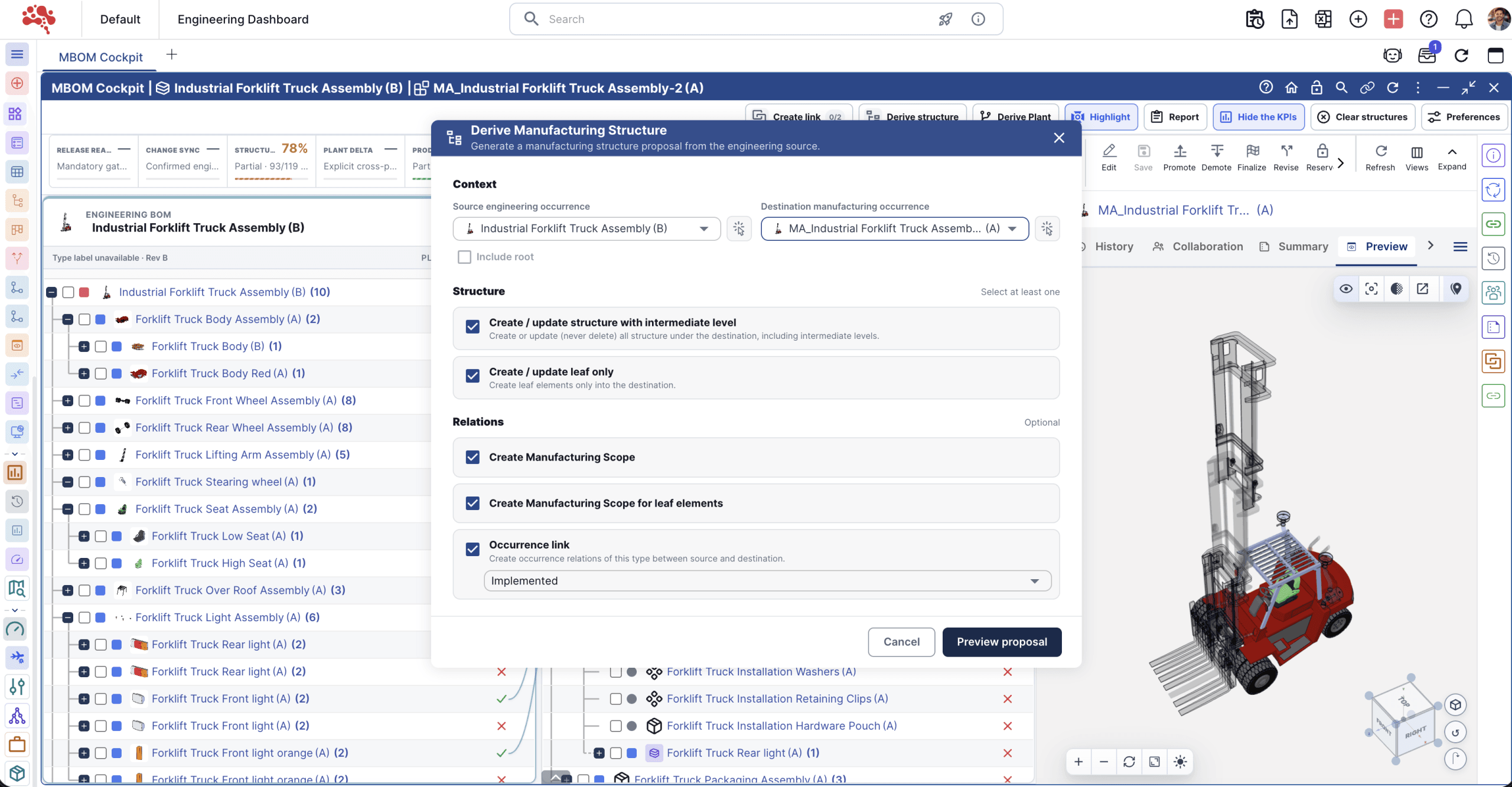
Derive manufacturing structure
Use an engineering root or selected occurrence as the starting point for a manufacturing structure. Choose what to create or update, which relationships to add, and review the proposal before submitting it.
Manufacturing structure authoring
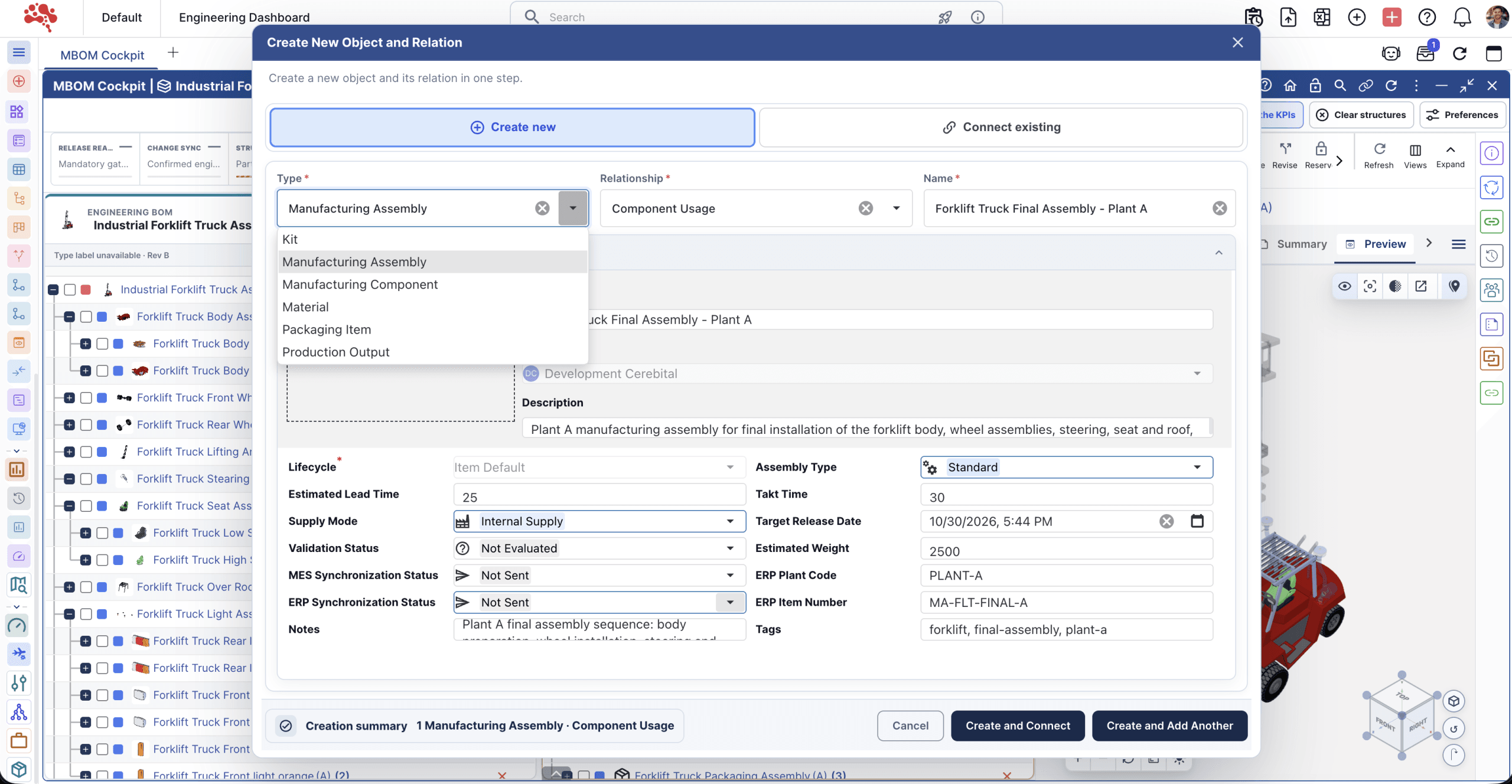
Create manufacturing assemblies, organize their content, and connect the manufacturing definition to engineering as you work. The MBOM can reflect a practical assembly breakdown rather than the design team’s grouping.
- Create and connect manufacturing objects.
- Re-parent content and reorder manufacturing structure rows.
- Use manufacturing-specific content where the build requires it.
Your manufacturing BOM.
Every connection in view.
Link the engineering source, review the proposed structure, and shape the MBOM around the build.
Different structures. Explicit connections.
The EBOM describes the engineering design. The MBOM organizes the manufacturing definition. Connect them through Manufacturing Scope relationships and occurrence links, even when their assembly hierarchies differ.
- Relate manufacturing items to their engineering source.
- Create typed links between selected occurrences.
- Show connection lines and locate linked counterparts.
Preserve traceability between the two product definitions.
Organize the build without having to mirror the design hierarchy.
Derive from engineering. Review before you generate.
Use an engineering root or selected occurrence as the starting point for a manufacturing structure. Choose what to create or update, which relationships to add, and review the proposal before submitting it.
Carry engineering content into the manufacturing definition, then refine the resulting MBOM around how the product will be assembled.
Shape the structure around the build.
Create manufacturing assemblies, organize their content, and connect the manufacturing definition to engineering as you work. The MBOM can reflect a practical assembly breakdown rather than the design team’s grouping.
- Create and connect manufacturing objects.
- Re-parent content and reorder manufacturing structure rows.
- Use manufacturing-specific content where the build requires it.
Same part number.
Different place in the build.
Link engineering and manufacturing structures, work with individual occurrences, and derive an MBOM you can shape around the build. Review both BOMs with 3D product context in the same workspace.
A part can appear more than once in a product. An occurrence identifies a specific use within an assembly path, so linking can distinguish where that part is used—not just which part it is.
- Inspect individual uses in Instances view.
- Connect the intended engineering and manufacturing occurrences.
- Switch to a rolled-up view for a consolidated structure view.
Manufacturing Scope relates objects; occurrence links identify the connected uses within their structures.
This link follows the front-axle use of WH-210. The rear-axle use remains a separate occurrence, with its own manufacturing connection.
Trace the relevant usage, with its assembly context.
Distinguish repeated components in separate build subassemblies.
More control.
Across the manufacturing definition.
MBOM derivation options
Choose the source and destination
Start from the relevant EBOM occurrence and target an existing manufacturing structure, or choose a manufacturing type for a new one.
Control the structure depth
Create or update a structure with intermediate levels, or create leaf elements only. Choose whether to include the engineering root itself.
Choose the connections
Configure Manufacturing Scope relationships and occurrence links, using the relationship types available for the selected source and destination.
Inspect the proposal
Review the proposed manufacturing structure in context, expand its content, and check the planned relationships before generation.
Carry engineering content into the manufacturing definition, then refine the resulting MBOM around how the product will be assembled.
Manufacturing structure authoring
Restructure assemblies
Group content into the subassemblies that make sense for manufacturing.
Add manufacturing context
Represent intermediate assemblies and manufacturing-specific items in the MBOM.
Keep both definitions visible
Check the source engineering structure while refining the manufacturing view.
See both structures.
Understand the physical product.
Bring the engineering BOM, manufacturing BOM, and 3D product preview into the same workspace. Use assembly paths, linked counterparts, and visual context together when reviewing the manufacturing definition.
Find the relevant component
Use the product’s geometry to understand parts that are difficult to identify by name alone.
Review in assembly context
Consider where a component sits physically while deciding how it belongs in the manufacturing structure.
Connect engineering and planning
Give both teams a shared visual reference alongside their different BOM structures.
Know what is connected.
See what needs attention.
Use occurrence links and structure indicators to review engineering coverage and manufacturing context. A manufacturing-only item and an engineering item without a confirmed implementation represent different planning decisions.
Confirmed connections
Identify the engineering source and manufacturing counterpart through their links and Manufacturing Scope relationships.
Unlinked and partial coverage
Spot content with no confirmed counterpart and, in rolled-up views, occurrences that are only partly linked.
Manufacturing-specific content
Distinguish items intentionally added for manufacturing from content that still needs an engineering connection.
Good questions.
Clear answers.
Does the MBOM have to match the EBOM hierarchy?
No. Engineering and manufacturing can use different assembly breakdowns. Manufacturing Scope relationships and occurrence links provide the connections between them.
Why link occurrences rather than only part numbers?
The same part can be used under different assemblies. An occurrence identifies a particular use in a structure, allowing that use to be connected to the intended manufacturing implementation.
What can I choose during MBOM derivation?
Select the engineering source and manufacturing destination, choose structure creation with intermediate levels or leaf elements, decide whether to include the root, and configure Manufacturing Scope and occurrence relationships. Review the proposal before generating.
From engineering intent.
To a connected manufacturing BOM.
Explore EBOM–MBOM linking, occurrence-level context, configurable derivation, and 3D-assisted structure authoring in one workspace.